Supporting collaboration through cross-platform messaging
Supporting collaboration through cross-platform messaging
Supporting collaboration through cross-platform messaging
Supporting collaboration through cross-platform messaging
TEAM
TEAM
TEAM


+6
TIMELINE
TIMELINE
3-4 months
3-4 months
3-4 months
MY ROLE
MY ROLE
MY ROLE
UX
UX
UI
UI
Interaction design
Interaction design
Design system
Design system
THE CHALLENGE
THE CHALLENGE
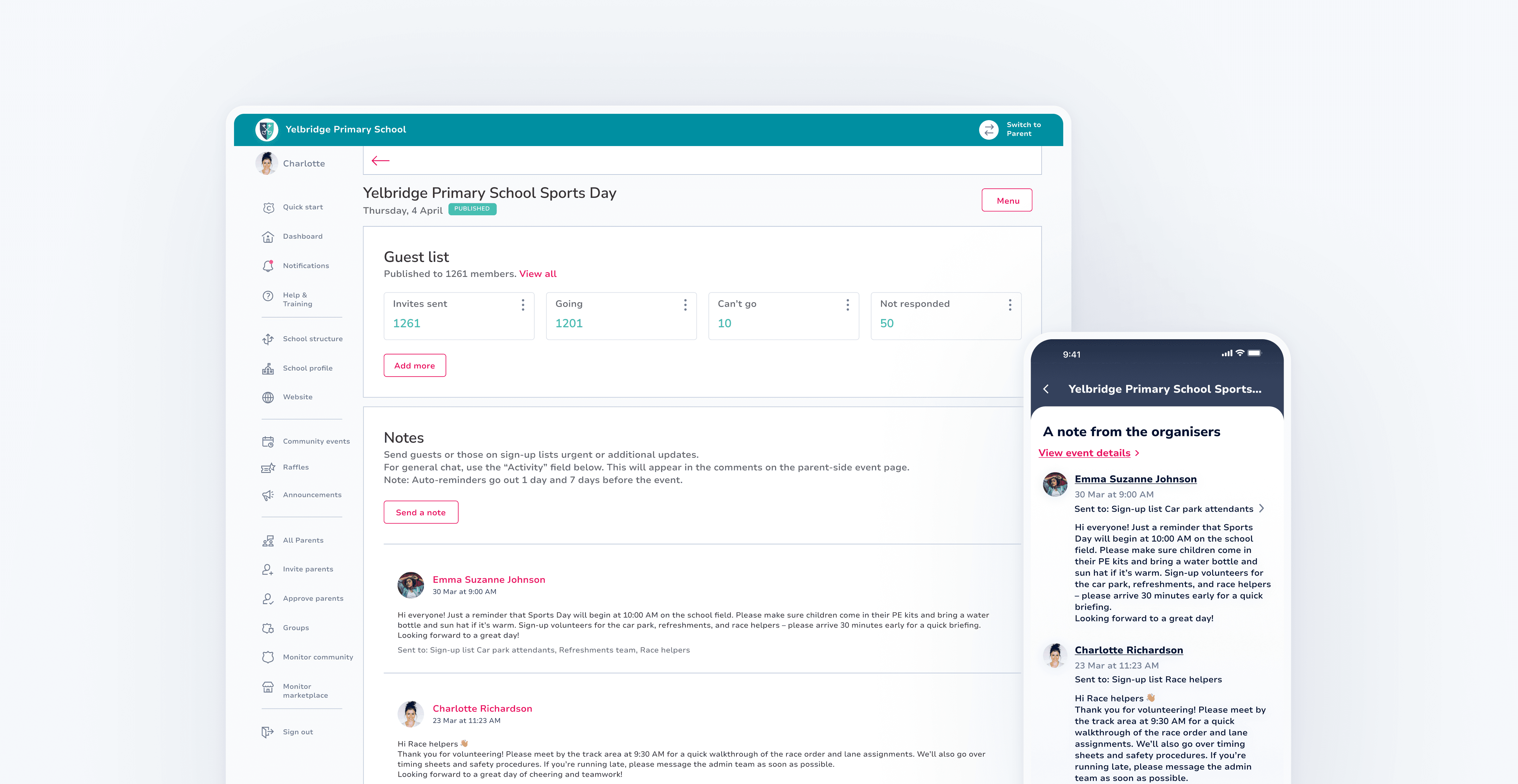
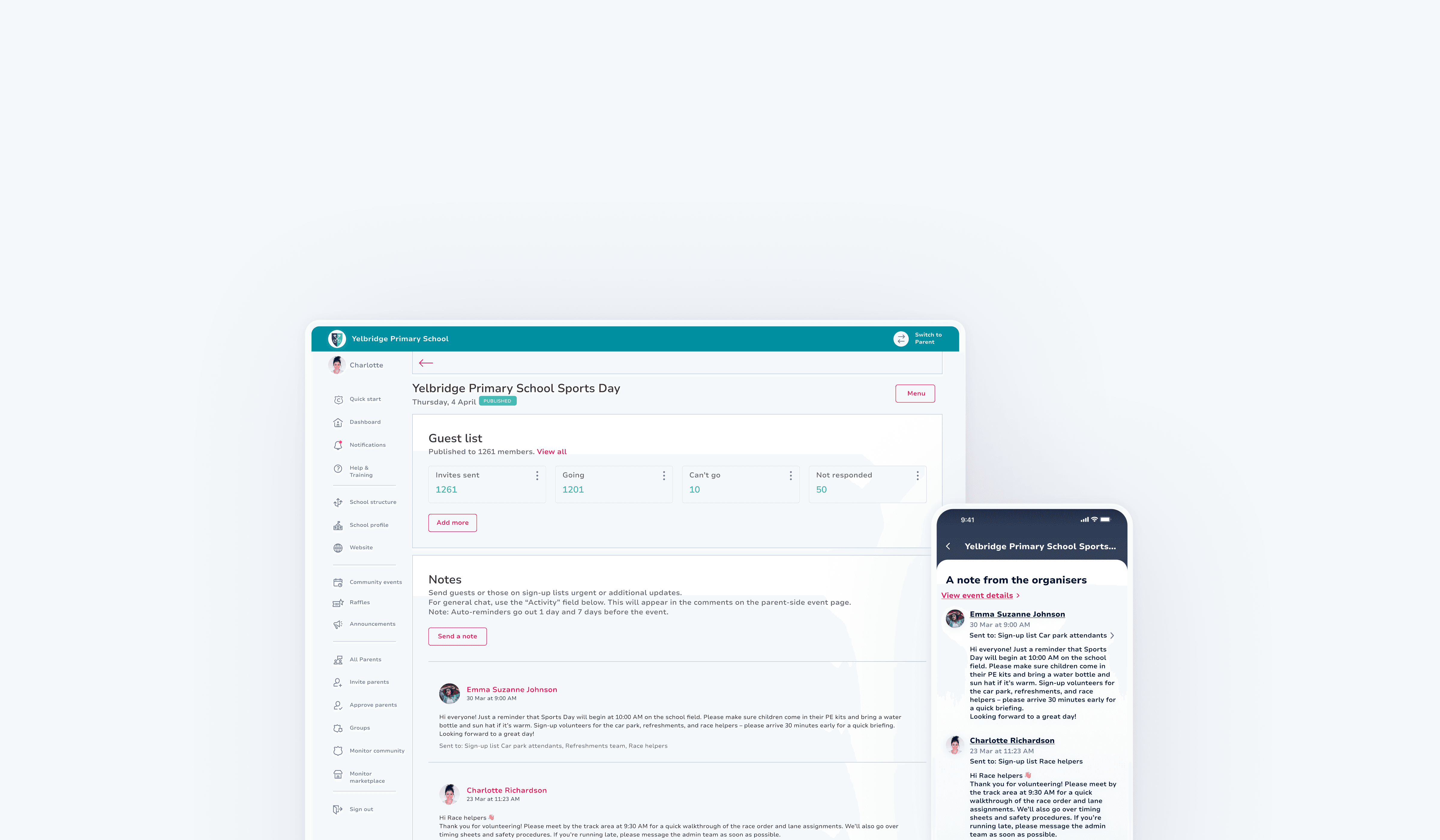
School event organisers rely heavily on volunteers to manage large events. However, they lacked a clear way to communicate with specific sign-up groups, making coordination inefficient and increasing the risk of missed updates. The goal was to design a targeted, cross-platform messaging flow that enabled organisers to send event notes and updates from the PWA to specific groups, while ensuring these messages were clearly surfaced across the Flutter mobile experience and the PWA parent view.
School event organisers rely heavily on volunteers to manage large events. However, they lacked a clear way to communicate with specific sign-up groups, making coordination inefficient and increasing the risk of missed updates. The goal was to design a targeted, cross-platform messaging flow that enabled organisers to send event notes and updates from the PWA to specific groups, while ensuring these messages were clearly surfaced across the Flutter mobile experience and the PWA parent view.
THE OUTCOME
THE OUTCOME
Strengthened event coordination through targeted messaging
Strengthened event coordination through targeted messaging
Enhanced message visibility by separating role-specific updates from general chat
Enhanced message visibility by separating role-specific updates from general chat
Reduced unnecessary notifications by limiting messages to relevant groups
Reduced unnecessary notifications by limiting messages to relevant groups
Supported smoother execution of high-attendance school events with multiple volunteer groups and tasks
Supported smoother execution of high-attendance school events with multiple volunteer groups and tasks
01 GETTING STARTED
01 GETTING STARTED
Exploring PWA admin experience
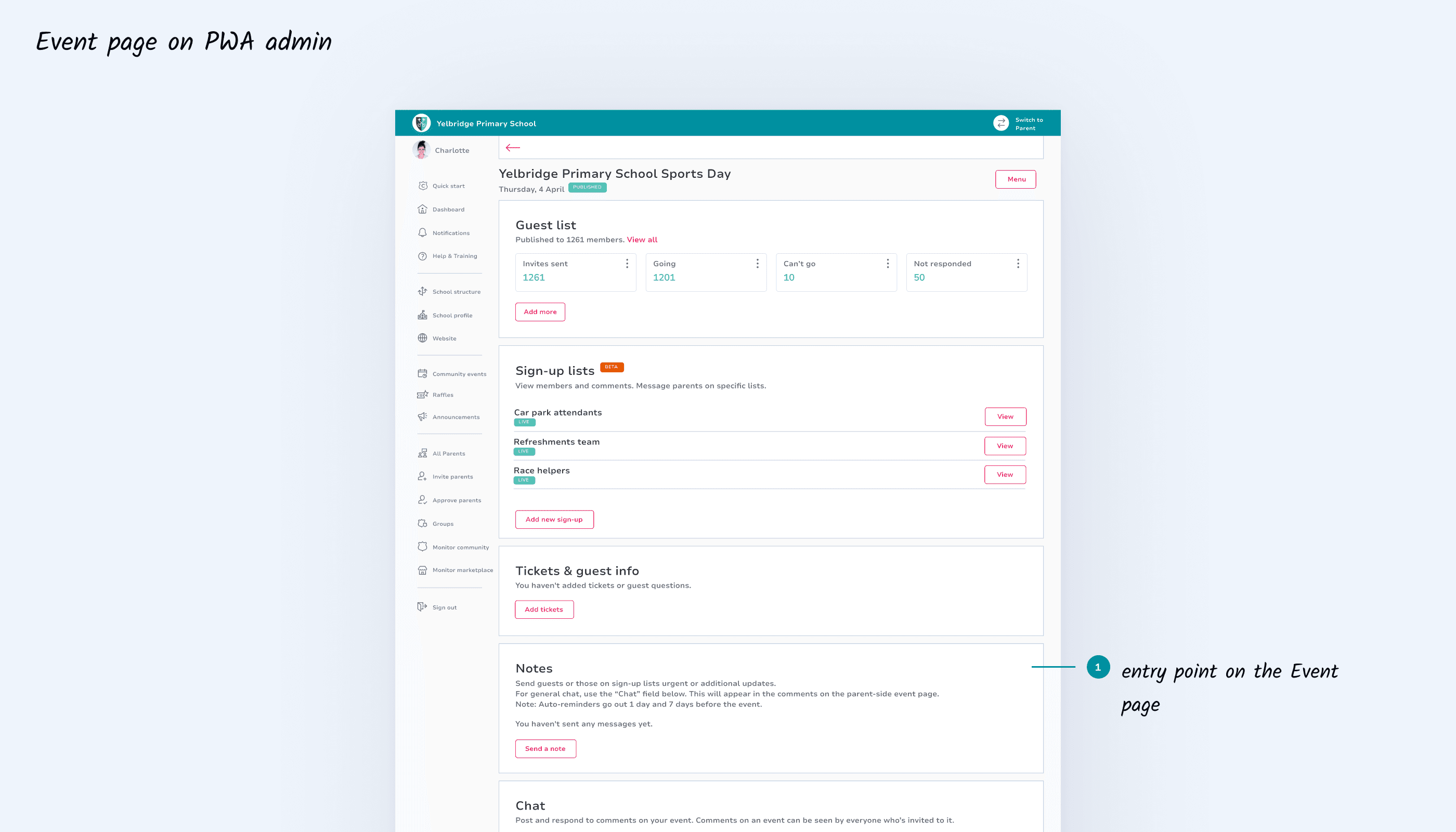
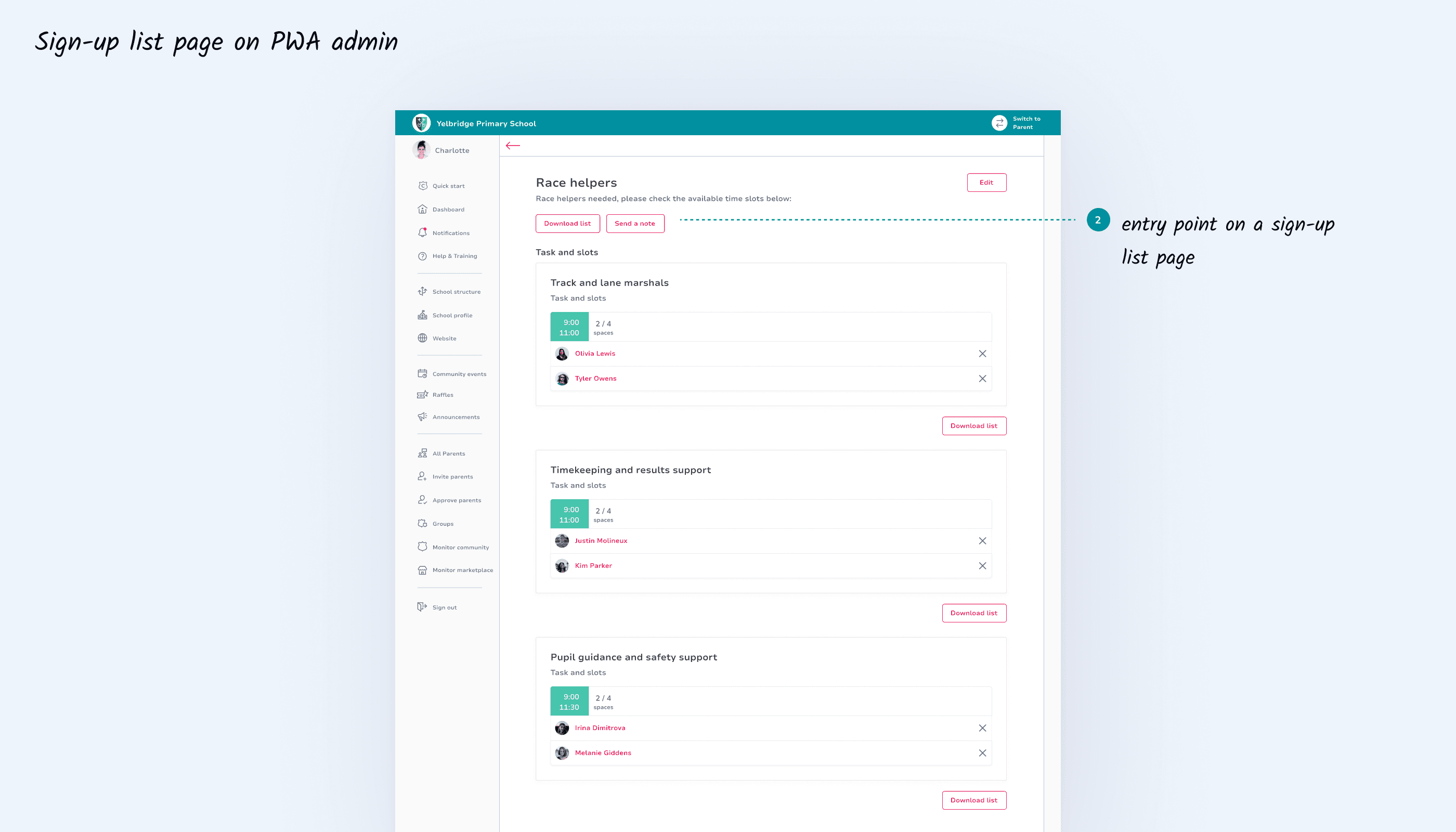
In collaboration with the product owner, we explored potential solutions for improving the admin experience on PWA. Based on organisers’ pain points, the focus was on making messaging clearly discoverable and easy to access within existing workflows. To support both event-level notes and task-specific coordination, we defined two primary entry points: from the main event page, and directly within individual sign-up lists.
In collaboration with the product owner, we explored potential solutions for improving the admin experience on PWA. Based on organisers’ pain points, the focus was on making messaging clearly discoverable and easy to access within existing workflows. To support both event-level notes and task-specific coordination, we defined two primary entry points: from the main event page, and directly within individual sign-up lists.
02 IDEATION I
02 IDEATION I
Flows time!
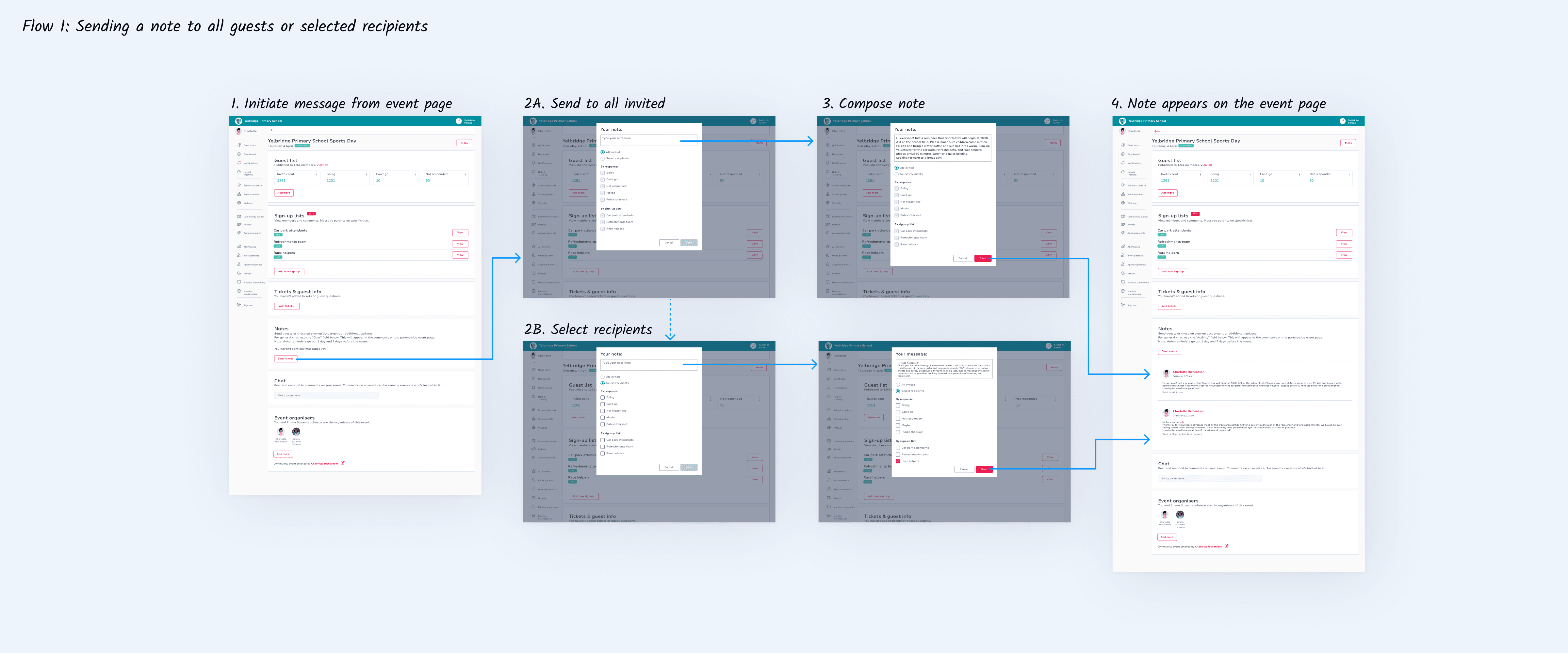
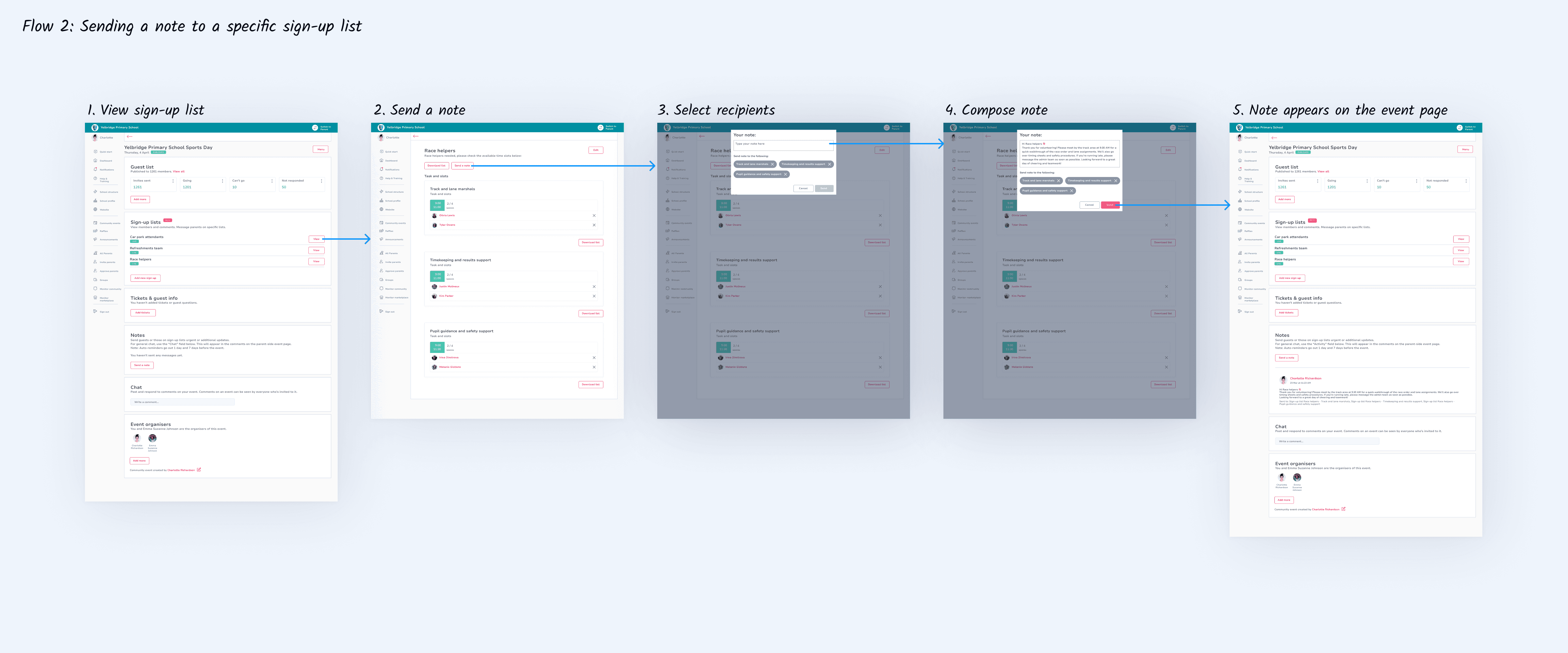
The PWA was built in Angular using a legacy component library with limited documentation. To maintain consistency, I audited and adapted existing patterns and reusable elements while designing the two messaging flows, prioritising clarity of navigation and communication structure. Flow 1 enabled event-level targeted communication (by RSVP response, ticket type, public checkout guests, and sign-up lists). Flow 2 supported more granular messaging within individual sign-up lists, allowing organisers to contact specific members tied to particular tasks.
The PWA was built in Angular using a legacy component library with limited documentation. To maintain consistency, I audited and adapted existing patterns and reusable elements while designing the two messaging flows, prioritising clarity of navigation and communication structure. Flow 1 enabled event-level targeted communication (by RSVP response, ticket type, public checkout guests, and sign-up lists). Flow 2 supported more granular messaging within individual sign-up lists, allowing organisers to contact specific members tied to particular tasks.
03 FEEDBACK
Feasibility and alignment
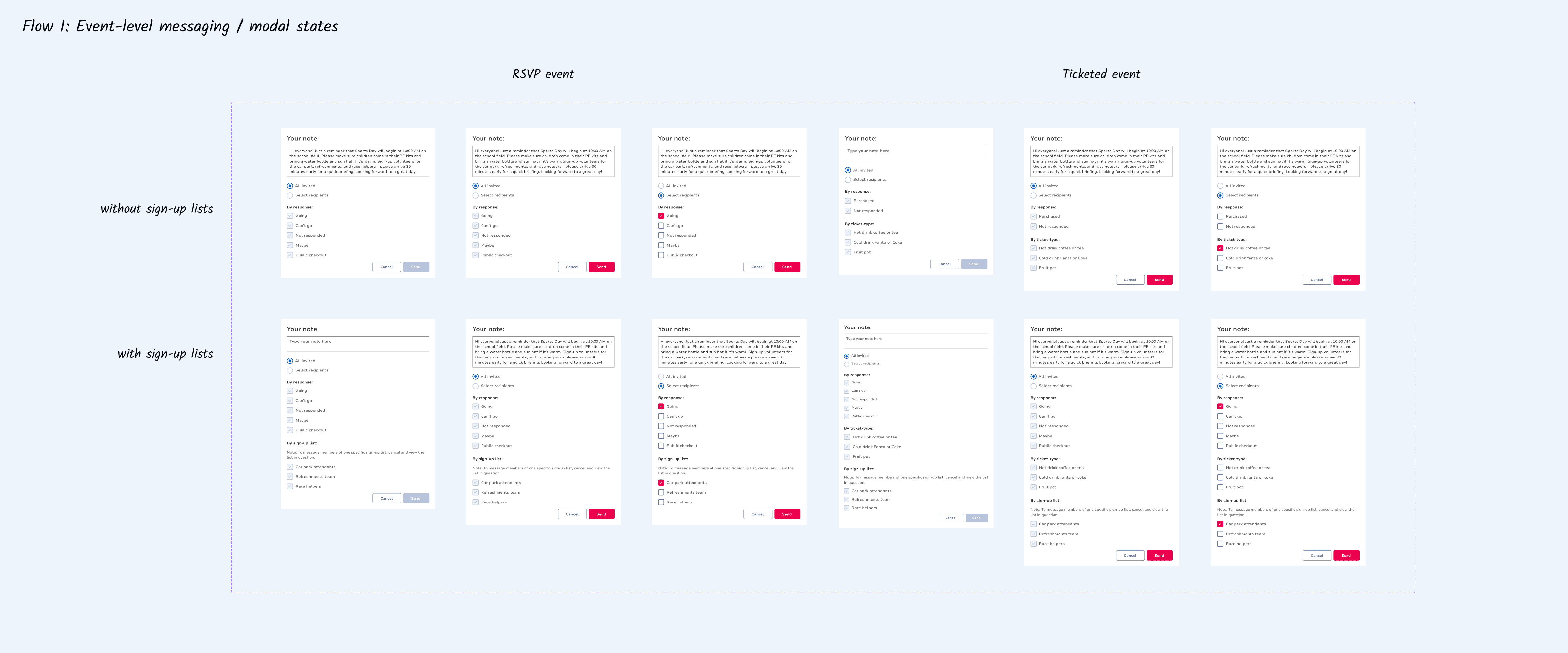
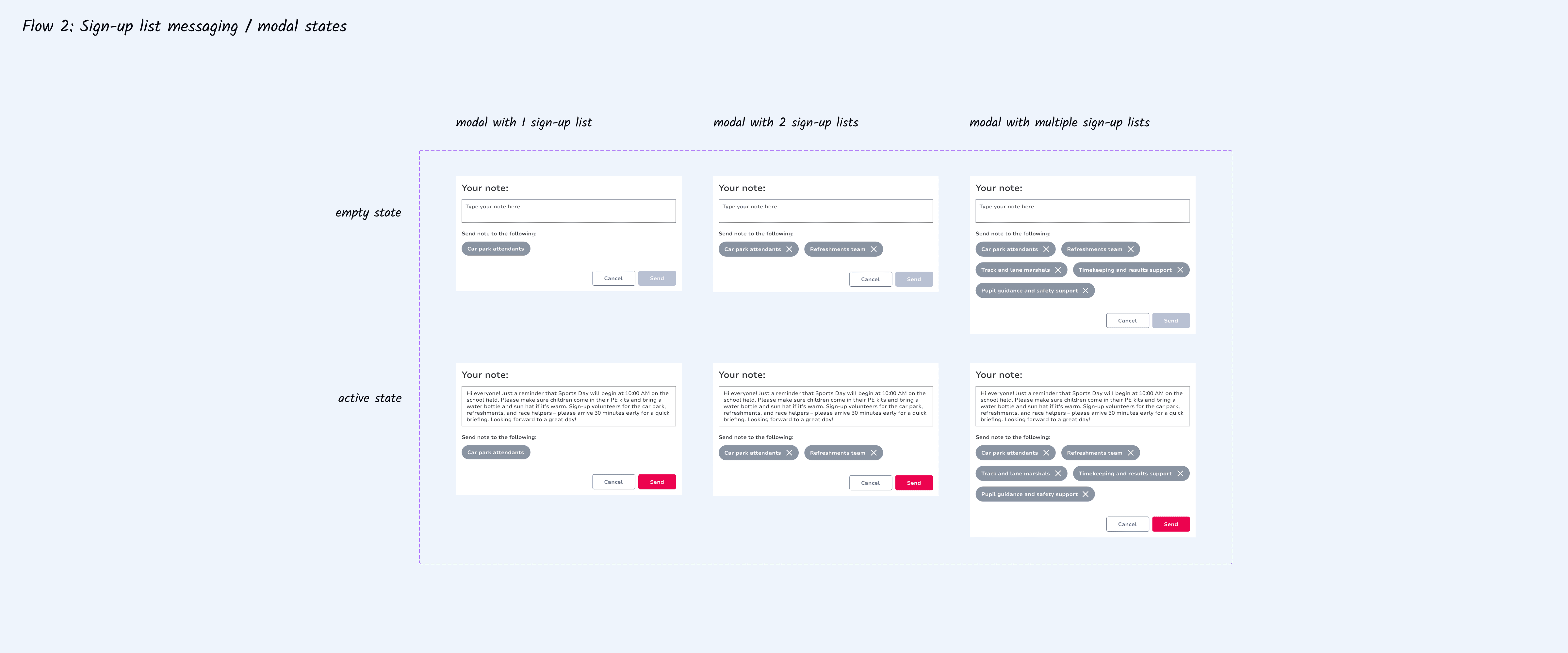
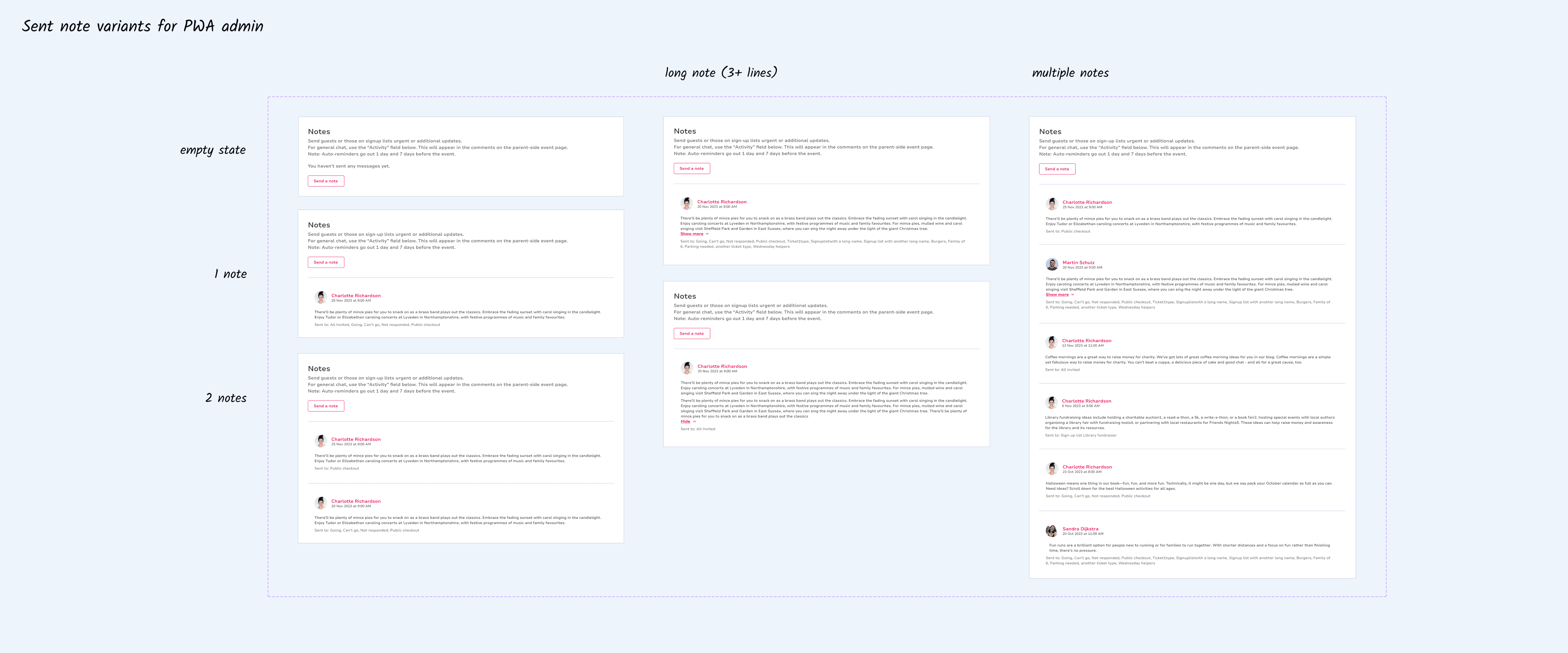
To ensure feasibility, I worked closely with the product owner and developers to review constraints and confirm alignment with the existing backend infrastructure. Following this, I finalised the flows and detailed the necessary screens, modal states, and component variations required for implementation.
To ensure feasibility, I worked closely with the product owner and developers to review constraints and confirm alignment with the existing backend infrastructure. Following this, I finalised the flows and detailed the necessary screens, modal states, and component variations required for implementation.
04 REVIEW
04 REVIEW
A few small refinements
A few small refinements
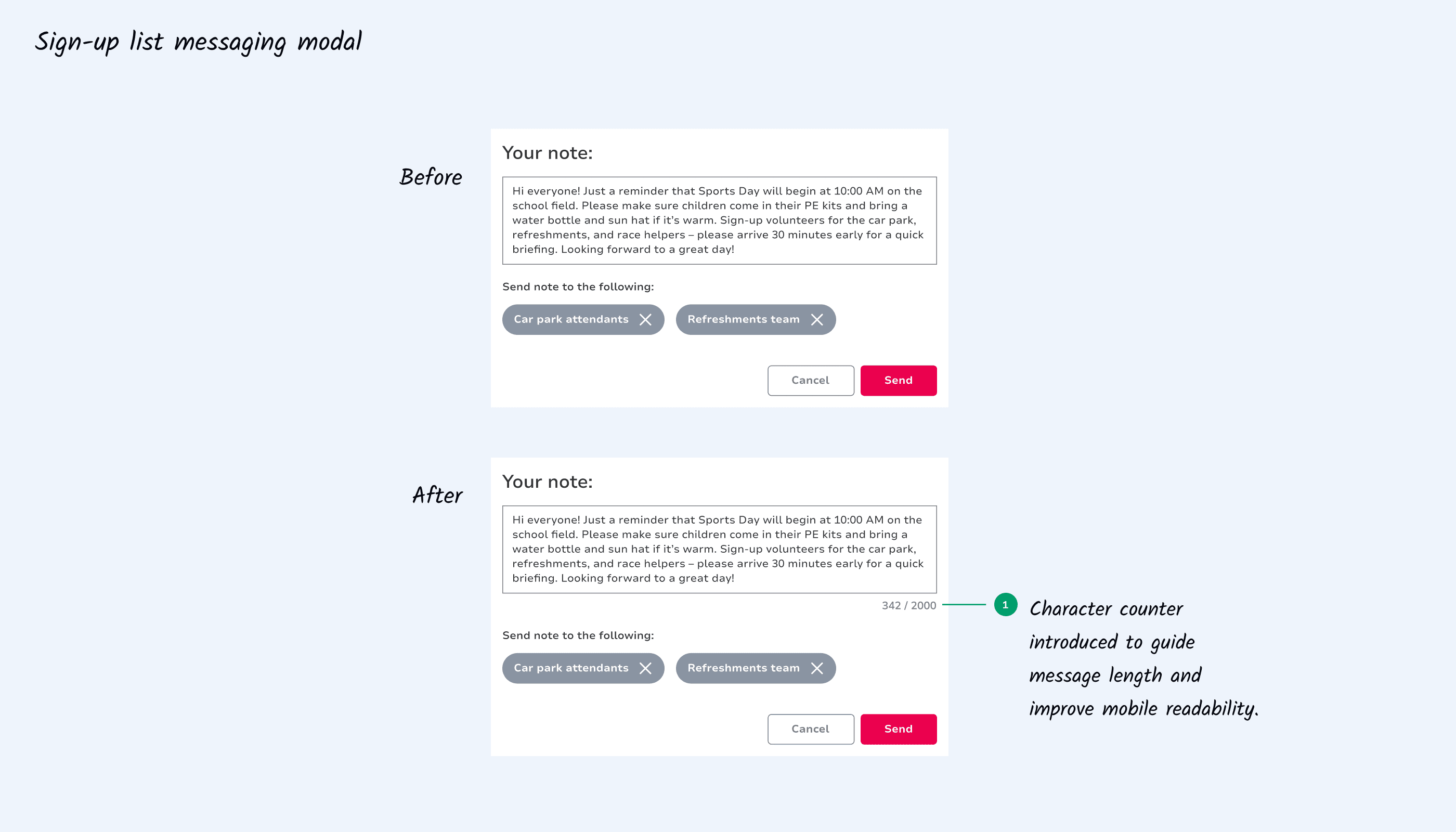
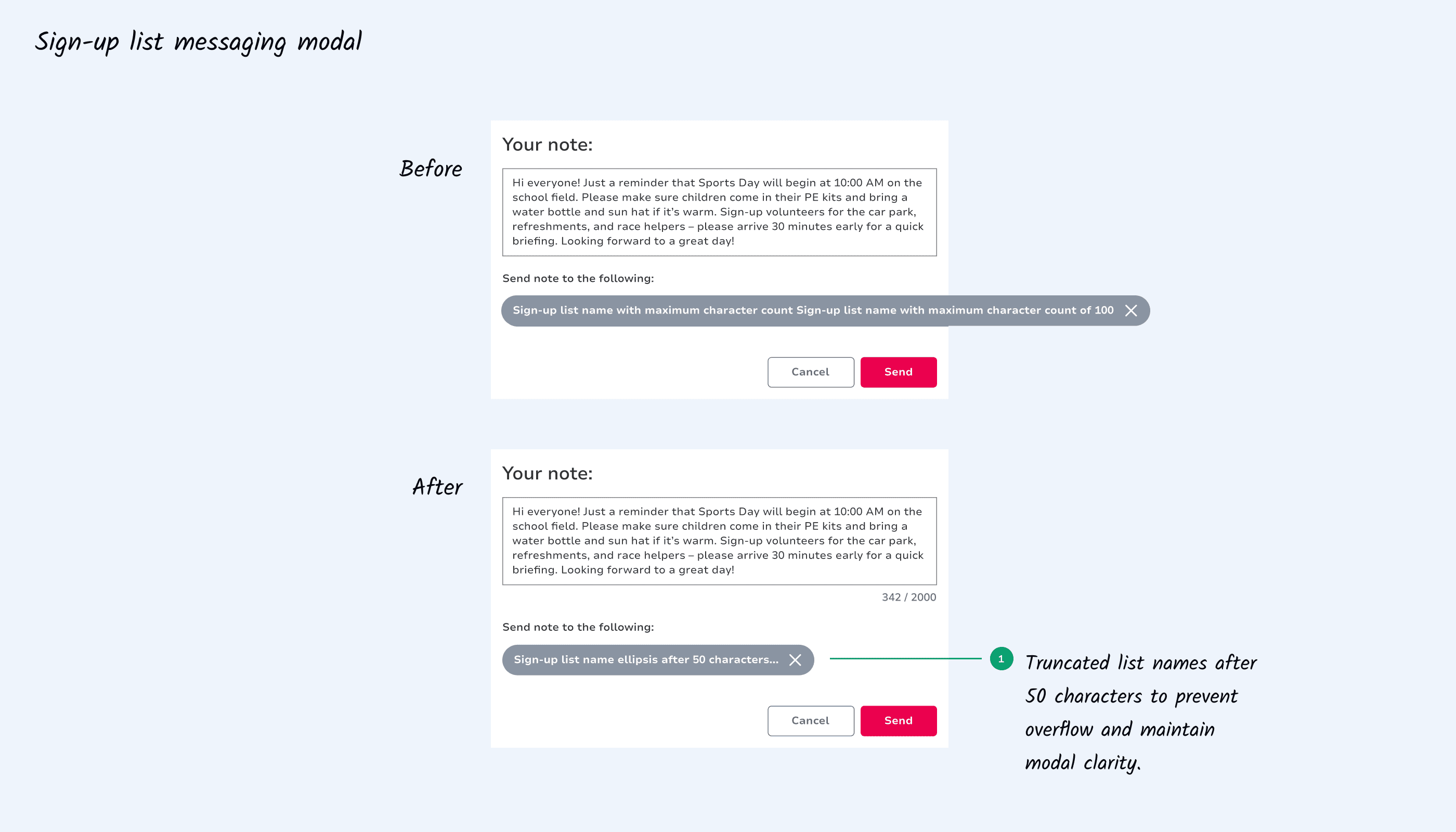
While the main solution worked, we introduced small refinements to improve clarity and layout resilience within backend constraints. A character counter was introduced to guide message length, and long sign-up list names (up to 100 characters) were truncated to prevent modal overflow.
While the main solution worked, we introduced small refinements to improve clarity and layout resilience within backend constraints. A character counter was introduced to guide message length, and long sign-up list names (up to 100 characters) were truncated to prevent modal overflow.
05 IDEATION II
05 IDEATION II
The parent experience on PWA
The parent experience on PWA
The parent experience on PWA
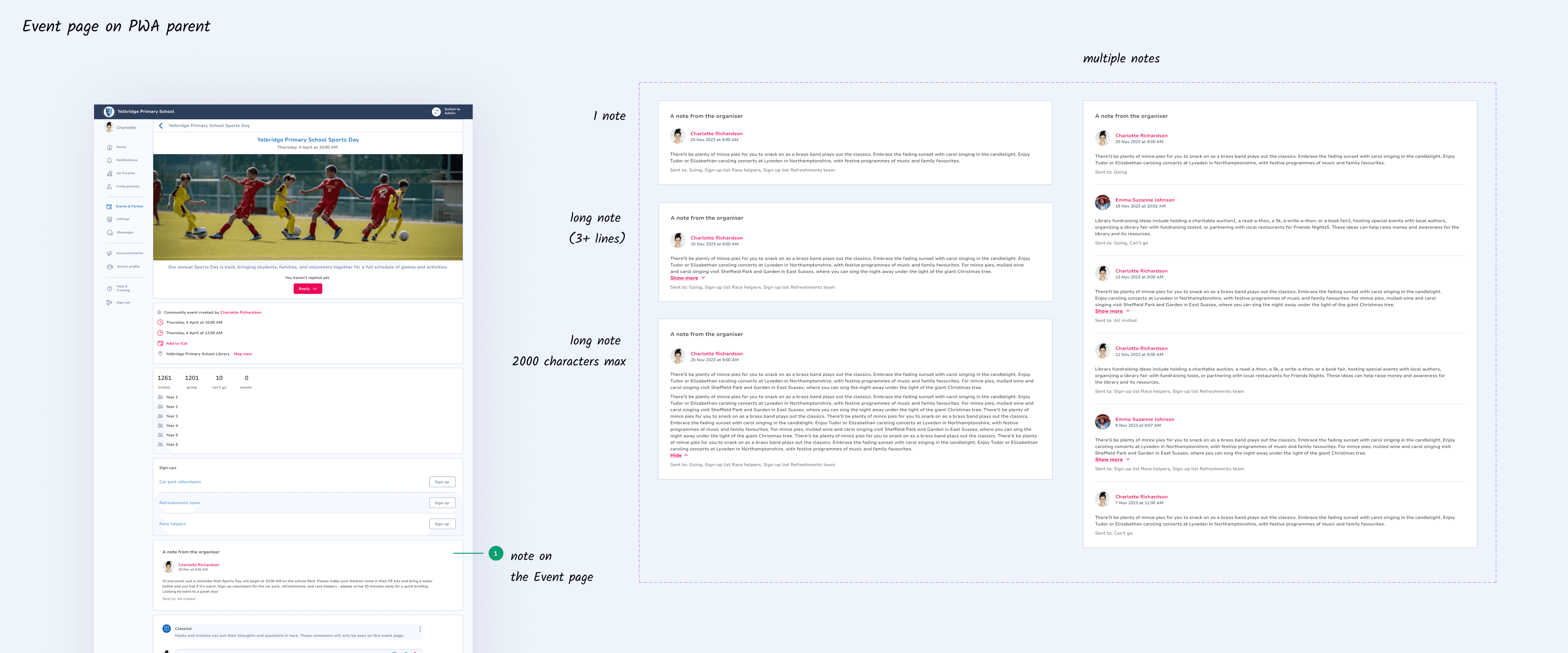
Next, I defined messaging for the PWA parent experience. Targeted notes appeared directly within the event page, separated from general chat for clarity and visibility. Notes reflected the admin-defined segmentation logic, ensuring families received only relevant updates. Components aligned with the PWA admin logic, featuring similar patterns and constraints for consistency and smooth backend handling.
Next, I defined messaging for the PWA parent experience. Targeted notes appeared directly within the event page, separated from general chat for clarity and visibility. Notes reflected the admin-defined segmentation logic, ensuring families received only relevant updates. Components aligned with the PWA admin logic, featuring similar patterns and constraints for consistency and smooth backend handling.
06 IDEATION III
The parent experience on Flutter
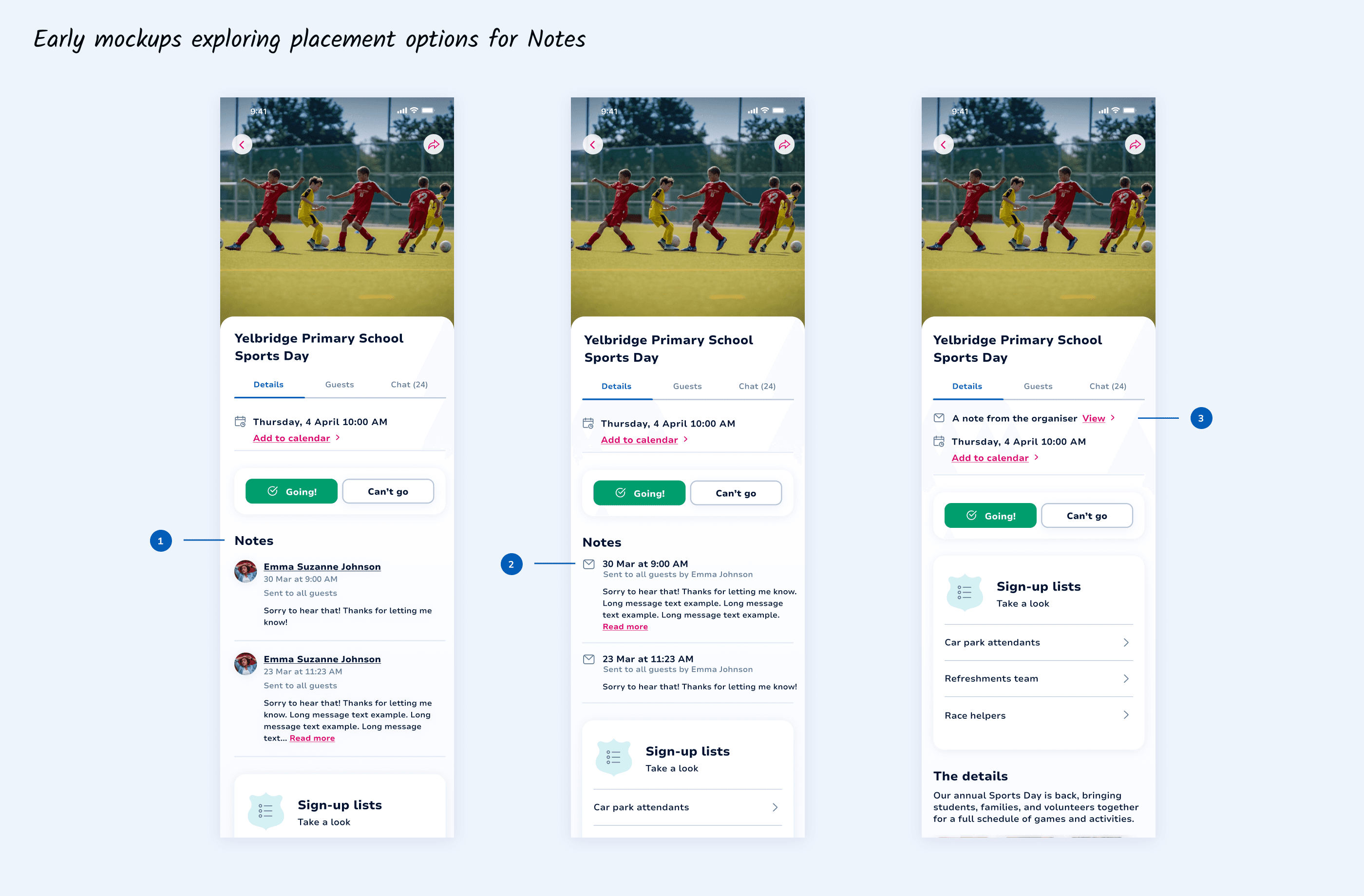
For the Flutter implementation, the feature was aligned with the newer mobile design system. I explored multiple placement options for organiser notes to balance visibility, engagement, and alignment with PWA admin and parent. In options 1 and 2, placing notes within the main content stream increased cognitive load and pushed sign-up lists further down, potentially impacting participation. Option 3 preserved hierarchy, providing the right balance between prominence and engagement.
For the Flutter implementation, the feature was aligned with the newer mobile design system. I explored multiple placement options for organiser notes to balance visibility, engagement, and alignment with PWA admin and parent. In options 1 and 2, placing notes within the main content stream increased cognitive load and pushed sign-up lists further down, potentially impacting participation. Option 3 preserved hierarchy, providing the right balance between prominence and engagement.
07 FEEDBACK
07 FEEDBACK
Next steps
Next steps
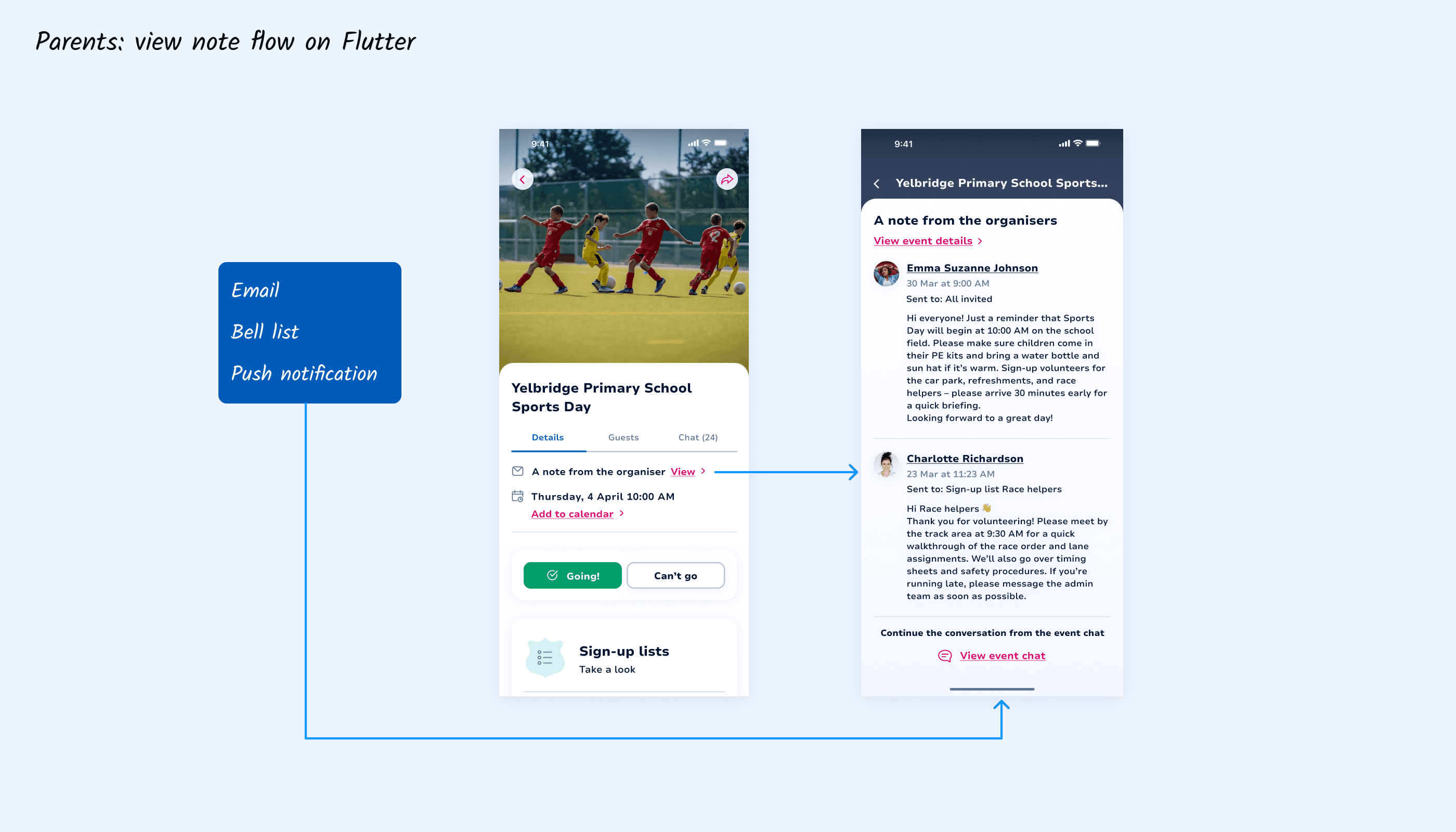
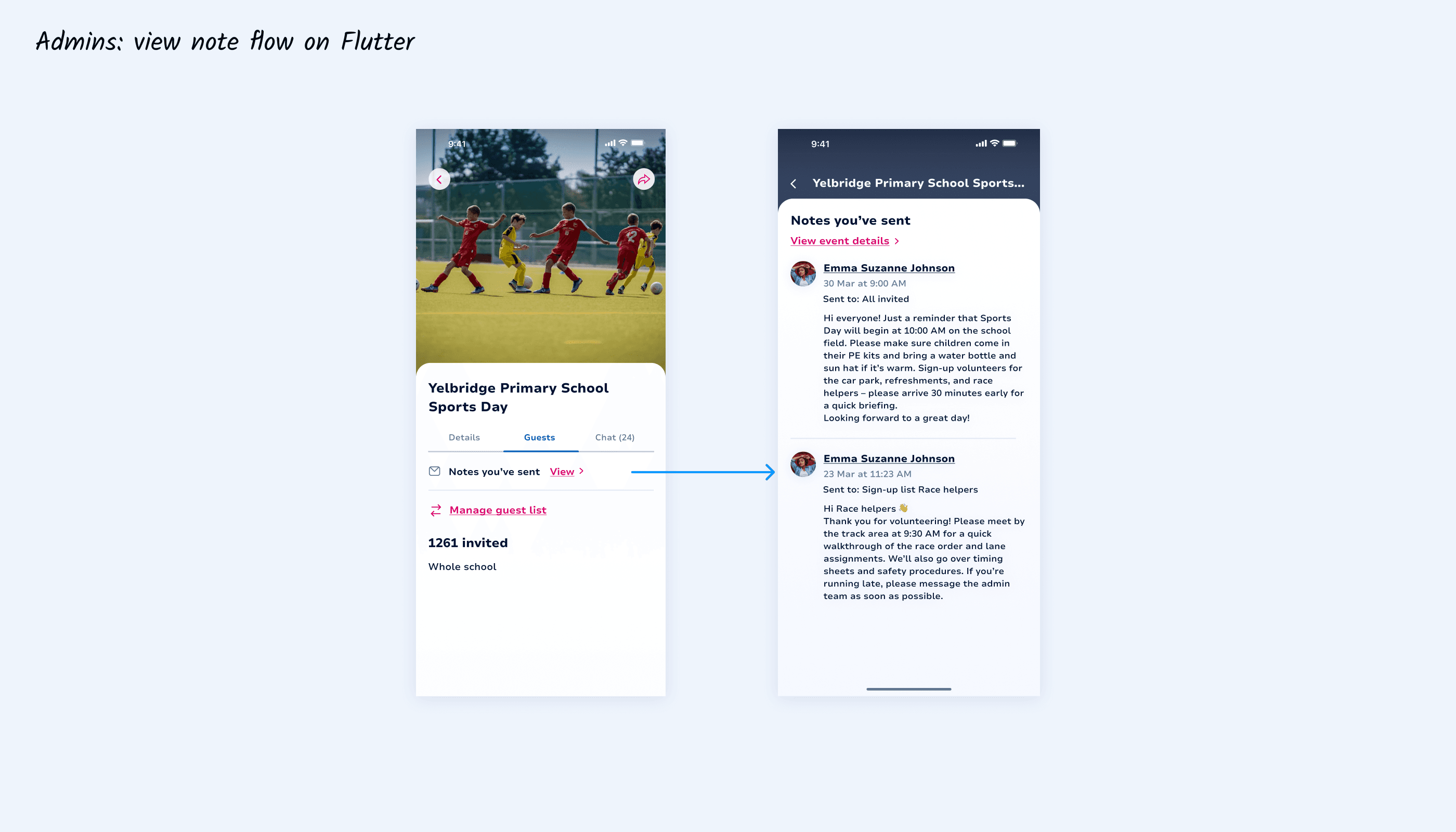
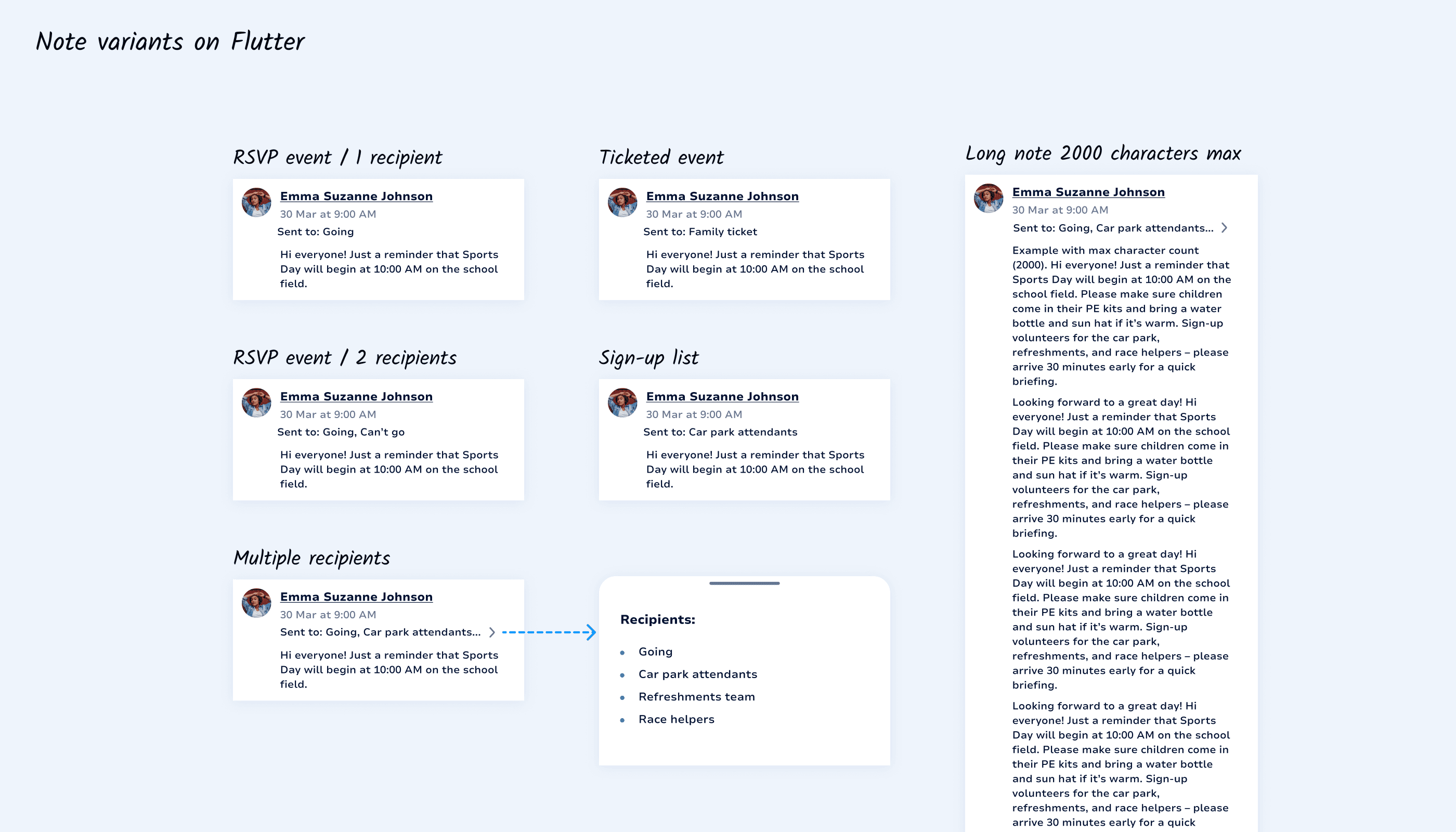
Next, I designed a dedicated Notes page on Flutter, accessible to parents from the Event details page. For admins, who also have a Flutter view, I added a “Notes you’ve sent” section under the Guests tab. Unlike the parent experience, notes did not require primary prominence for admins, as they were tied to recipient management. I validated feasibility with the Flutter developer and prepared Zeplin handoff and design system components aligned with PWA constraints.
Next, I designed a dedicated Notes page on Flutter, accessible to parents from the Event details page. For admins, who also have a Flutter view, I added a “Notes you’ve sent” section under the Guests tab. Unlike the parent experience, notes did not require primary prominence for admins, as they were tied to recipient management. I validated feasibility with the Flutter developer and prepared Zeplin handoff and design system components aligned with PWA constraints.
08 LAUNCH
08 LAUNCH
Collaboration enhanced
Collaboration enhanced
Collaboration enhanced
The feature was tested and launched by the development and QA teams based on documentation provided in Jira. While formal metrics were not captured, organiser feedback was positive, highlighting improved coordination and clearer segmented communication. Some organisers expressed interest in two-way functionality, which presents a clear opportunity for future iteration.
The feature was tested and launched by the development and QA teams based on documentation provided in Jira. While formal metrics were not captured, organiser feedback was positive, highlighting improved coordination and clearer segmented communication. Some organisers expressed interest in two-way functionality, which presents a clear opportunity for future iteration.
The feature was tested and launched by the development and QA teams based on documentation provided in Jira. While formal metrics were not captured, organiser feedback was positive, highlighting improved coordination and clearer segmented communication. Some organisers expressed interest in two-way functionality, which presents a clear opportunity for future iteration.
09 LESSONS
09 LESSONS
What I learnt
What I learnt
Align cross-platform features as much as possible.
Align cross-platform features as much as possible.
Designing with PWA constraints in mind ensured consistency across platforms.
Designing with PWA constraints in mind ensured consistency across platforms.
This strengthened usability and reduced friction for users navigating between systems.
This strengthened usability and reduced friction for users navigating between systems.
Balance visibility with engagement priorities.
Balance visibility with engagement priorities.
For parents, the compact View link on Flutter maintained high visibility without overwhelming the Event details page.
For parents, the compact View link on Flutter maintained high visibility without overwhelming the Event details page.
This preserved the prominence of sign-up lists, a key driver of community participation.
This preserved the prominence of sign-up lists, a key driver of community participation.
Explore more
Explore more

Let’s connect!
Copyright © 2026 Gabriella Kovacs