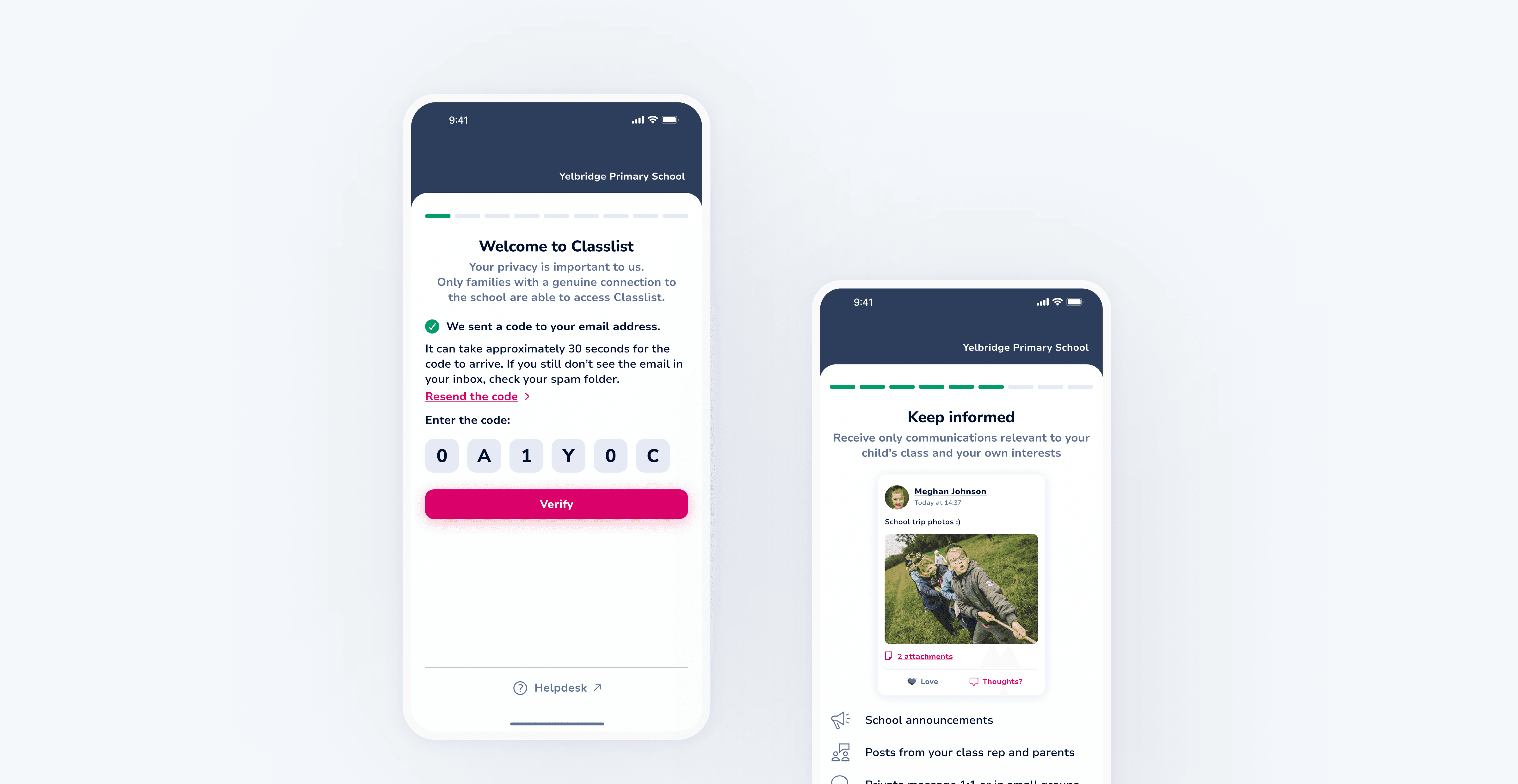
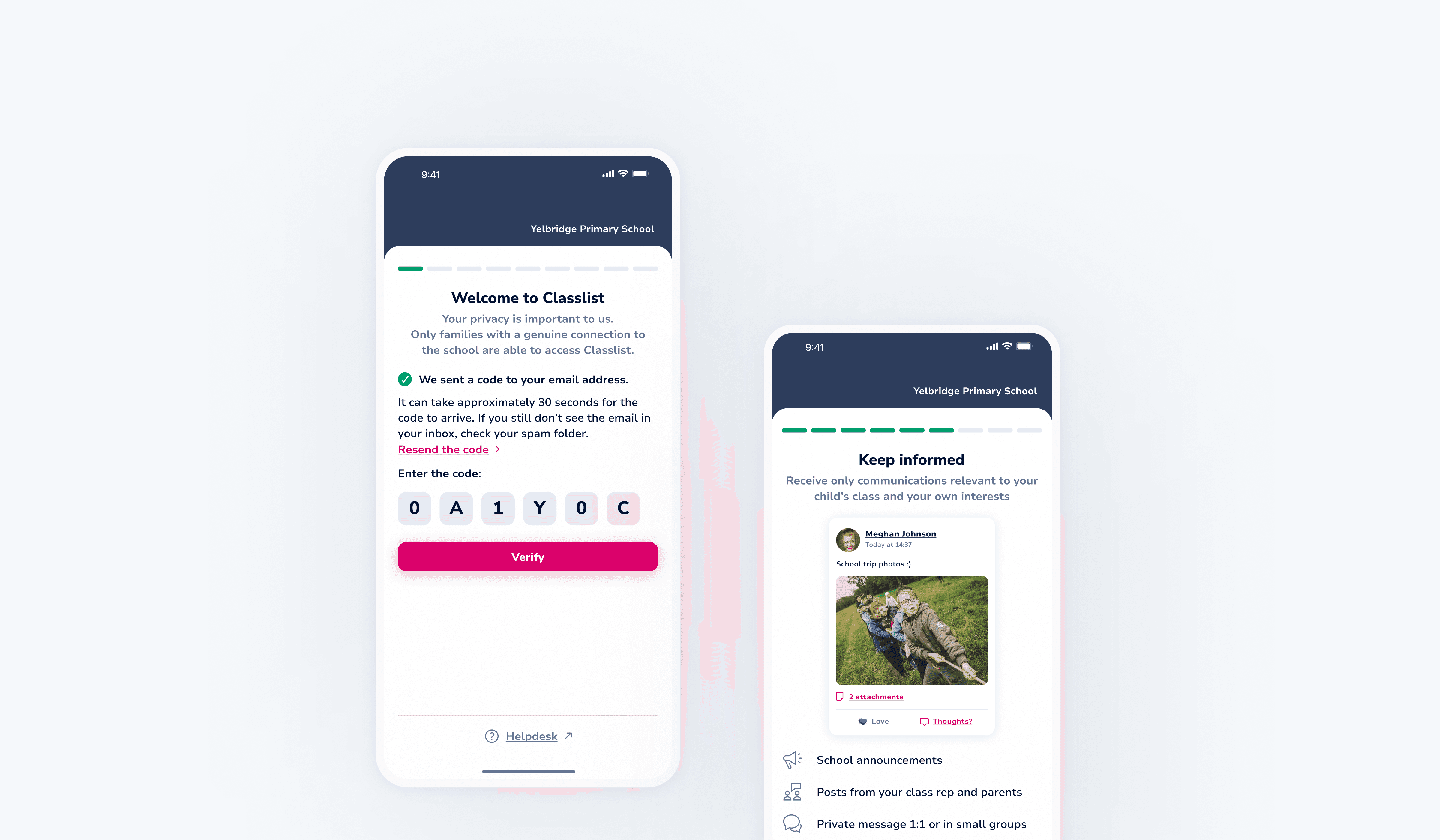
Designing parent onboarding through school data integration
Designing parent onboarding through school data integration
Designing parent onboarding through school data integration
Designing parent onboarding through school data integration
TEAM
TEAM
TEAM


+6
TIMELINE
TIMELINE
2-3 months
2-3 months
2-3 months
MY ROLE
MY ROLE
MY ROLE
UX
UX
UI
UI
Interaction design
Interaction design
Usability testing
Usability testing
THE CHALLENGE
THE CHALLENGE
The introduction of school data integration simplified onboarding for parents who no longer needed to manually enter their details, as they were now pulled from the school’s management system (MIS). The existing registration flow became outdated and provided little context about Classlist’s value. The goal was to redesign the flow so it matched the new, automated setup while turning it into an opportunity that showcased the app’s key benefits and encouraged parents to complete their registration with confidence.
The introduction of school data integration simplified onboarding for parents who no longer needed to manually enter their details, as they were now pulled from the school’s management system (MIS). The existing registration flow became outdated and provided little context about Classlist’s value. The goal was to redesign the flow so it matched the new, automated setup while turning it into an opportunity that showcased the app’s key benefits and encouraged parents to complete their registration with confidence.
THE OUTCOME
THE OUTCOME
Reduced friction during registration and created a faster onboarding experience
Reduced friction during registration and created a faster onboarding experience
Increased consistency of sign-ups across classes
Increased consistency of sign-ups across classes
Helped schools establish a reliable, trusted channel for parent communication
Helped schools establish a reliable, trusted channel for parent communication
Improved first-time engagement as parents discovered key app features early on
Improved first-time engagement as parents discovered key app features early on
01 RESEARCH AND INSIGHTS
01 RESEARCH AND INSIGHTS
Understanding the technical constraints
Understanding the technical constraints
Understanding the technical constraints
Before redesigning the onboarding flow, we needed clarity on how the system handled school data, verification, and permissions. The product and development teams worked closely together to understand the underlying logic and define the constraints that would shape the new experience. At this stage, we had to answer questions such as:
Before redesigning the onboarding flow, we needed clarity on how the system handled school data, verification, and permissions. The product and development teams worked closely together to understand the underlying logic and define the constraints that would shape the new experience. At this stage, we had to answer questions such as:
Q1: How does MIS data affect onboarding?
Q1: How does MIS data affect onboarding?
With parent and child details now pulled from the school’s MIS, we needed to balance flexibility with security. MIS data is authoritative and cannot be edited in Classlist. Parents can review their information but only update a limited set of fields themselves.
With parent and child details now pulled from the school’s MIS, we needed to balance flexibility with security. MIS data is authoritative and cannot be edited in Classlist. Parents can review their information but only update a limited set of fields themselves.
Q2: What can parents change and what can’t they?
Q2: What can parents change and what can’t they?
We collaborated with developers to define clear rules around editable and locked fields.
For safeguarding and data integrity reasons, only parent-owned fields are editable (contact details, addresses, photo). All MIS-owned fields, such as child name, year, class, and school relationships, remain read-only in Classlist.
We collaborated with developers to define clear rules around editable and locked fields.
For safeguarding and data integrity reasons, only parent-owned fields are editable (contact details, addresses, photo). All MIS-owned fields, such as child name, year, class, and school relationships, remain read-only in Classlist.
Q3: How will we handle verification?
Q3: How will we handle verification?
Verification must occur before parents access MIS-linked data. This ensured only genuine families reached the onboarding stage and aligned the flow with backend security requirements.
Verification must occur before parents access MIS-linked data. This ensured only genuine families reached the onboarding stage and aligned the flow with backend security requirements.
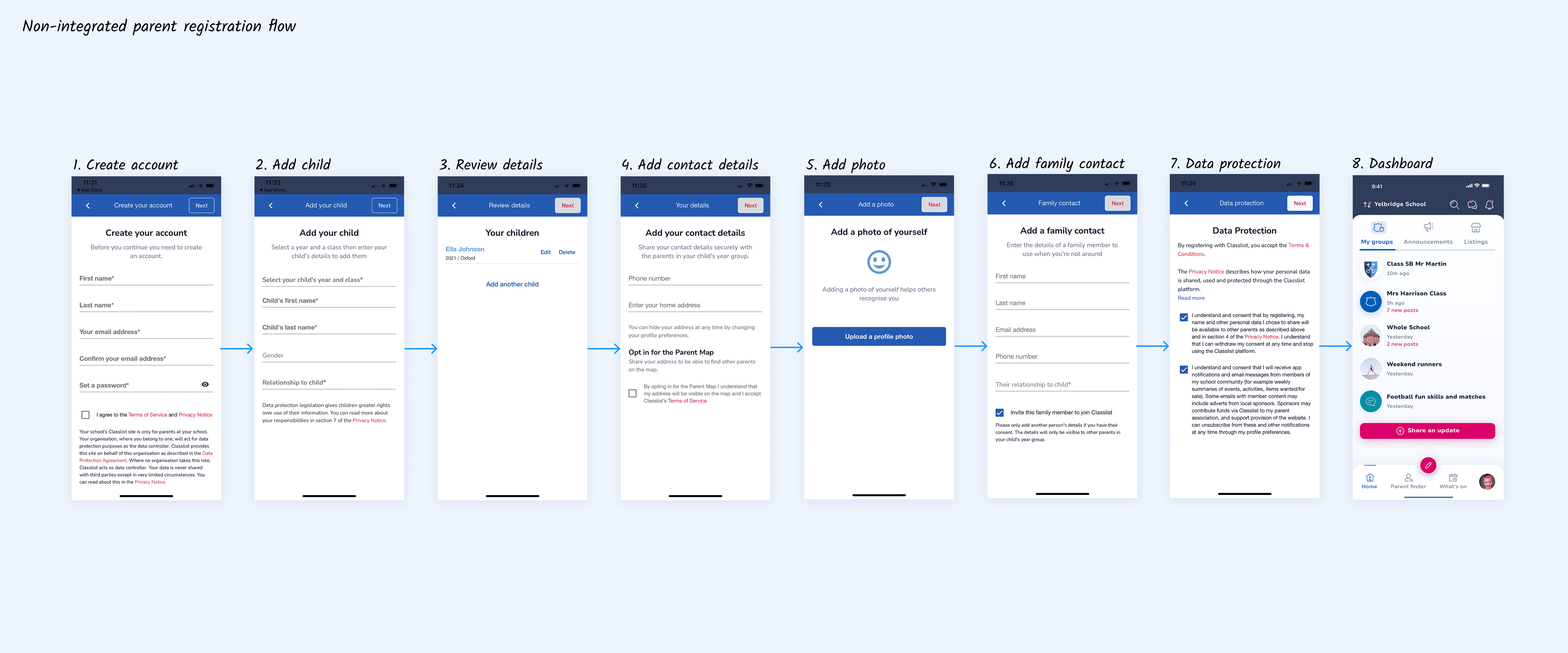
These decisions shaped a secure onboarding journey that respected school-managed data while still giving parents control over their information. The old registration flow was built on the previous web-app design system and no longer aligned with the native mobile experience or the updated MIS-driven logic. I redesigned both the structure and visual language of the flow to bring it in line with the current mobile design system.
These decisions shaped a secure onboarding journey that respected school-managed data while still giving parents control over their information. The old registration flow was built on the previous web-app design system and no longer aligned with the native mobile experience or the updated MIS-driven logic. I redesigned both the structure and visual language of the flow to bring it in line with the current mobile design system.
02 IDEATION I
02 IDEATION I
Verification
Verification
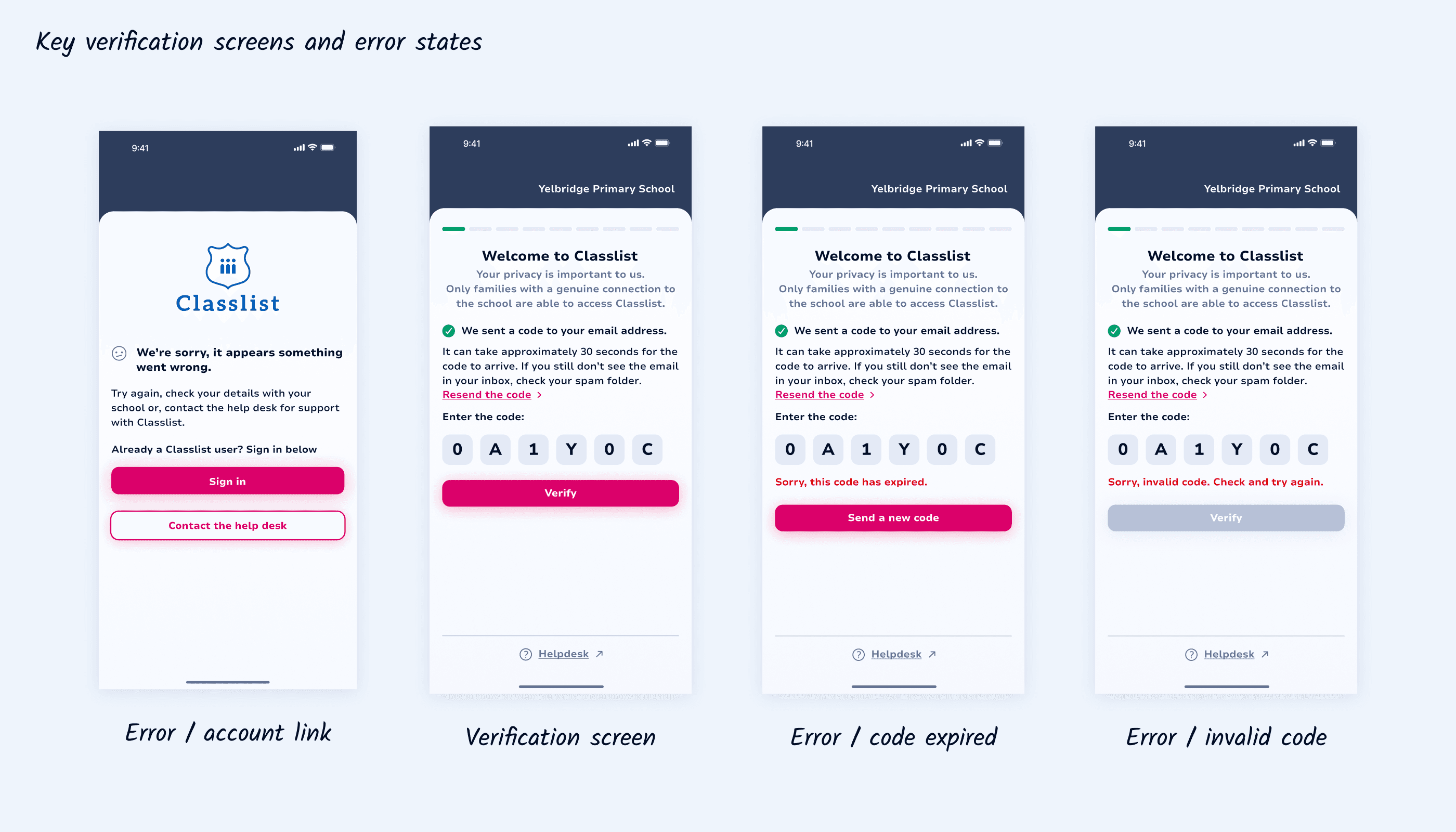
Because verification happens before parents access any MIS-linked data, it was critical to ensure parents could recover quickly from issues without getting stuck or confused.
The system needed to handle invalid or expired codes, as well as cases where a parent’s account could not be linked.
Because verification happens before parents access any MIS-linked data, it was critical to ensure parents could recover quickly from issues without getting stuck or confused.
The system needed to handle invalid or expired codes, as well as cases where a parent’s account could not be linked.
03 IDEATION II
03 IDEATION II
Account activation
Account activation
Account activation
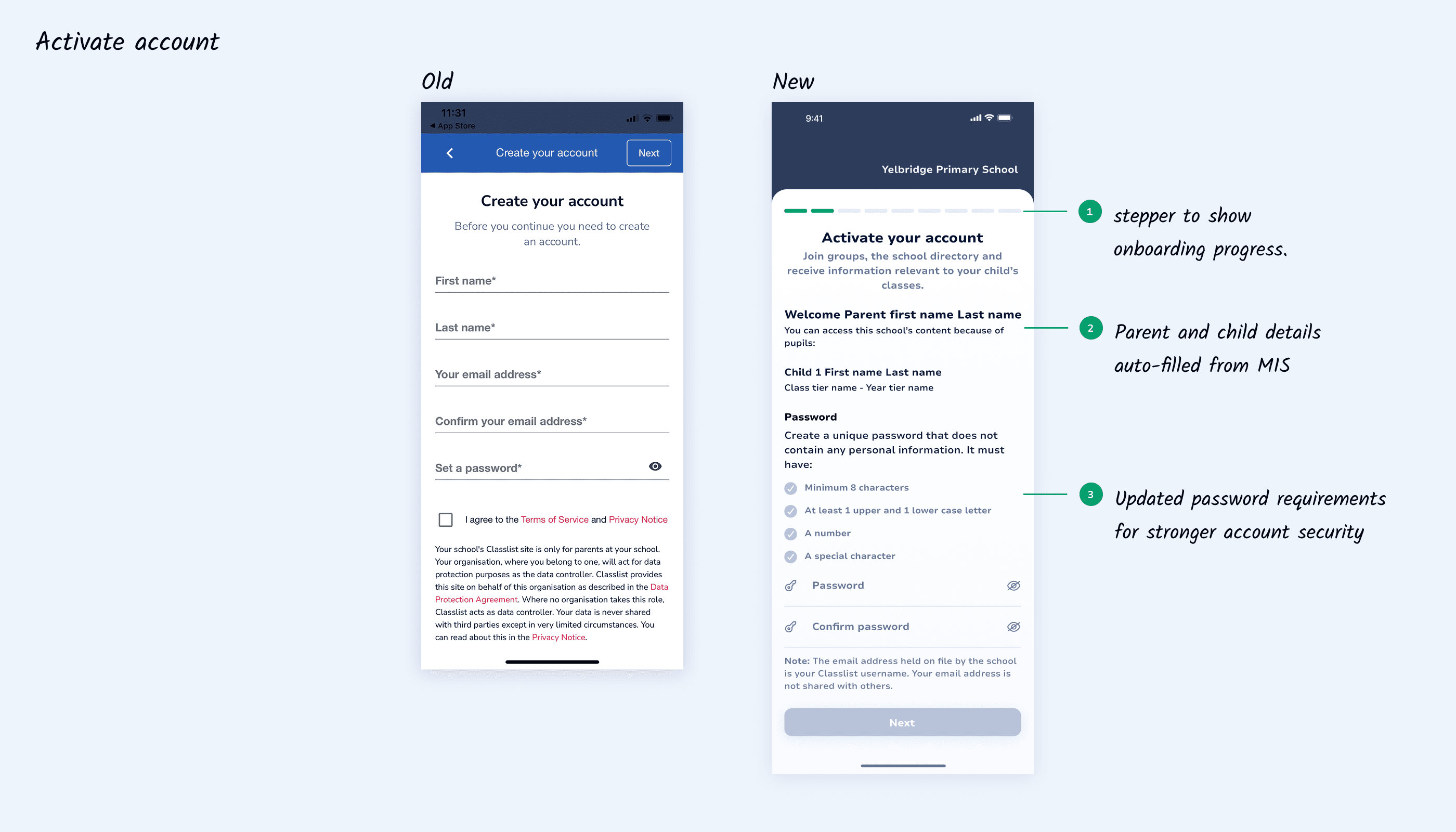
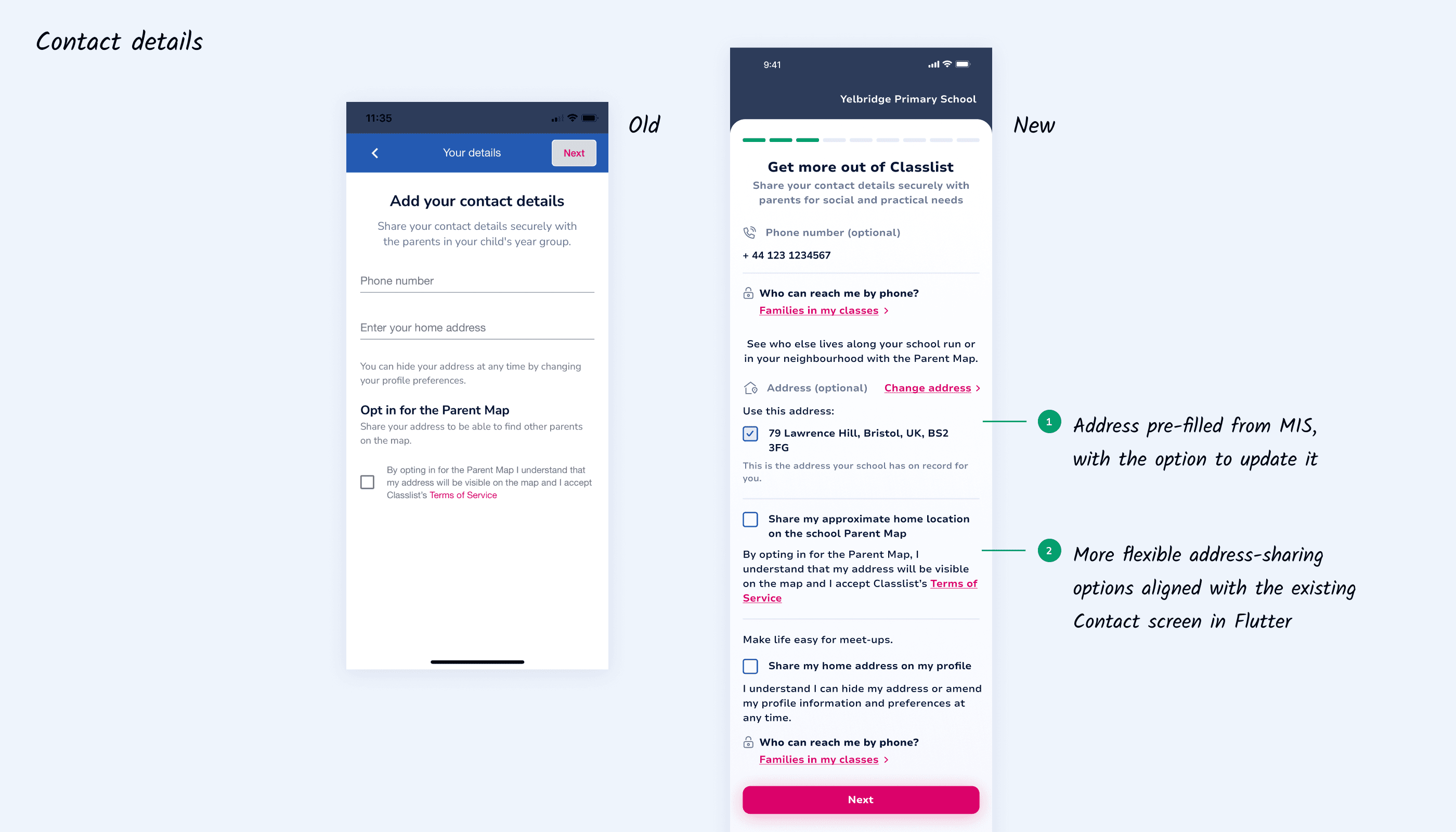
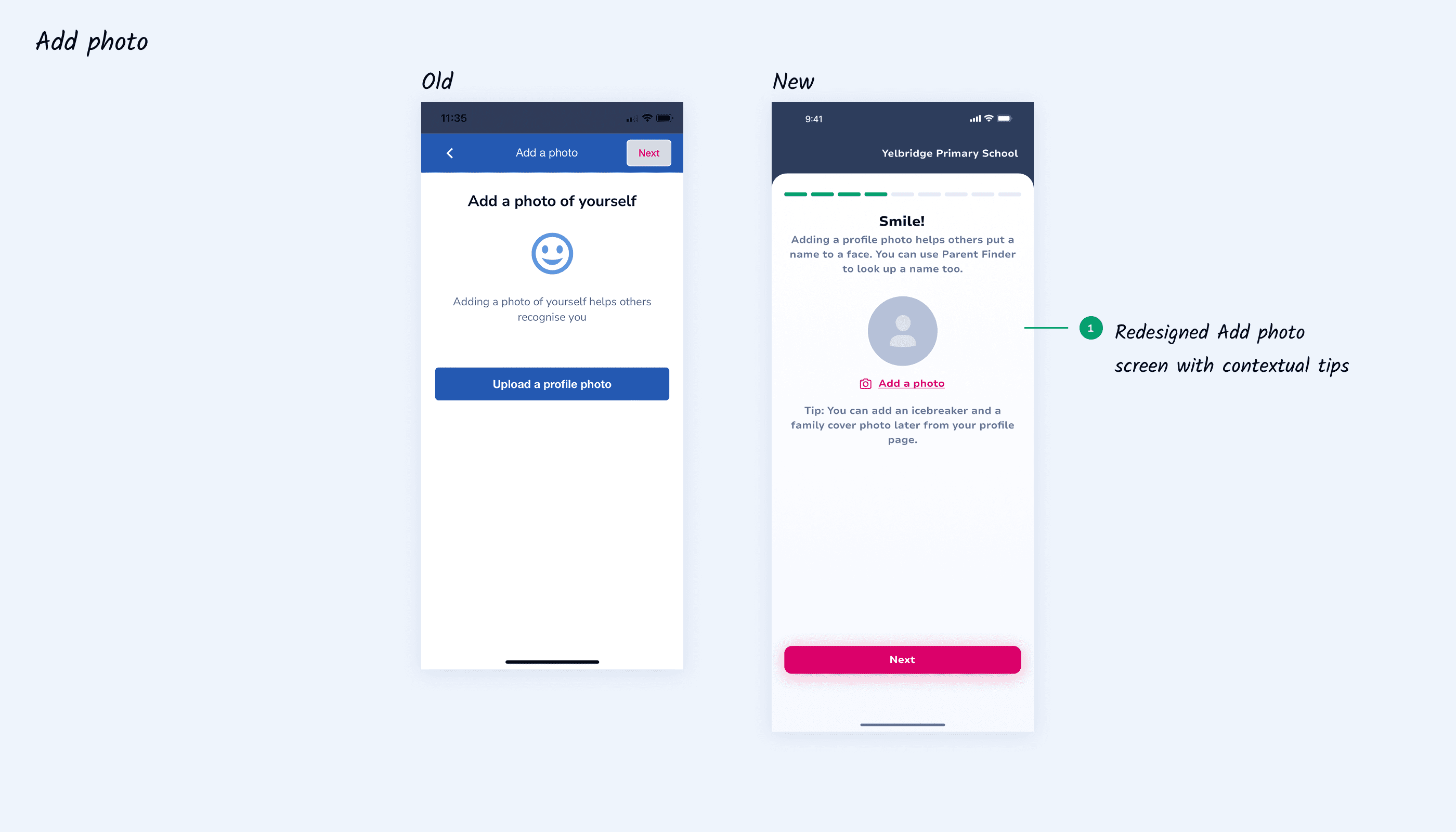
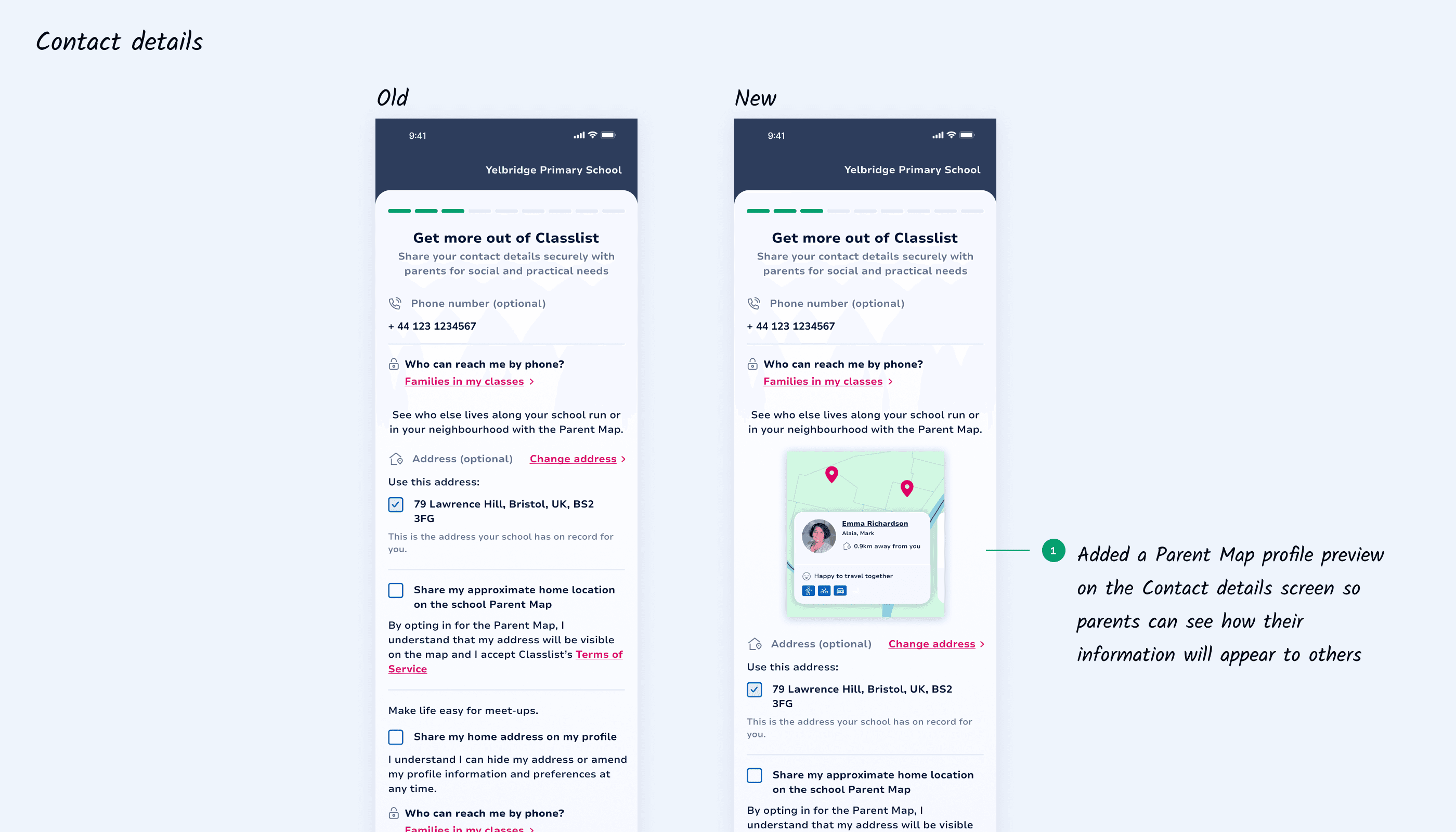
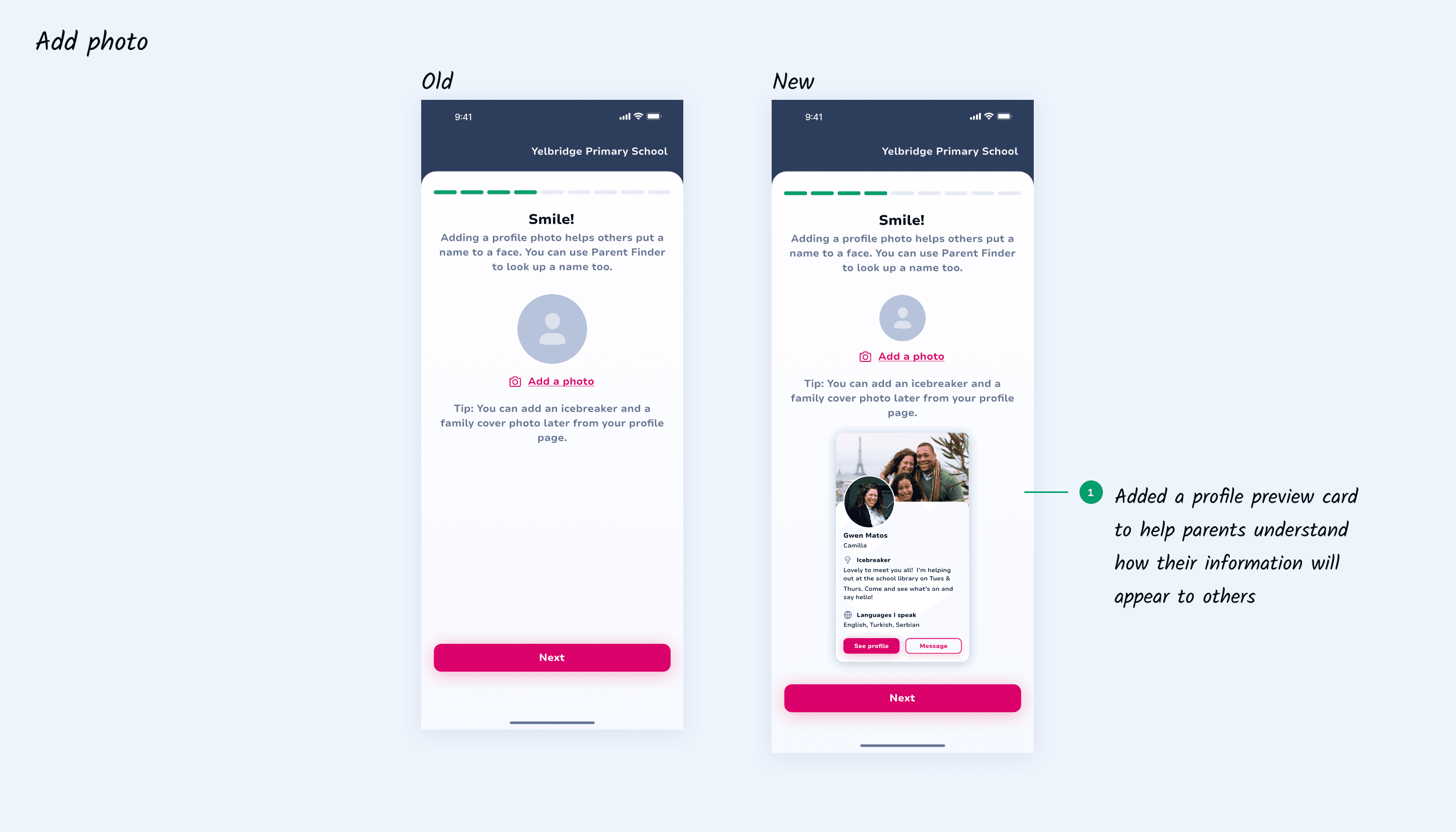
Next, we focused on improving account activation, contact details, and profile photos. The activation screen was updated with MIS-auto-filled data and a clearer stepper to guide parents. We refined the password logic to strengthen security and provide better feedback. The contact details screen was redesigned to align with the existing Flutter system, giving parents more control over address updates and sharing preferences. Finally, we refreshed the “Add photo” screen using the new Classlist design system to encourage parents to personalise their profile.
Next, we focused on improving account activation, contact details, and profile photos. The activation screen was updated with MIS-auto-filled data and a clearer stepper to guide parents. We refined the password logic to strengthen security and provide better feedback. The contact details screen was redesigned to align with the existing Flutter system, giving parents more control over address updates and sharing preferences. Finally, we refreshed the “Add photo” screen using the new Classlist design system to encourage parents to personalise their profile.
04 IDEATION III
04 IDEATION III
Now for the fun part
Now for the fun part
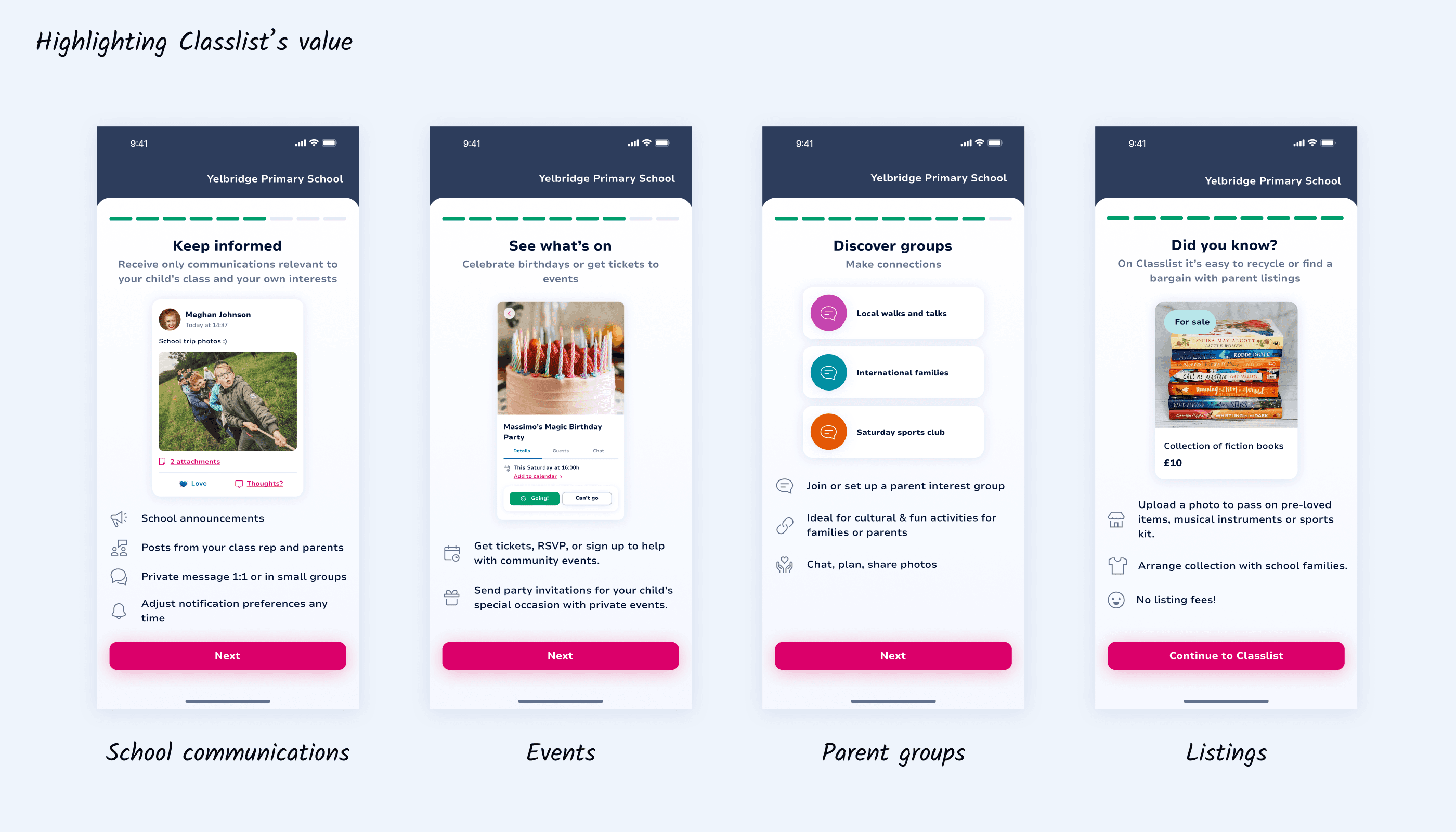
With the new logic in place, registering an account became quick and seamless, but we didn’t want to stop there. We aimed to elevate the onboarding experience and communicate Classlist’s value early. Working closely with the product owner, I designed screens that highlighted Classlist’s key features and functionality, along with a few extra refinements to the activation flow.
With the new logic in place, registering an account became quick and seamless, but we didn’t want to stop there. We aimed to elevate the onboarding experience and communicate Classlist’s value early. Working closely with the product owner, I designed screens that highlighted Classlist’s key features and functionality, along with a few extra refinements to the activation flow.
05 FEEDBACK
05 FEEDBACK
The new flow is ready!
The new flow is ready!
The new flow is ready!
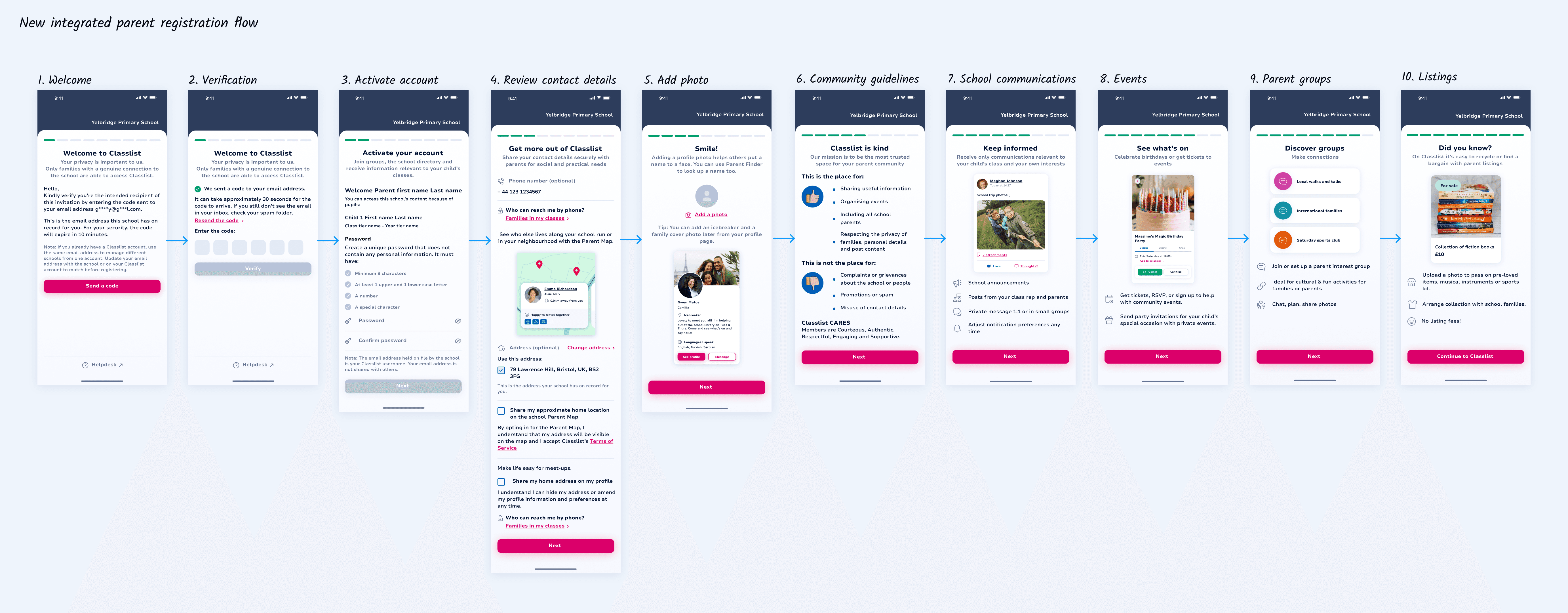
I mapped out the full journey, finalised the UI, and caught up with the developers again to validate the flow end-to-end. Aside from a few small backend tweaks, everything aligned cleanly. The new integrated onboarding experience was ready for implementation.
I mapped out the full journey, finalised the UI, and caught up with the developers again to validate the flow end-to-end. Aside from a few small backend tweaks, everything aligned cleanly. The new integrated onboarding experience was ready for implementation.
06 TESTING
06 TESTING
A few hiccups
A few hiccups
I collaborated with the development and QA teams to run end-to-end tests. Most of the flow behaved as expected, but a few important issues surfaced that required quick iteration:
Account redirection issue
If a parent already had a Classlist account, the final “Continue to Classlist” button redirected them to their existing account instead of the newly created school account. This caused confusion during onboarding. We resolved it by updating the redirect logic and ensuring the correct account loaded after registration.
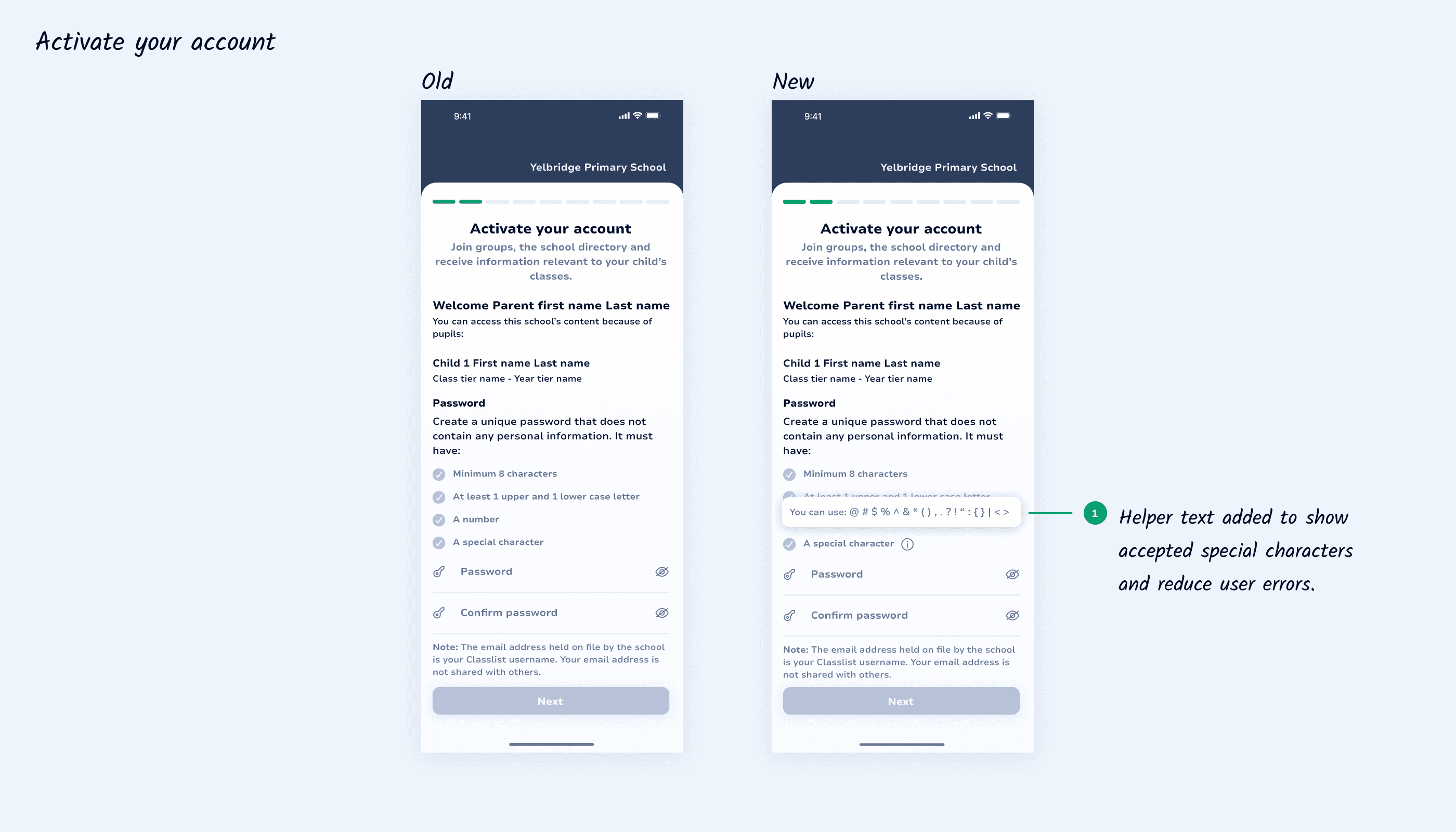
2. Password rule clarity
The initial password validation wasn’t specific enough. “Include a special character” left parents guessing, so we added helper text listing the accepted characters. This made the requirement clear and significantly reduced errors.
I collaborated with the development and QA teams to run end-to-end tests. Most of the flow behaved as expected, but a few important issues surfaced that required quick iteration:
Account redirection issue
If a parent already had a Classlist account, the final “Continue to Classlist” button redirected them to their existing account instead of the newly created school account. This caused confusion during onboarding. We resolved it by updating the redirect logic and ensuring the correct account loaded after registration.
2. Password rule clarity
The initial password validation wasn’t specific enough. “Include a special character” left parents guessing, so we added helper text listing the accepted characters. This made the requirement clear and significantly reduced errors.
I collaborated with the development and QA teams to run end-to-end tests. Most of the flow behaved as expected, but a few important issues surfaced that required quick iteration:
Account redirection issue
If a parent already had a Classlist account, the final “Continue to Classlist” button redirected them to their existing account instead of the newly created school account. This caused confusion during onboarding. We resolved it by updating the redirect logic and ensuring the correct account loaded after registration.
2. Password rule clarity
The initial password validation wasn’t specific enough. “Include a special character” left parents guessing, so we added helper text listing the accepted characters. This made the requirement clear and significantly reduced errors.
07 LAUNCH
07 LAUNCH
It's celebration time!
It's celebration time!
It's celebration time!
After resolving the last few issues, we rolled out the new onboarding flow across integrated schools. The launch was smooth, and both schools and parents immediately felt the difference. For parents, registration became faster and more user-friendly, leading to better take-up across year groups. The refreshed screens also highlighted key features earlier, helping parents discover the value of Classlist sooner. For schools, Classlist became a more inclusive communication tool, making it easier for updates to reach all families.
After resolving the last few issues, we rolled out the new onboarding flow across integrated schools. The launch was smooth, and both schools and parents immediately felt the difference. For parents, registration became faster and more user-friendly, leading to better take-up across year groups. The refreshed screens also highlighted key features earlier, helping parents discover the value of Classlist sooner. For schools, Classlist became a more inclusive communication tool, making it easier for updates to reach all families.
After resolving the last few issues, we rolled out the new onboarding flow across integrated schools. The launch was smooth, and both schools and parents immediately felt the difference. For parents, registration became faster and more user-friendly, leading to better take-up across year groups. The refreshed screens also highlighted key features earlier, helping parents discover the value of Classlist sooner. For schools, Classlist became a more inclusive communication tool, making it easier for updates to reach all families.
08 LESSONS
08 LESSONS
What I learnt
What I learnt
Technical constraints matter early.
Technical constraints matter early.
MIS rules, permissions, and backend logic shaped the onboarding flow.
MIS rules, permissions, and backend logic shaped the onboarding flow.
Early alignment with developers helped avoid rework and design dead ends.
Early alignment with developers helped avoid rework and design dead ends.
Always consider existing user states.
Always consider existing user states.
Previously registered users were redirected to their existing account instead of the newly created school account.
Previously registered users were redirected to their existing account instead of the newly created school account.
Testing with real user conditions helped uncover and resolve this logic issue early.
Testing with real user conditions helped uncover and resolve this logic issue early.
Explore more
Explore more
Let’s connect!
Copyright © 2026 Gabriella Kovacs