Improving parent onboarding through school data integration
Improving parent onboarding through school data integration
Improving parent onboarding through school data integration
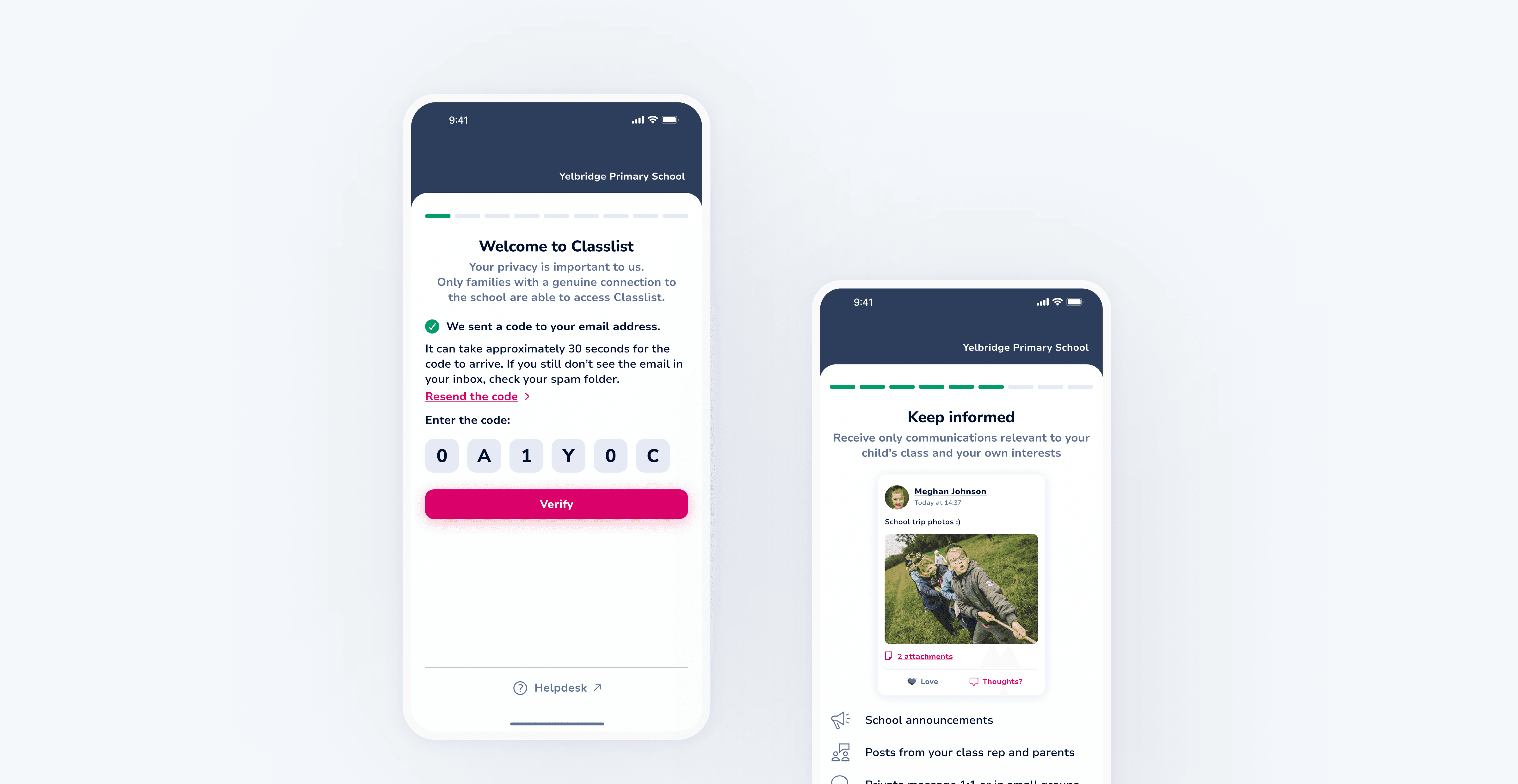
Reworked the registration experience to align with MIS-driven data, enabling faster sign-ups, clearer onboarding, and more consistent adoption across classes
Reworked the registration experience to align with MIS-driven data, enabling faster sign-ups, clearer onboarding, and more consistent adoption across classes
Reworked the registration experience to align with MIS-driven data, enabling faster sign-ups, clearer onboarding, and more consistent adoption across classes
TEAM
TEAM
TEAM


+6
TIMELINE
TIMELINE
2-3 months
2-3 months
2-3 months
MY ROLE
MY ROLE
MY ROLE
UX
UX
UI
UI
Interaction design
Interaction design
Usability testing
Usability testing
The challenge
The challenge
The existing registration flow was slow and manual, creating friction during onboarding. Adoption varied significantly across classes, with some reaching high sign-up rates while others lagged behind. At the same time, parents had limited visibility into the product’s value, making it harder to motivate completion.
The existing registration flow was slow and manual, creating friction during onboarding. Adoption varied significantly across classes, with some reaching high sign-up rates while others lagged behind. At the same time, parents had limited visibility into the product’s value, making it harder to motivate completion.
Time-consuming registration
Time-consuming registration


"How long is this? I feel like I’ve been typing in details the school already has for at least 5 minutes now…"
"How long is this? I feel like I’ve been typing in details the school already has for at least 5 minutes now…"

Uneven adoption across classes
Uneven adoption across classes
"Ohh no I forgot to finish registration as I was busy and now the link has expired!"
"Ohh no I forgot to finish registration as I was busy and now the link has expired!"

Unclear product value
Unclear product value

"I finished the registration, but I’m still not sure what this app is actually for."
"I finished the registration, but I’m still not sure what this app is actually for."
The outcome
The outcome
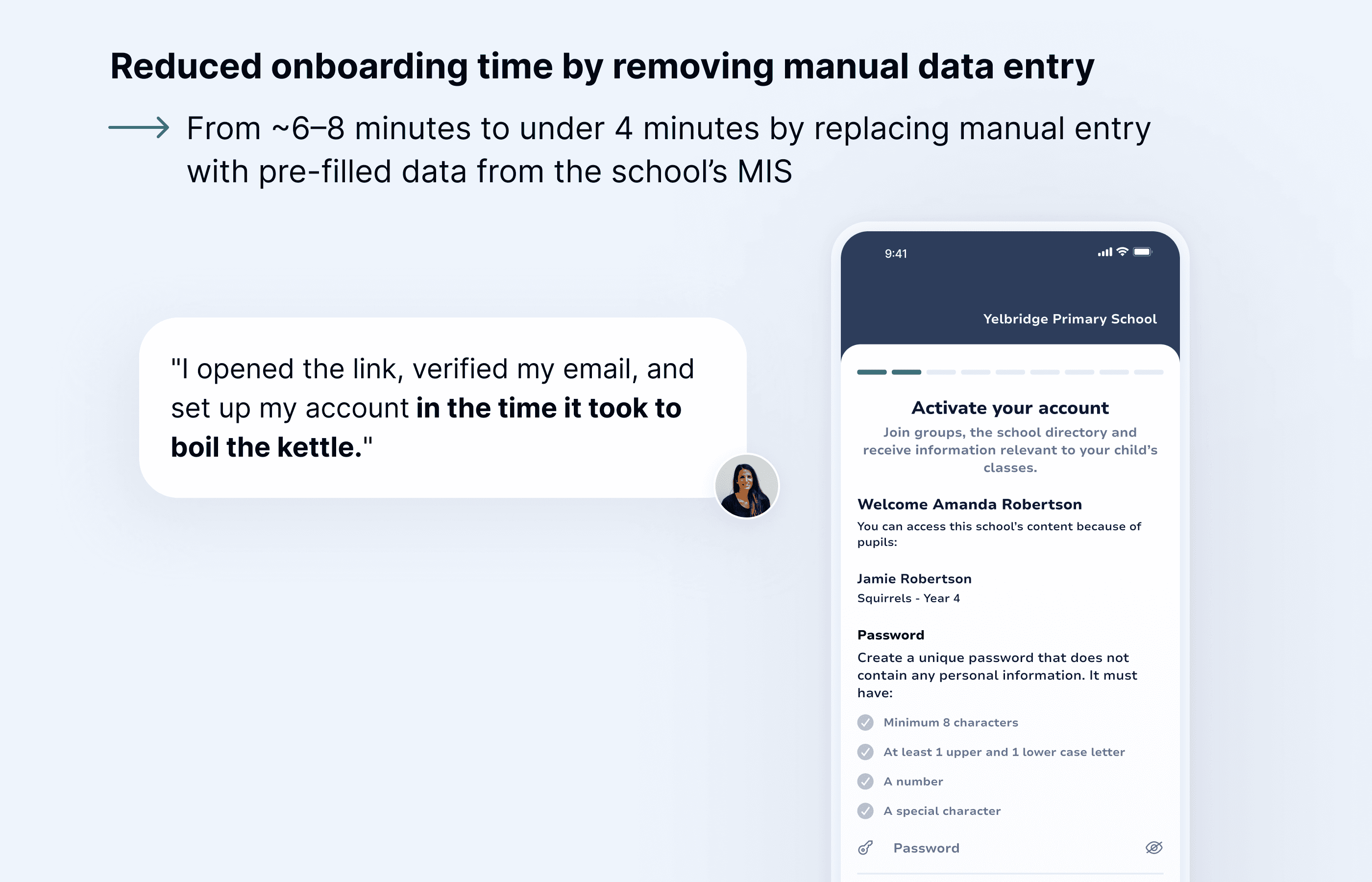
Reduced onboarding time from ~6–8 minutes to under 4 minutes by replacing manual data entry with pre-filled MIS data
Reduced onboarding time from ~6–8 minutes to under 4 minutes by replacing manual data entry with pre-filled MIS data
Created a more consistent onboarding experience across classes by standardising the registration flow
Created a more consistent onboarding experience across classes by standardising the registration flow
Introduced key product touchpoints during onboarding to better communicate value to parents
Introduced key product touchpoints during onboarding to better communicate value to parents
Supported schools in establishing a clearer communication channel with parents from the start
Supported schools in establishing a clearer communication channel with parents from the start
01 RESEARCH AND INSIGHTS
01 RESEARCH AND INSIGHTS
Defining system constraints
Defining system constraints
Before redesigning the onboarding flow, we defined how the MIS-integrated system would handle school data, verification, and permissions. Working closely with product and development, we aligned on the underlying logic and constraints that would shape the experience.
Before redesigning the onboarding flow, we defined how the MIS-integrated system would handle school data, verification, and permissions. Working closely with product and development, we aligned on the underlying logic and constraints that would shape the experience.
Q1: How will we handle verification?
Q1: How will we handle verification?
Verification occurs before parents can access MIS-linked data, ensuring only authorised users proceed and aligning the flow with backend security requirements.
Verification occurs before parents can access MIS-linked data, ensuring only authorised users proceed and aligning the flow with backend security requirements.
Q2: How do we balance data authority with user flexibility?
Q2: How do we balance data authority with user flexibility?
With parent and child data pulled from the school’s MIS, we defined clear rules for editable and locked fields to maintain data integrity. Parent-owned fields (e.g. contact details, address, profile image) remain editable, while MIS-owned data (e.g. child name, year, class, and school relationships) is read-only in Classlist.
With parent and child data pulled from the school’s MIS, we defined clear rules for editable and locked fields to maintain data integrity. Parent-owned fields (e.g. contact details, address, profile image) remain editable, while MIS-owned data (e.g. child name, year, class, and school relationships) is read-only in Classlist.
Q3: How do we handle outdated or incorrect data?
Q3: How do we handle outdated or incorrect data?
As MIS-owned data cannot be edited directly, users are guided to contact the school to request updates. This maintains a single source of truth while ensuring records remain accurate.
As MIS-owned data cannot be edited directly, users are guided to contact the school to request updates. This maintains a single source of truth while ensuring records remain accurate.
These constraints shaped a secure onboarding journey that respected school-managed data while preserving parent control where appropriate. The existing flow, built on a legacy web-based system, no longer aligned with the native mobile experience or the updated MIS-driven logic. I redesigned the onboarding structure to eliminate most manual data entry, introduce verification and data review at the right moments, and align the experience with the current mobile design system.
These constraints shaped a secure onboarding journey that respected school-managed data while preserving parent control where appropriate. The existing flow, built on a legacy web-based system, no longer aligned with the native mobile experience or the updated MIS-driven logic. I redesigned the onboarding structure to eliminate most manual data entry, introduce verification and data review at the right moments, and align the experience with the current mobile design system.
02 IDEATION I
02 IDEATION I
Verification
Verification
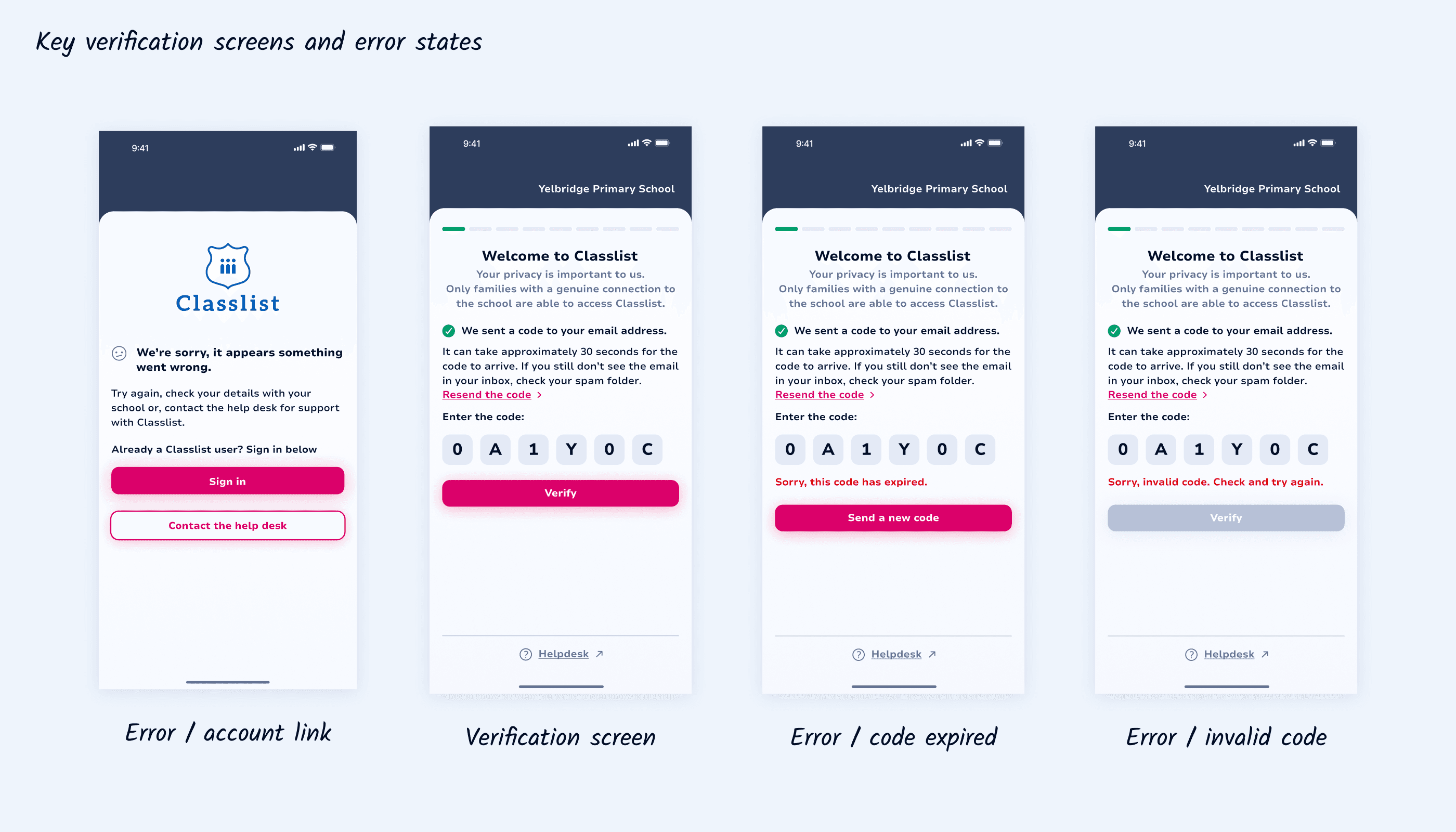
As verification occurs before parents can access MIS-linked data, it was critical to support quick recovery from errors without blocking progress. The flow was designed to handle key failure states, including invalid or expired codes and cases where a parent account could not be linked.
As verification occurs before parents can access MIS-linked data, it was critical to support quick recovery from errors without blocking progress. The flow was designed to handle key failure states, including invalid or expired codes and cases where a parent account could not be linked.
03 IDEATION II
03 IDEATION II
Account activation
Account activation
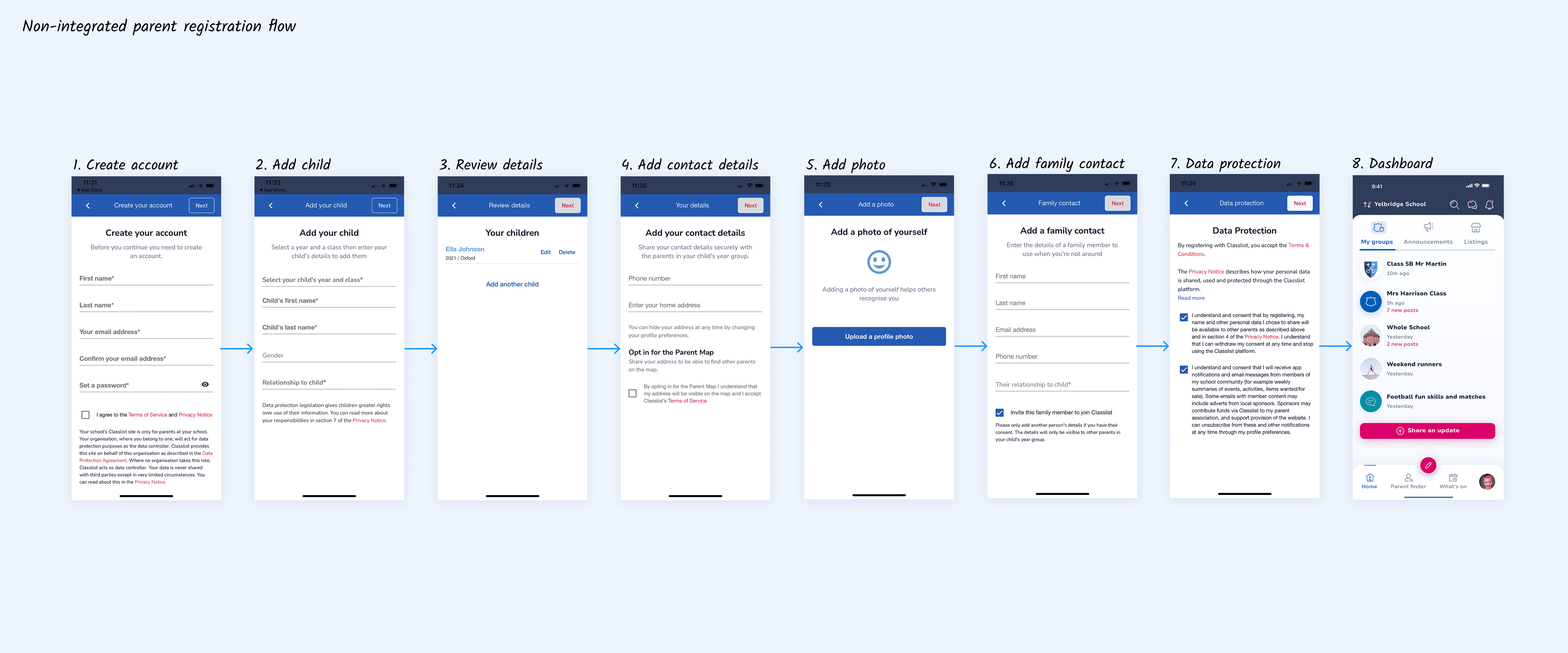
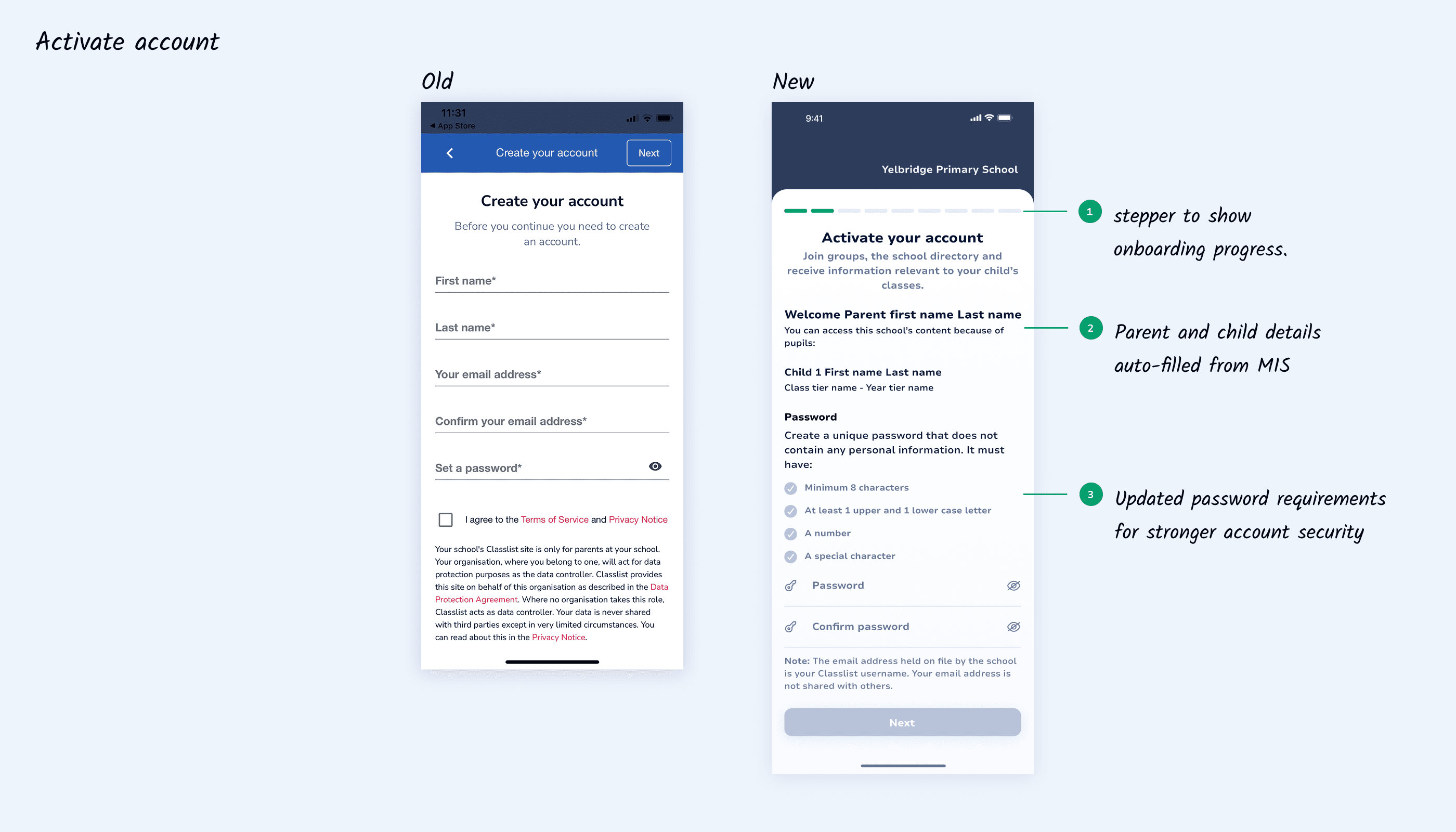
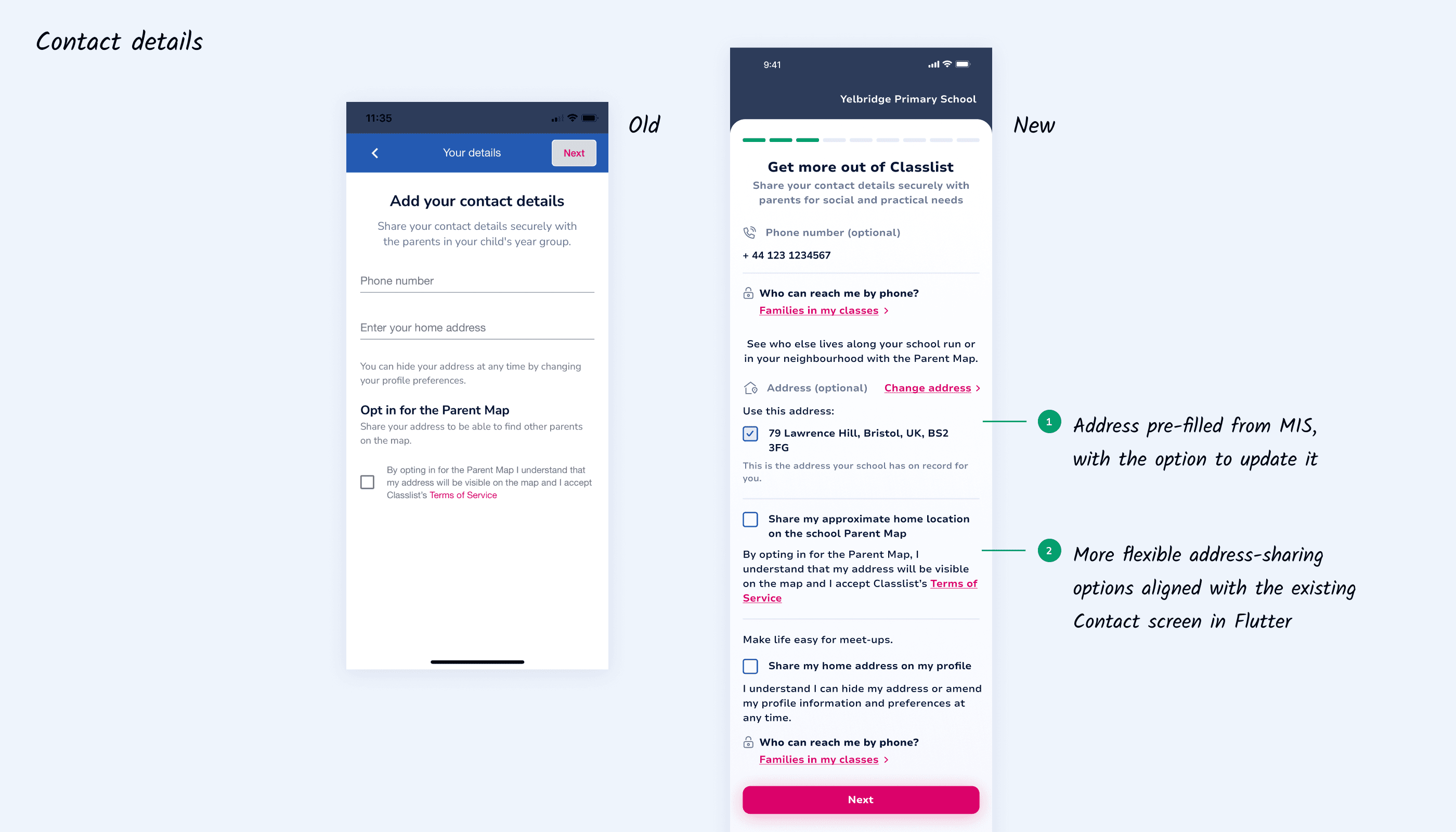
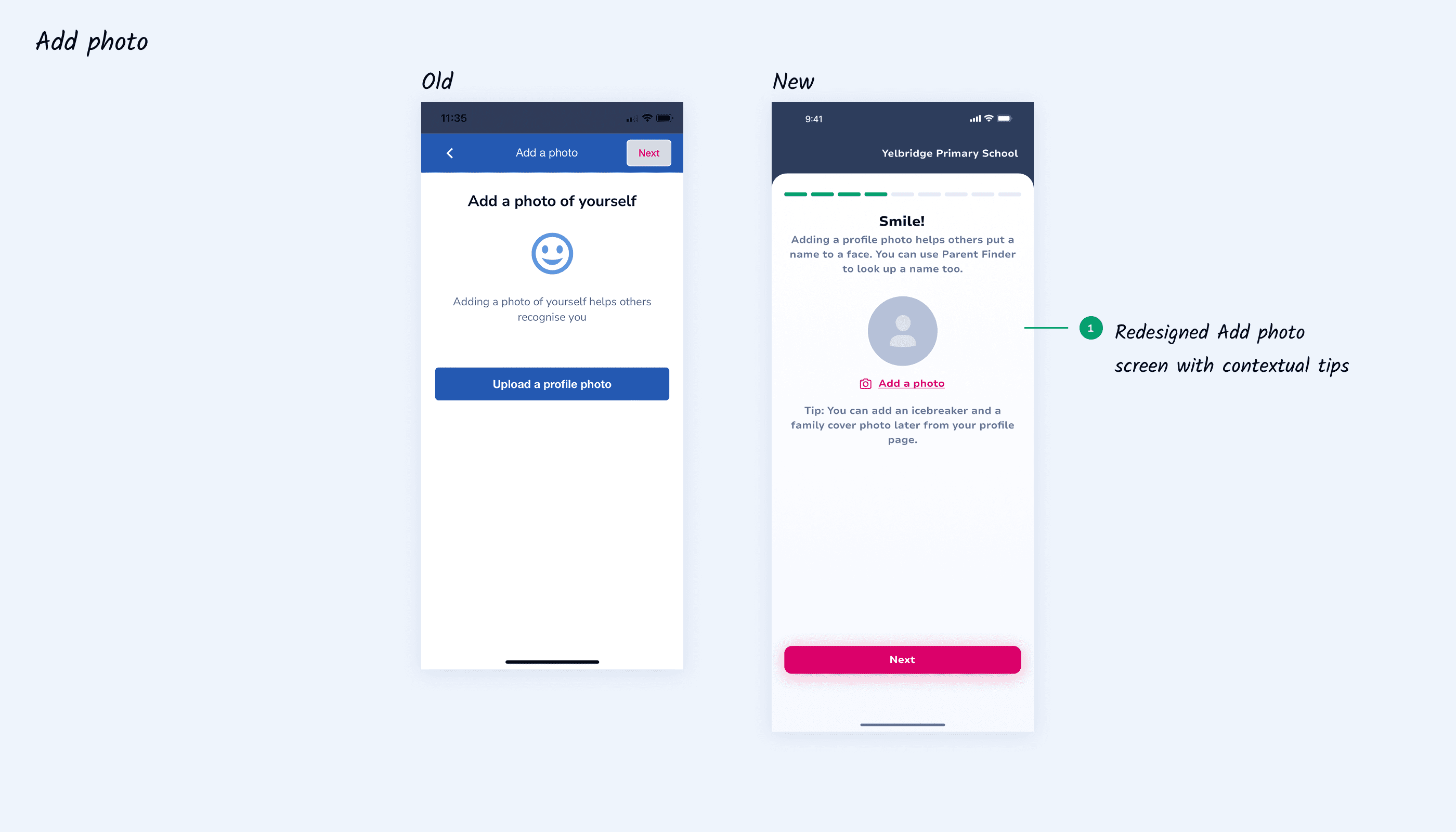
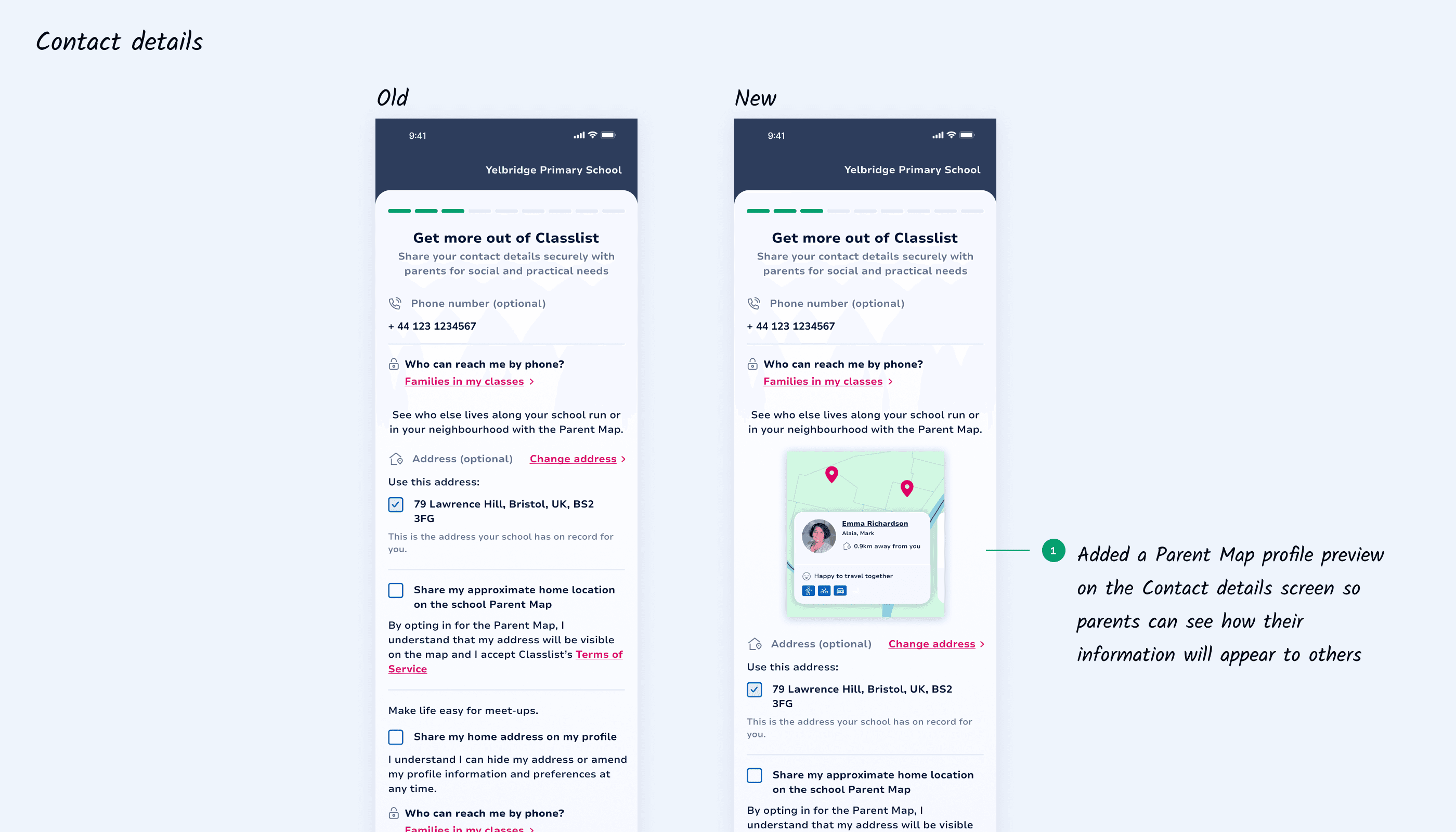
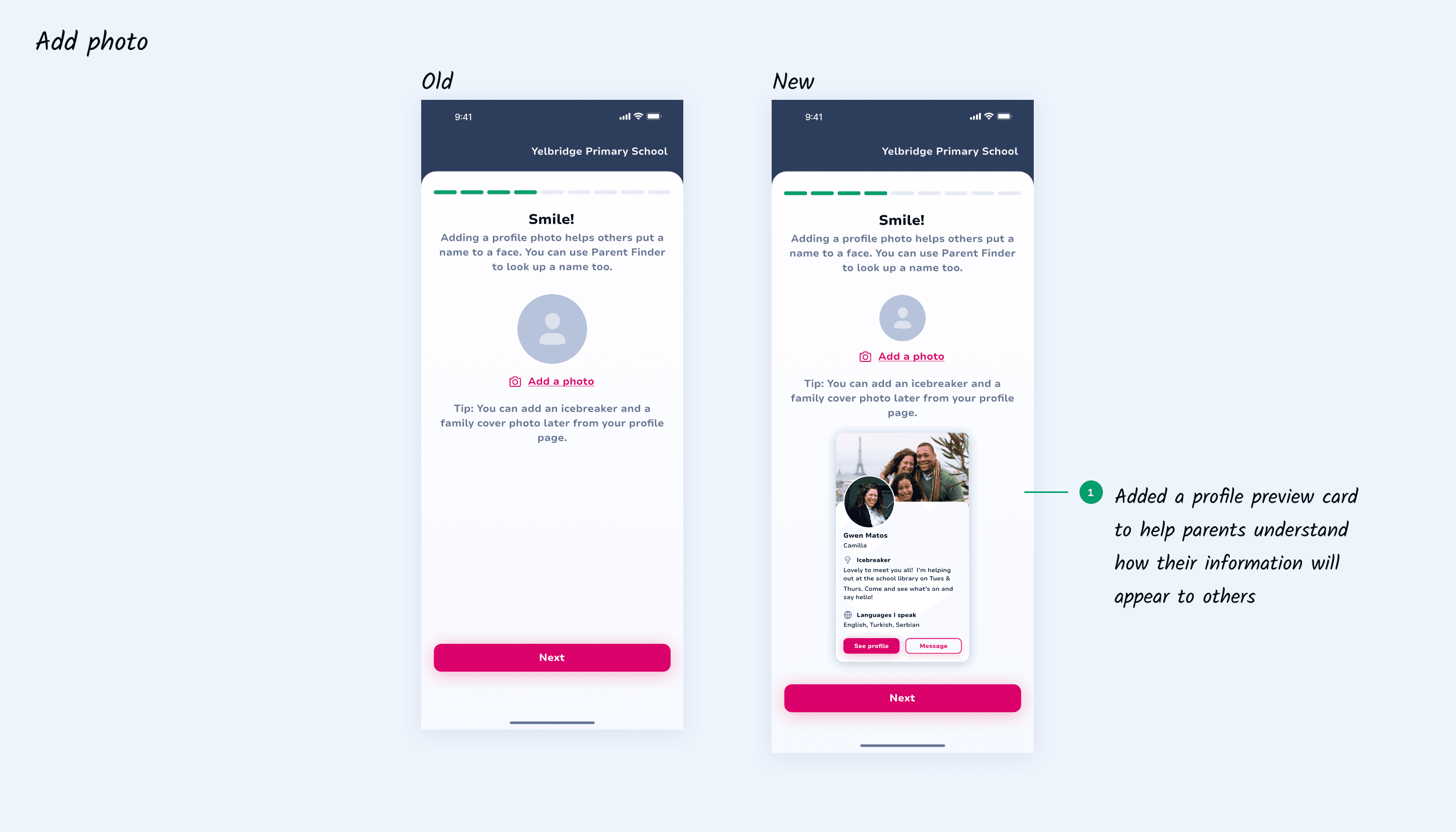
Next, I focused on streamlining account activation. MIS data was used to pre-fill parent and child details, removing most data entry. A stepper was introduced to guide parents through the process, while updated password requirements improved security with clearer feedback. Contact details and profile photo setup were refined to give parents control over editable information while maintaining consistency with the existing mobile design system.
Next, I focused on streamlining account activation. MIS data was used to pre-fill parent and child details, removing most data entry. A stepper was introduced to guide parents through the process, while updated password requirements improved security with clearer feedback. Contact details and profile photo setup were refined to give parents control over editable information while maintaining consistency with the existing mobile design system.
04 IDEATION III
04 IDEATION III
Communicating product value during onboarding
Communicating product value during onboarding
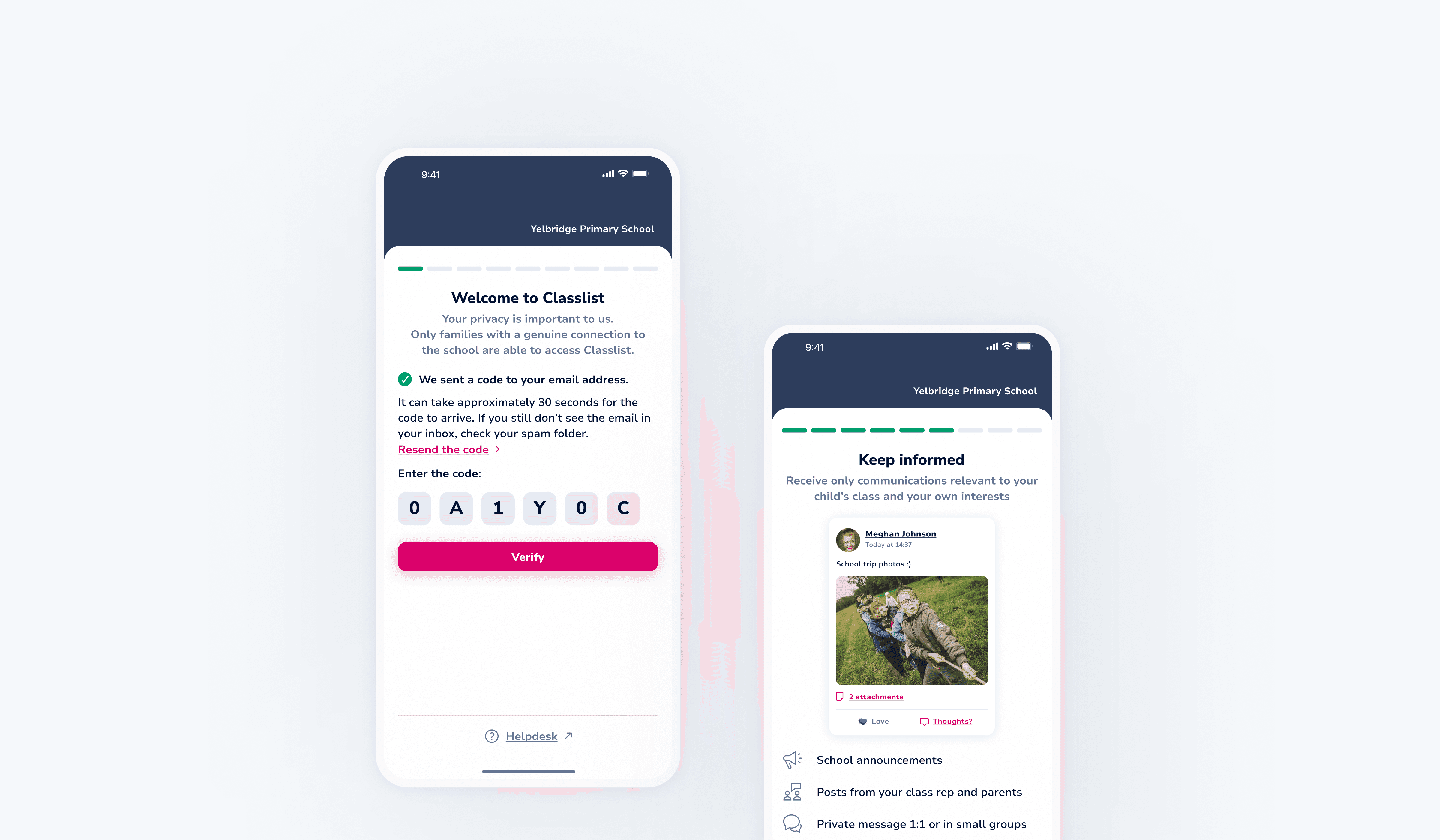
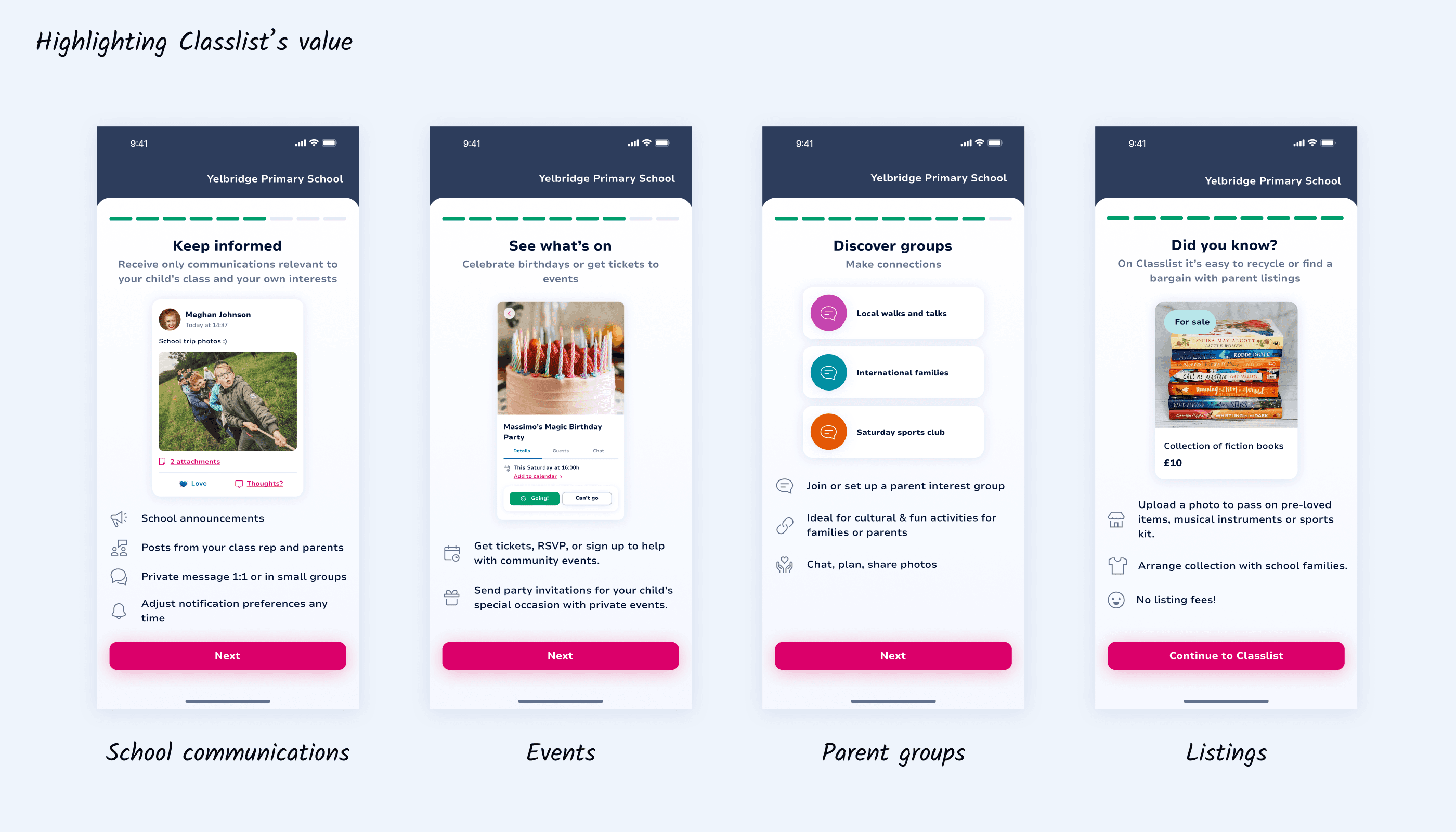
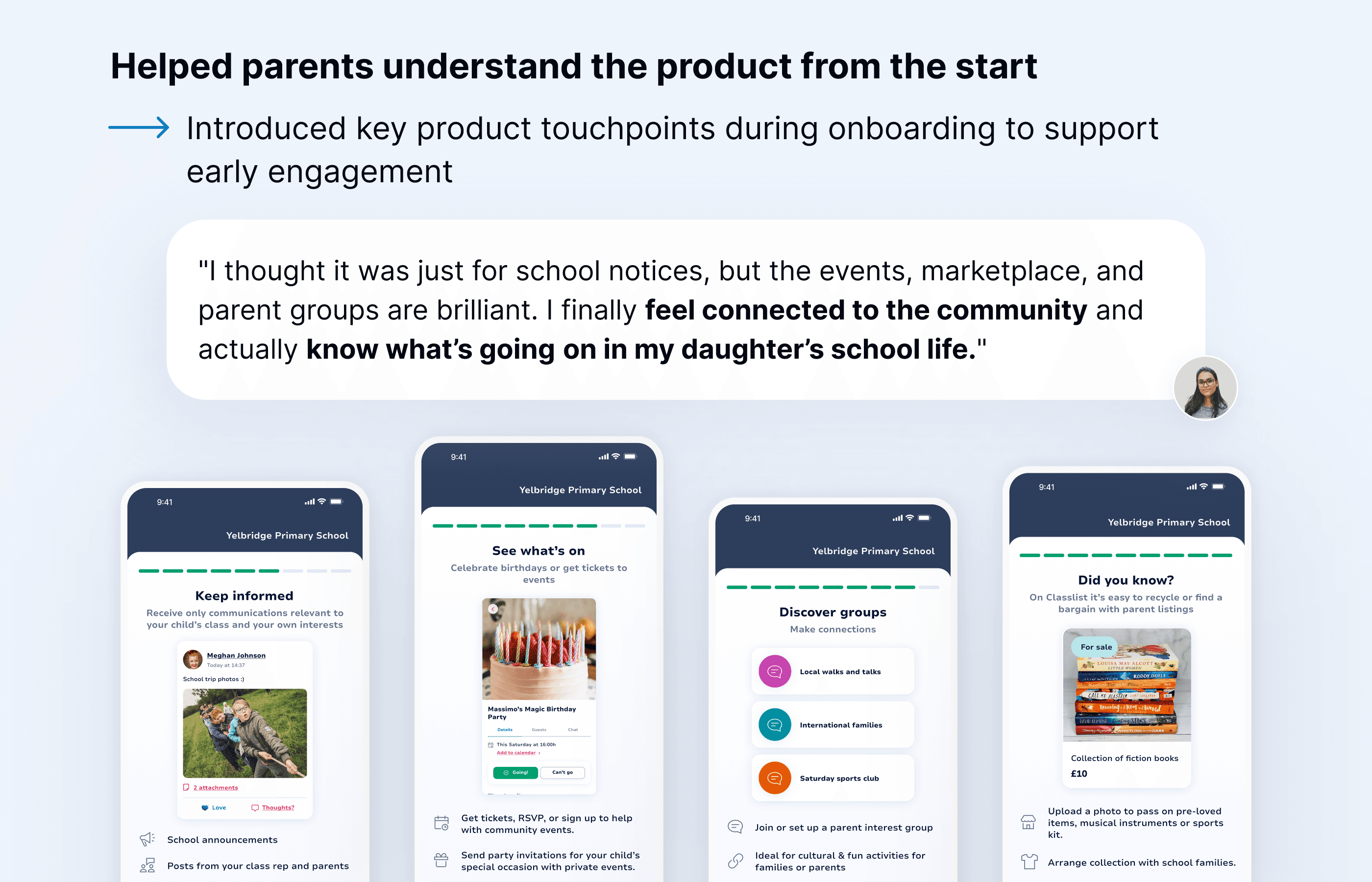
Early users lacked visibility into what Classlist offered. To address this, I introduced a set of onboarding screens that highlighted key features and use cases, helping parents understand the platform’s value from the start. This improved clarity around the platform’s purpose, supporting early engagement after sign-up.
Early users lacked visibility into what Classlist offered. To address this, I introduced a set of onboarding screens that highlighted key features and use cases, helping parents understand the platform’s value from the start. This improved clarity around the platform’s purpose, supporting early engagement after sign-up.
05 FEEDBACK
05 FEEDBACK
Finalised onboarding flow
Finalised onboarding flow
Finalised onboarding flow
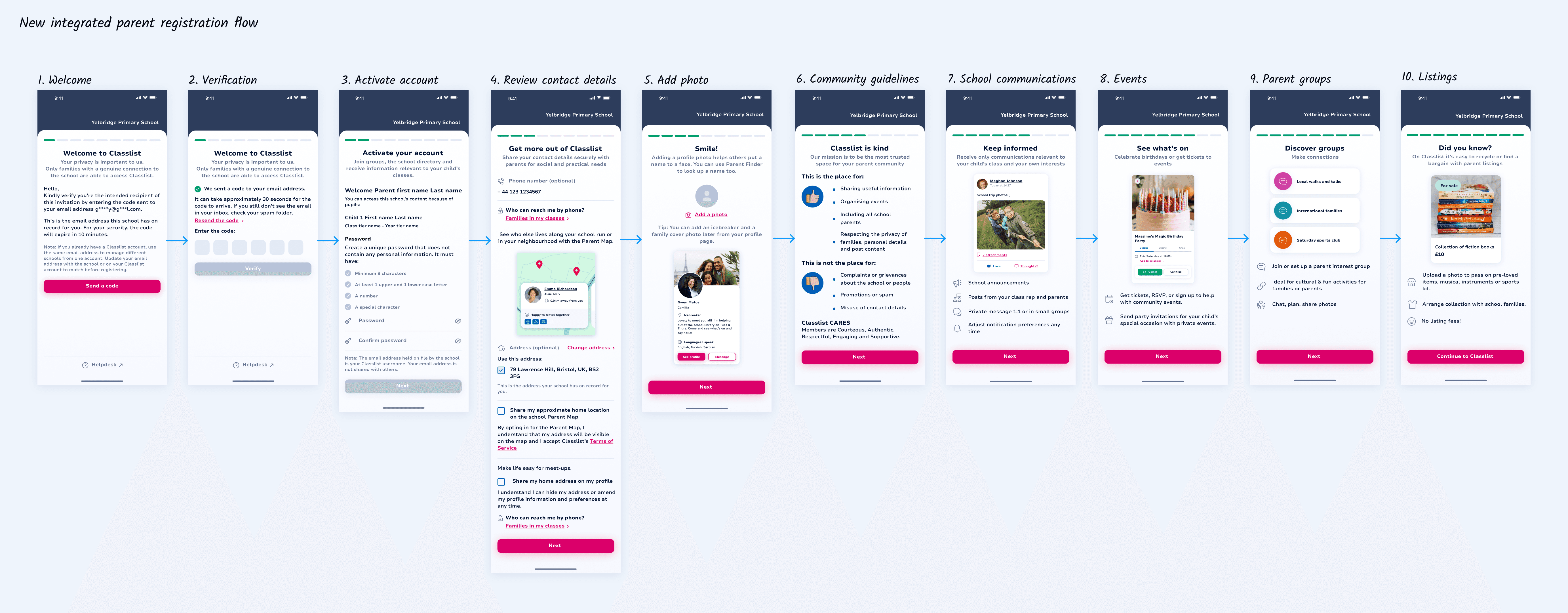
I mapped the full onboarding journey in Figma and validated the end-to-end flow with developers to ensure alignment with backend logic. Final designs were handed off in Zeplin, supporting implementation in Flutter.
I mapped the full onboarding journey in Figma and validated the end-to-end flow with developers to ensure alignment with backend logic. Final designs were handed off in Zeplin, supporting implementation in Flutter.
06 TESTING
06 TESTING
Refining the flow
Refining the flow
I collaborated with the development and QA teams to run end-to-end testing of the onboarding flow. While most of the experience worked as expected, testing revealed a few key issues:
Account redirection issue
If a parent already had a Classlist account, the final “Continue to Classlist” action redirected them to their existing account instead of the newly created school account. This caused confusion during onboarding. We resolved it by updating the redirect logic to ensure the correct account loaded after registration.
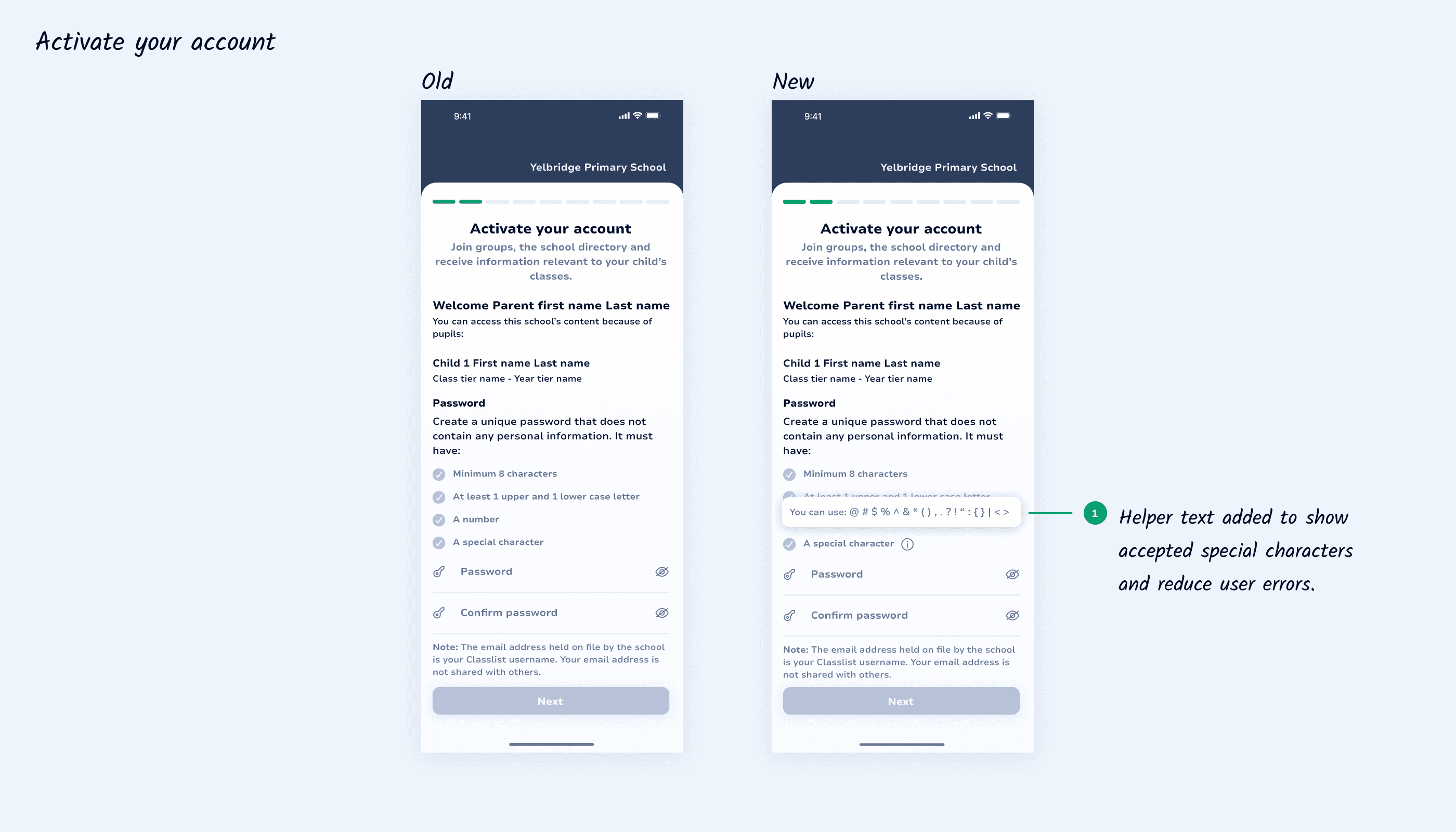
2. Password rule clarity
The initial password validation lacked specificity, leaving parents unsure which characters were accepted. We introduced helper text listing valid characters, improving clarity and reducing input errors.
I collaborated with the development and QA teams to run end-to-end testing of the onboarding flow. While most of the experience worked as expected, testing revealed a few key issues:
Account redirection issue
If a parent already had a Classlist account, the final “Continue to Classlist” action redirected them to their existing account instead of the newly created school account. This caused confusion during onboarding. We resolved it by updating the redirect logic to ensure the correct account loaded after registration.
2. Password rule clarity
The initial password validation lacked specificity, leaving parents unsure which characters were accepted. We introduced helper text listing valid characters, improving clarity and reducing input errors.
I collaborated with the development and QA teams to run end-to-end testing of the onboarding flow. While most of the experience worked as expected, testing revealed a few key issues:
Account redirection issue
If a parent already had a Classlist account, the final “Continue to Classlist” action redirected them to their existing account instead of the newly created school account. This caused confusion during onboarding. We resolved it by updating the redirect logic to ensure the correct account loaded after registration.
2. Password rule clarity
The initial password validation lacked specificity, leaving parents unsure which characters were accepted. We introduced helper text listing valid characters, improving clarity and reducing input errors.
07 LAUNCH AND IMPACT
07 LAUNCH AND IMPACT
Seeing the results
Seeing the results
The launch across integrated schools was smooth, and both parents and schools quickly felt the difference. For parents, onboarding became faster and easier to complete, reducing friction during account setup. For schools, the improved flow supported more consistent uptake across year groups and made communication more accessible to all families. The new onboarding experience also helped parents understand the value of Classlist from the start, encouraging engagement beyond initial sign-up.
The launch across integrated schools was smooth, and both parents and schools quickly felt the difference. For parents, onboarding became faster and easier to complete, reducing friction during account setup. For schools, the improved flow supported more consistent uptake across year groups and made communication more accessible to all families. The new onboarding experience also helped parents understand the value of Classlist from the start, encouraging engagement beyond initial sign-up.
08 LESSONS
08 LESSONS
What I learnt
What I learnt
What I learnt
Technical constraints shape the experience early.
Technical constraints shape the experience early.
MIS rules, permissions, and backend logic directly influenced how the onboarding flow could work.
MIS rules, permissions, and backend logic directly influenced how the onboarding flow could work.
Early alignment with developers helped avoid rework and ensured the design remained feasible.
Early alignment with developers helped avoid rework and ensured the design remained feasible.
Account states must be handled explicitly.
Account states must be handled explicitly.
Existing users introduced cases that weren’t initially visible in the flow, leading to incorrect account redirection.
Existing users introduced cases that weren’t initially visible in the flow, leading to incorrect account redirection.
Testing in real-world scenarios helped uncover and resolve these issues before launch.
Testing in real-world scenarios helped uncover and resolve these issues before launch.
Reducing effort matters more than reducing steps.
Reducing effort matters more than reducing steps.
The new onboarding flow introduced additional steps.
The new onboarding flow introduced additional steps.
Removing manual data entry significantly reduced user effort and improved completion.
Removing manual data entry significantly reduced user effort and improved completion.
Explore more
Explore more

Let’s connect!
Copyright © 2026 Gabriella Kovacs