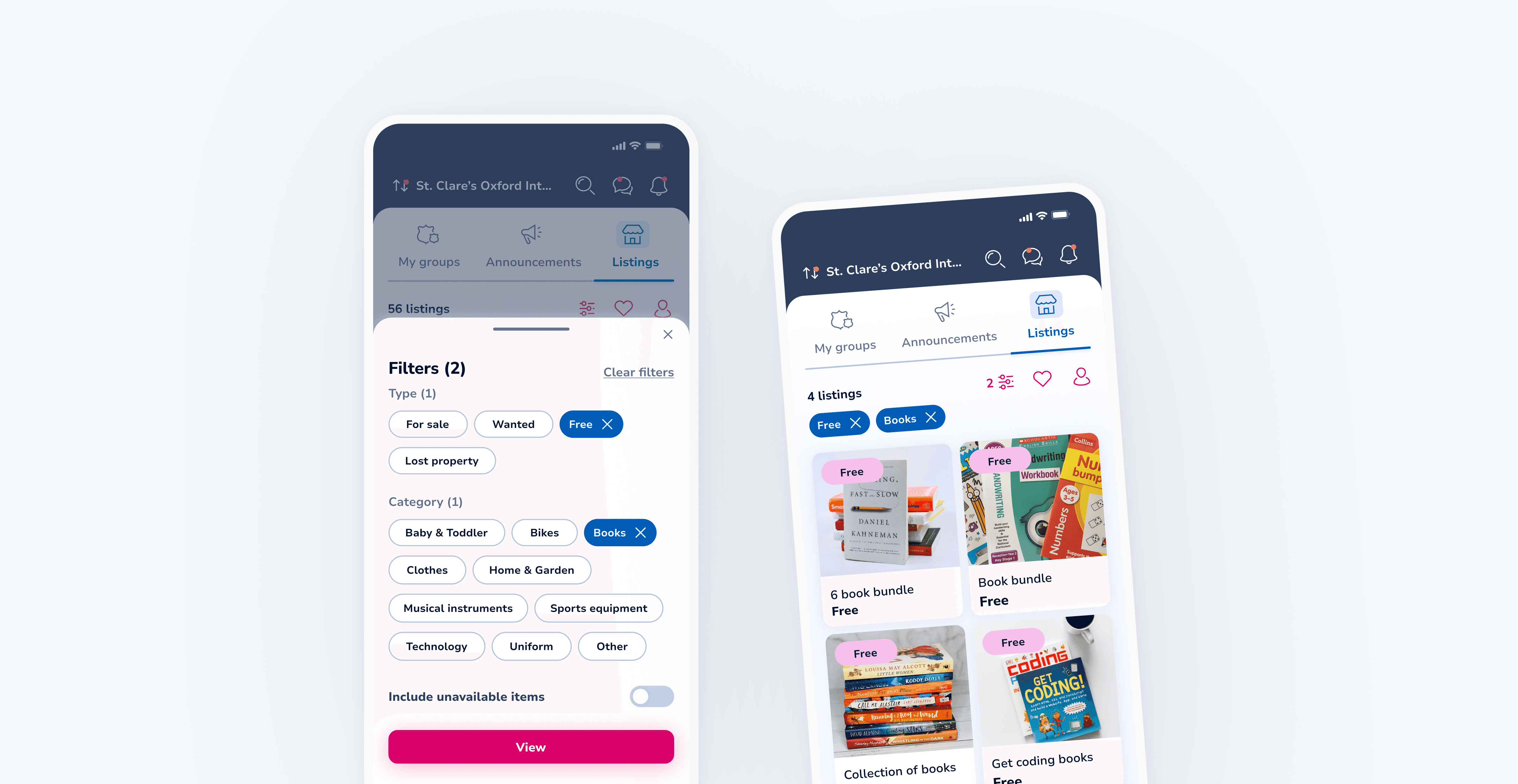
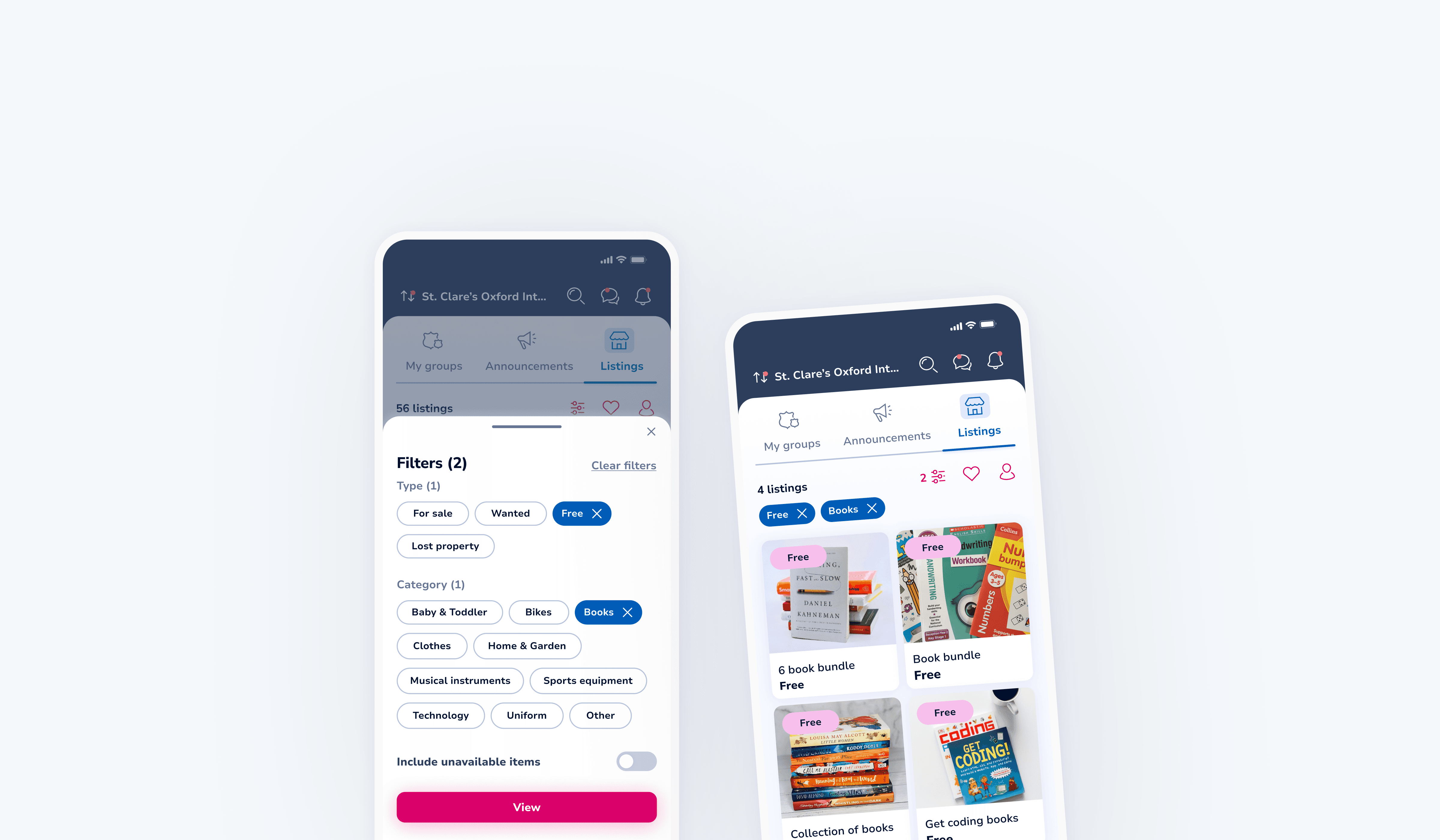
Improving browsing and discovery through filters on Listings
Improving browsing and discovery through filters on Listings
Improving browsing and discovery through filters on Listings
Improving browsing and discovery through filters on Listings
TEAM
TEAM
TEAM


+6
TIMELINE
TIMELINE
1-2 months
1-2 months
1-2 months
MY ROLE
MY ROLE
MY ROLE
UX
UX
UI
UI
Interaction design
Interaction design
Usability testing
Usability testing
THE CHALLENGE
THE CHALLENGE
As Classlist expanded to larger schools with over 2000 pupils, listings grew significantly in volume. Users could initially browse listings only by type: free, for sale, wanted, or lost property. This surfaced a high number of irrelevant results, making it difficult and time-consuming for users to find what they were looking for. Browsing became inefficient, particularly for schools with large and active communities. The goal was to introduce category-based filtering to help users narrow results more effectively and improve browsing efficiency on mobile.
As Classlist expanded to larger schools with over 2000 pupils, listings grew significantly in volume. Users could initially browse listings only by type: free, for sale, wanted, or lost property. This surfaced a high number of irrelevant results, making it difficult and time-consuming for users to find what they were looking for. Browsing became inefficient, particularly for schools with large and active communities. The goal was to introduce category-based filtering to help users narrow results more effectively and improve browsing efficiency on mobile.
THE OUTCOME
THE OUTCOME
Improved browsing efficiency by allowing users to filter listings by category
Improved browsing efficiency by allowing users to filter listings by category
Reduced cognitive load when navigating large volumes of listings
Reduced cognitive load when navigating large volumes of listings
Enhanced usability for larger schools where listing volume is significantly higher
Enhanced usability for larger schools where listing volume is significantly higher
01 INITIAL EXPLORATION
01 INITIAL EXPLORATION
Patterns and technical constraints
Patterns and technical constraints
Patterns and technical constraints
To understand how users commonly browse and filter large volumes of content, I reviewed filtering patterns used in established platforms such as Amazon, Booking.com, and eBay. This helped identify familiar interaction patterns and user expectations around category-based filtering. I also had a short alignment discussion with the development team to confirm technical feasibility, including support for applying multiple filters simultaneously. This ensured the proposed solution was both usable and practical to implement within existing constraints.
To understand how users commonly browse and filter large volumes of content, I reviewed filtering patterns used in established platforms such as Amazon, Booking.com, and eBay. This helped identify familiar interaction patterns and user expectations around category-based filtering. I also had a short alignment discussion with the development team to confirm technical feasibility, including support for applying multiple filters simultaneously. This ensured the proposed solution was both usable and practical to implement within existing constraints.
02 IDEATION
02 IDEATION
Shaping the interaction
Shaping the interaction
Shaping the interaction
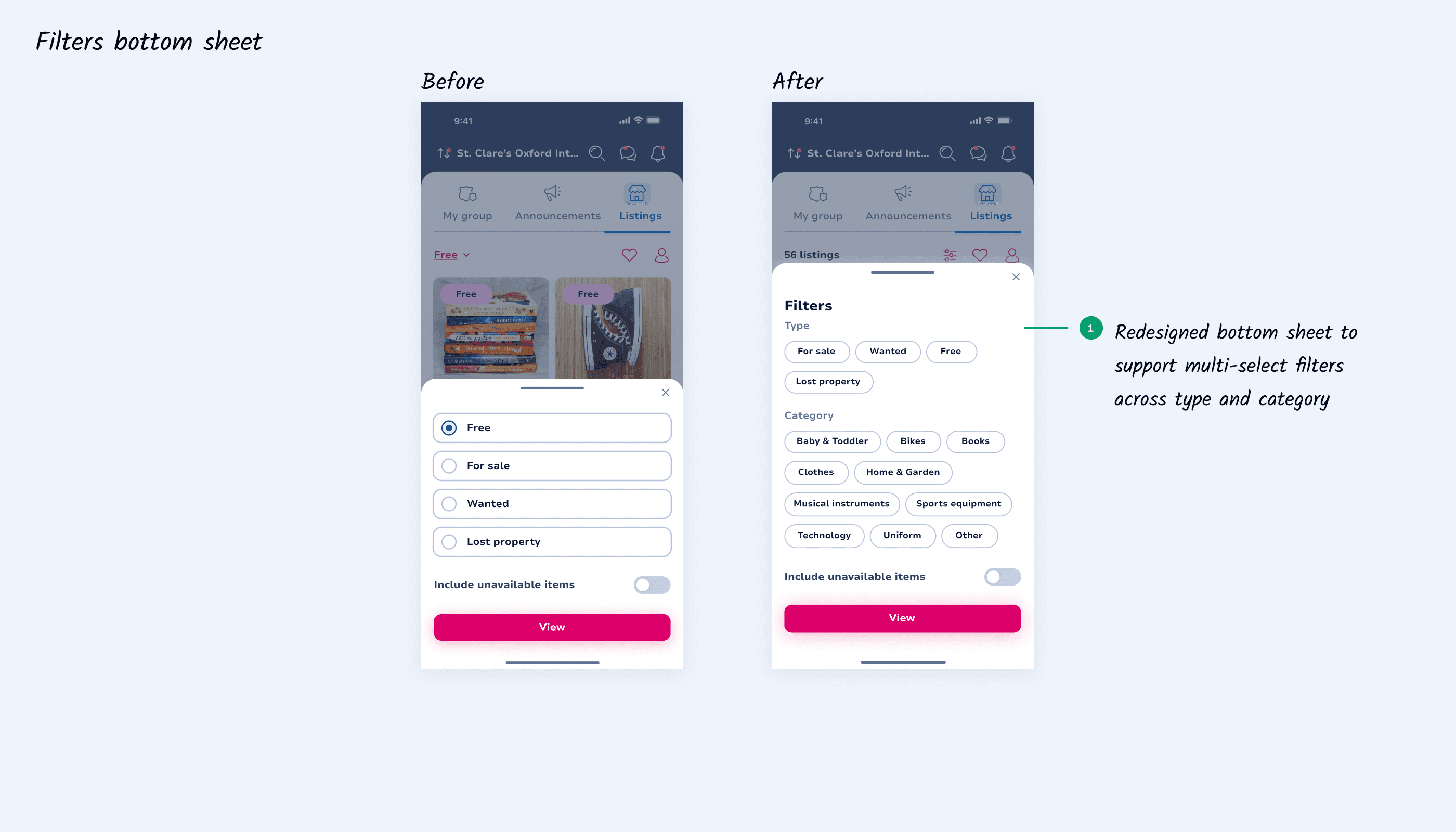
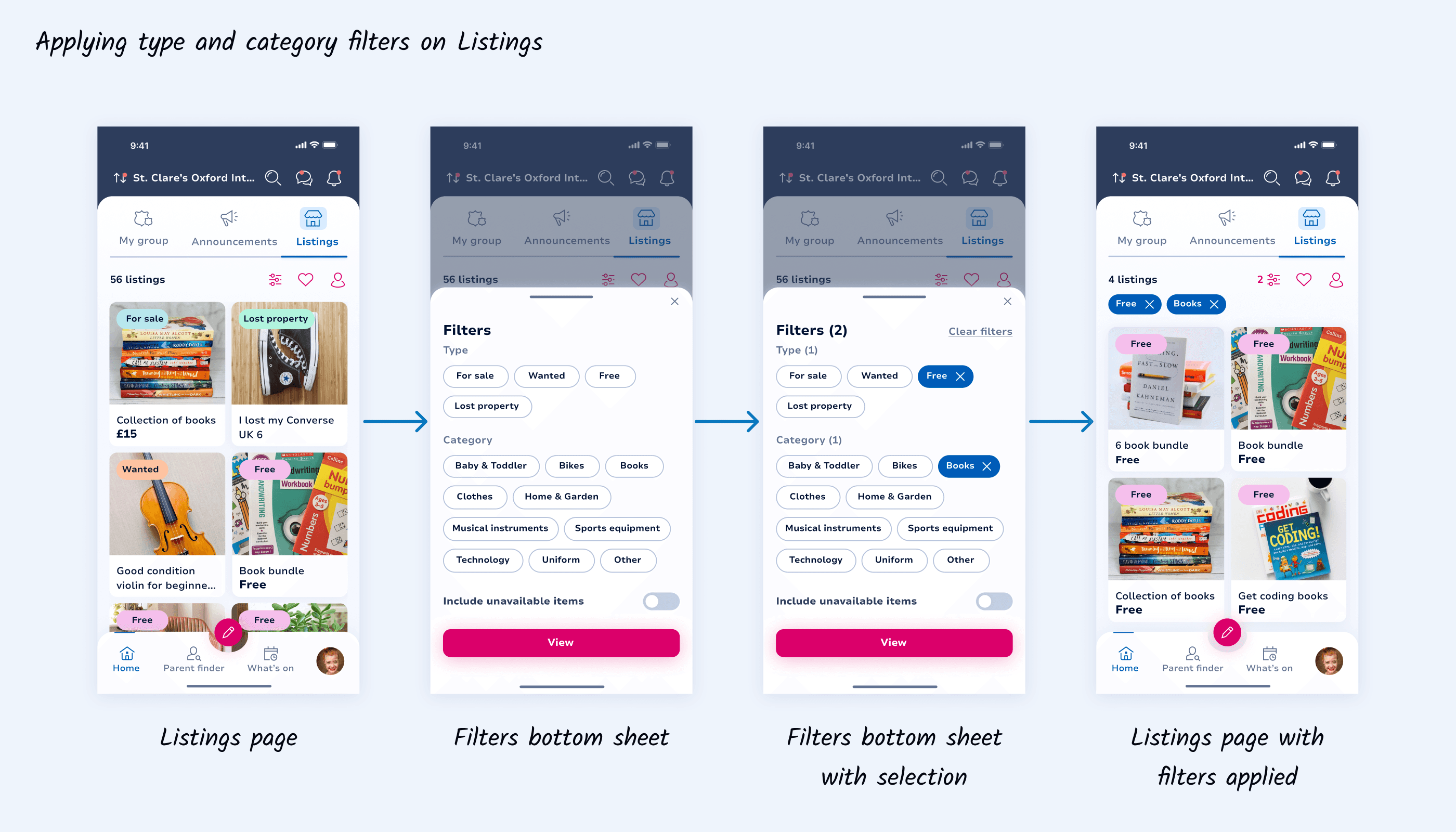
I sketched out the main navigation flow and explored how category-based filtering could integrate into the existing listings experience. This required adjusting the bottom sheet to accommodate both listing type and category filters. To support this, I introduced new filter components and refined the UI to ensure selections were easy to scan, understand, and modify. A key consideration was giving users flexibility in how they manage filters. Users can either clear all filters at once or remove individual selections directly by deselecting them.
I sketched out the main navigation flow and explored how category-based filtering could integrate into the existing listings experience. This required adjusting the bottom sheet to accommodate both listing type and category filters. To support this, I introduced new filter components and refined the UI to ensure selections were easy to scan, understand, and modify. A key consideration was giving users flexibility in how they manage filters. Users can either clear all filters at once or remove individual selections directly by deselecting them.
03 FEEDBACK
03 FEEDBACK
Teamwork in action
Teamwork in action
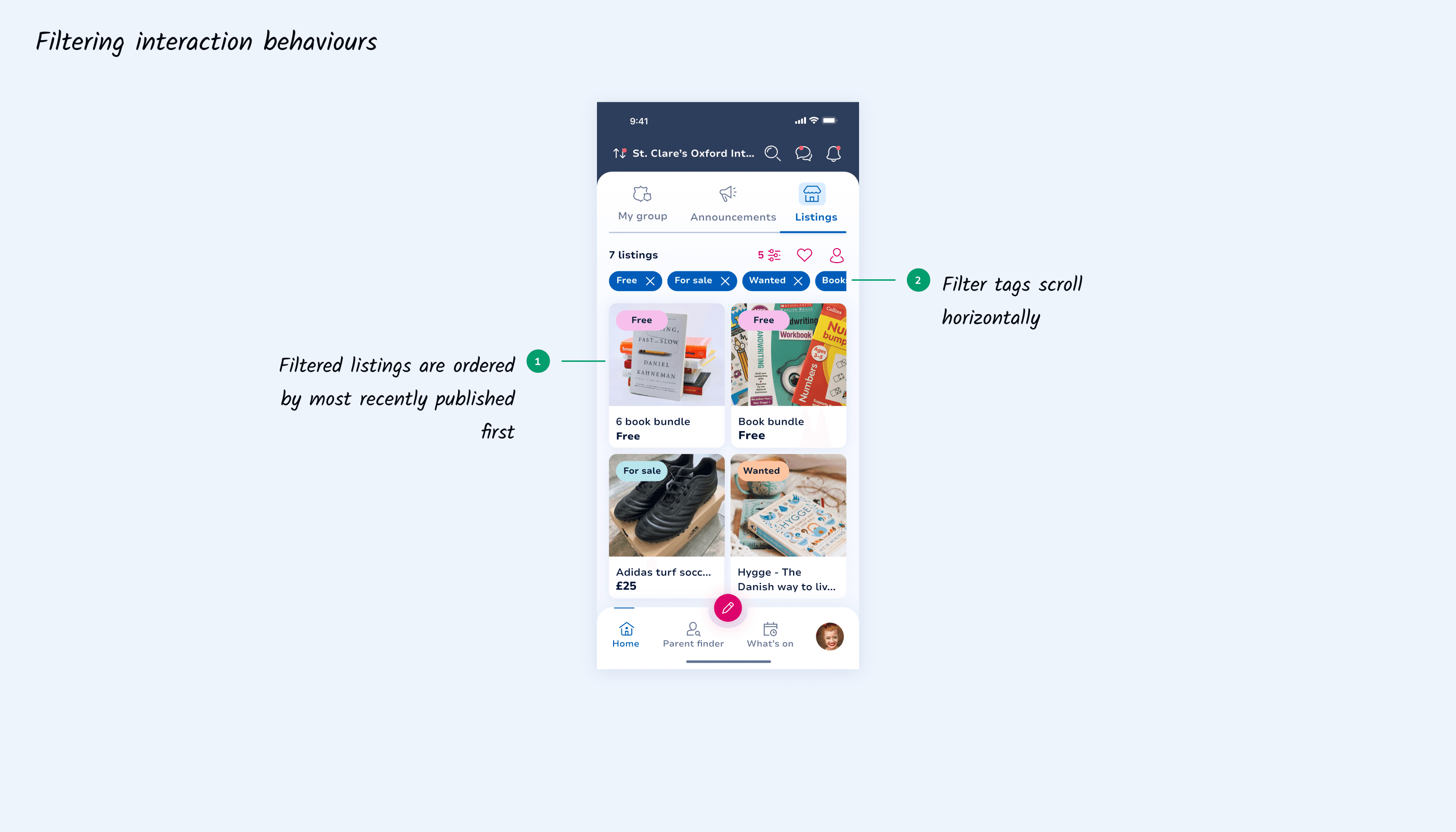
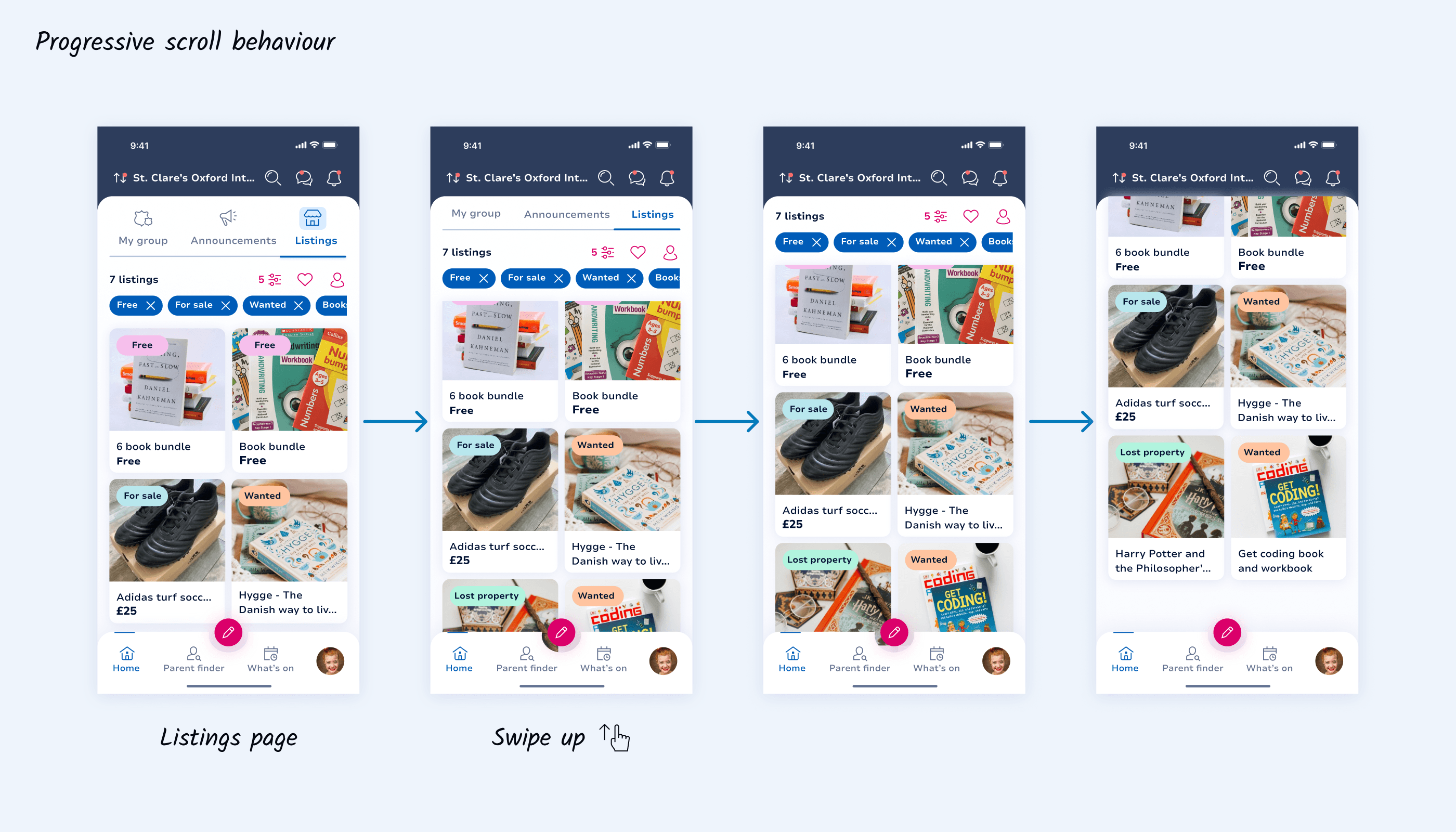
Next, I got more granular and defined key interaction patterns and edge cases. I caught up with the product owner to align on the ordering of filtered listings, how to handle a high number of active filter tags, and whether navigation elements should progressively hide on scroll to keep focus on content. With these behaviours defined, I built quick prototypes to clearly communicate how the interactions should work to developers.
Next, I got more granular and defined key interaction patterns and edge cases. I caught up with the product owner to align on the ordering of filtered listings, how to handle a high number of active filter tags, and whether navigation elements should progressively hide on scroll to keep focus on content. With these behaviours defined, I built quick prototypes to clearly communicate how the interactions should work to developers.
04 REVIEW
04 REVIEW
Refining the solution with engineering
Refining the solution with engineering
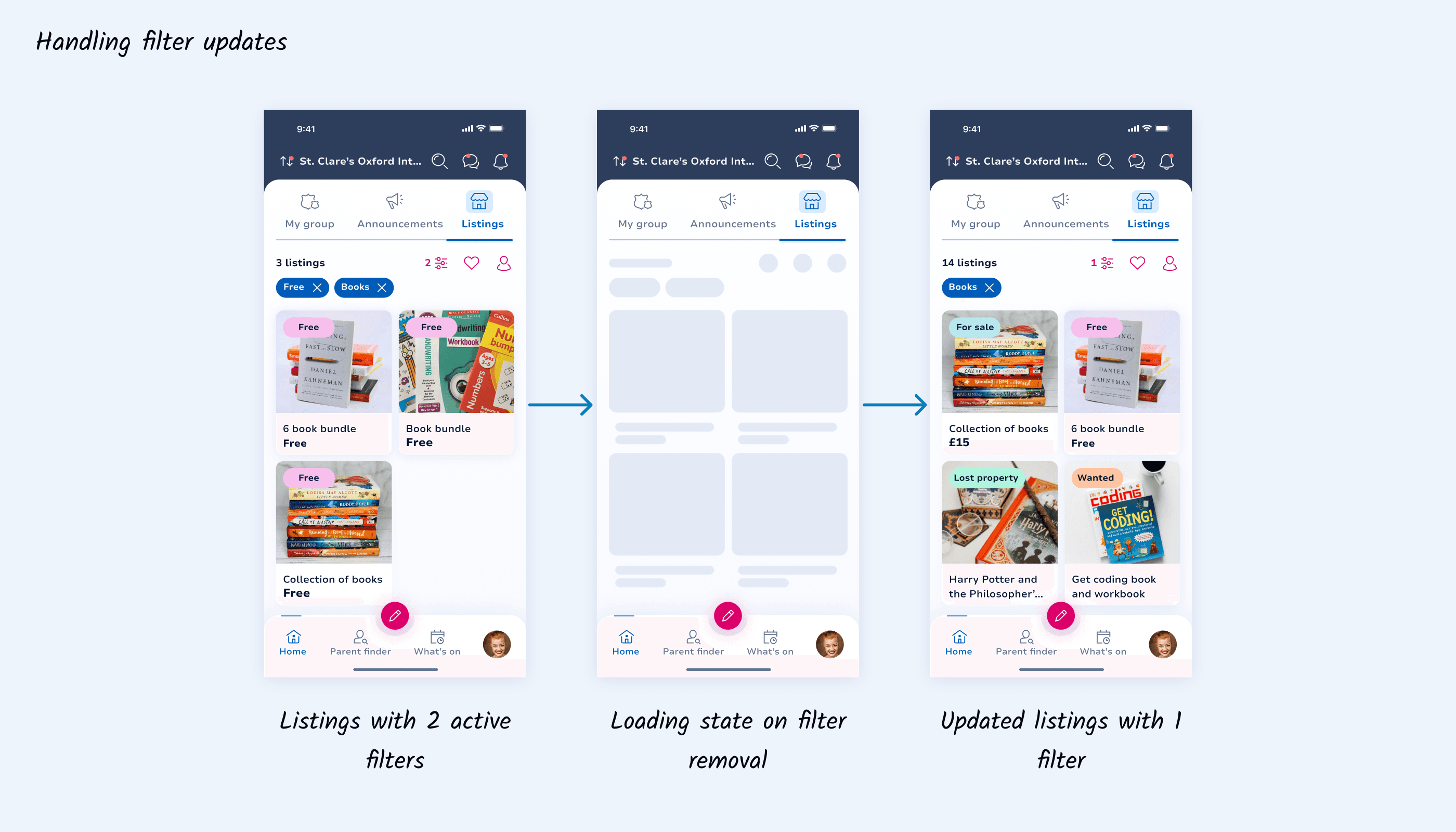
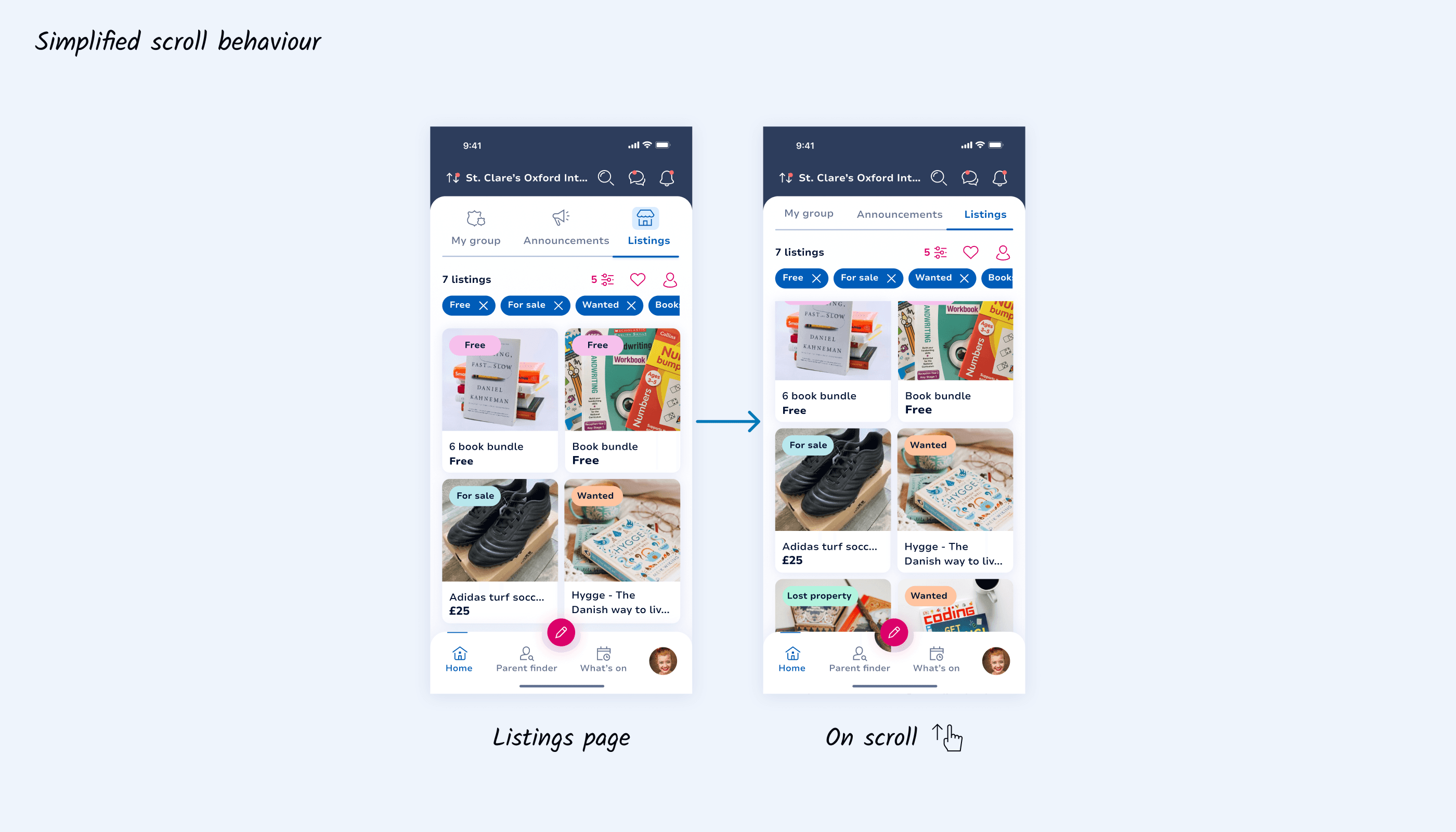
During the review, two interaction details were flagged. Removing individual filters would trigger a refresh of results, so a lightweight loading state was needed to manage the transition smoothly. We also discussed the feasibility of progressive scroll behaviour. Given sprint constraints, we agreed to proceed with a simpler approach that hides only the top navigation elements while scrolling, keeping the core interaction intact without impacting delivery timelines. I quickly updated the prototypes to reflect these decisions and prepared the final assets for handoff.
During the review, two interaction details were flagged. Removing individual filters would trigger a refresh of results, so a lightweight loading state was needed to manage the transition smoothly. We also discussed the feasibility of progressive scroll behaviour. Given sprint constraints, we agreed to proceed with a simpler approach that hides only the top navigation elements while scrolling, keeping the core interaction intact without impacting delivery timelines. I quickly updated the prototypes to reflect these decisions and prepared the final assets for handoff.
05 TESTING
05 TESTING
Checking the implementation
Checking the implementation
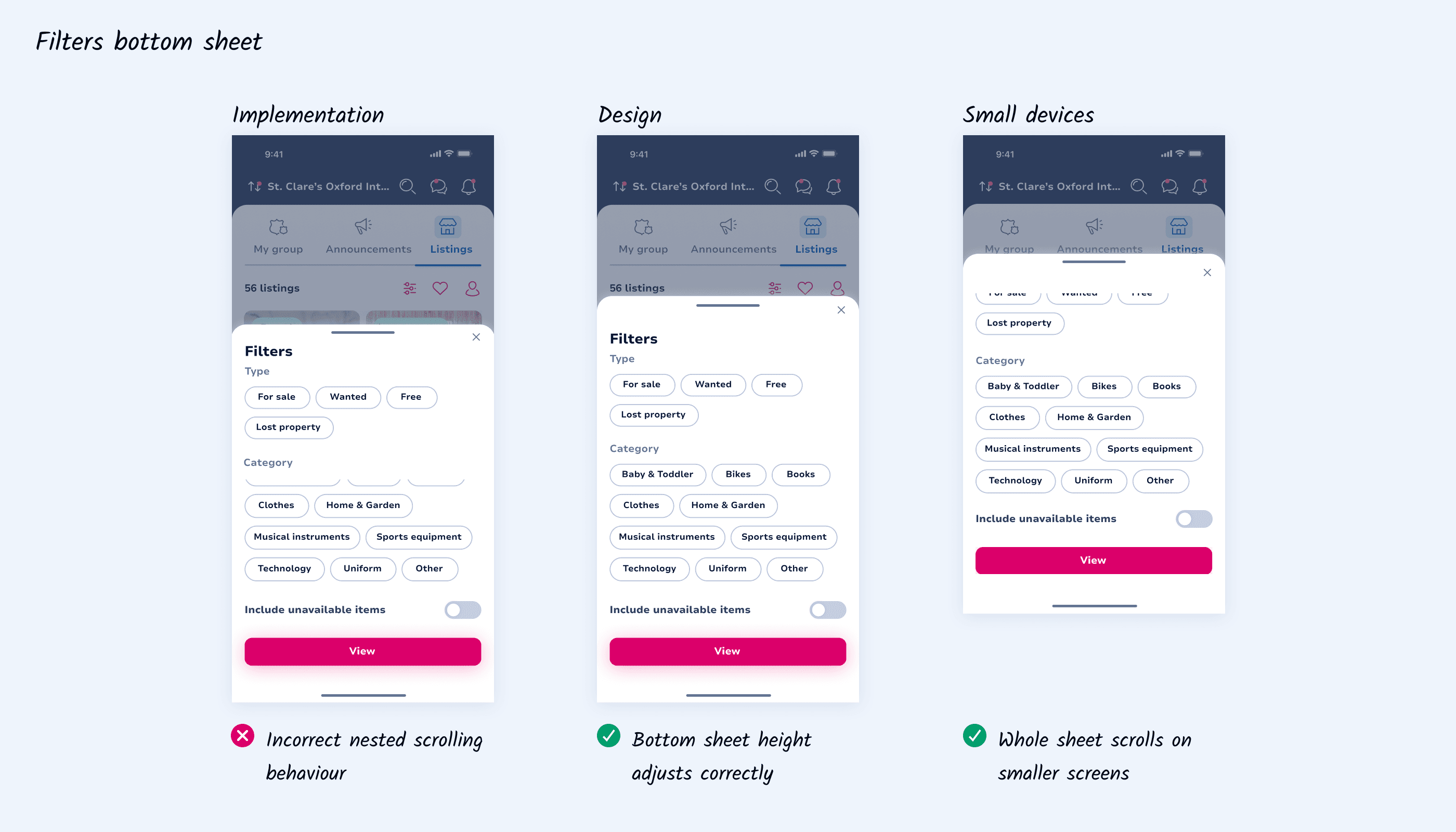
While most testing was handled by the QA and development teams, I was asked to carry out a final UX review before release. The core flow behaved as expected; however, I identified an issue with nested scrolling within the category filters. I flagged this with the development team, and we aligned on the intended behaviour: the bottom sheet should expand where screen space allows, or allow the entire sheet to scroll when space is limited. This ensured a consistent and predictable interaction across device sizes.
While most testing was handled by the QA and development teams, I was asked to carry out a final UX review before release. The core flow behaved as expected; however, I identified an issue with nested scrolling within the category filters. I flagged this with the development team, and we aligned on the intended behaviour: the bottom sheet should expand where screen space allows, or allow the entire sheet to scroll when space is limited. This ensured a consistent and predictable interaction across device sizes.
06 LAUNCH
06 LAUNCH
Nice one, team!
Nice one, team!
The feature was successfully released following final UX checks and refinements. The updated filtering experience makes it easier for users to narrow down listings quickly, even in large and active school communities. By aligning early on interaction behaviour and validating implementation details before launch, we ensured a consistent experience across devices and avoided friction at scale. See the implemented behaviour below 🙂
The feature was successfully released following final UX checks and refinements. The updated filtering experience makes it easier for users to narrow down listings quickly, even in large and active school communities. By aligning early on interaction behaviour and validating implementation details before launch, we ensured a consistent experience across devices and avoided friction at scale. See the implemented behaviour below 🙂
07 LESSONS
07 LESSONS
What I learnt
What I learnt
Prototypes are a shared language with engineers.
Prototypes are a shared language with engineers.
They helped align quickly with developers, especially around edge cases that are hard to explain in static screens.
They helped align quickly with developers, especially around edge cases that are hard to explain in static screens.
This reduced back-and-forth and kept the sprint on track.
This reduced back-and-forth and kept the sprint on track.
Device constraints shape the experience.
Device constraints shape the experience.
Designing for smaller screens surfaced behaviours that weren’t obvious on larger devices.
Designing for smaller screens surfaced behaviours that weren’t obvious on larger devices.
Testing across breakpoints ensured the filtering experience remained predictable and usable for everyone.
Testing across breakpoints ensured the filtering experience remained predictable and usable for everyone.
Explore more
Explore more
Let’s connect!
Copyright © 2026 Gabriella Kovacs